Home Blog Page 16

How to Unblock Down­loads in Chrome [ Must Try ]

0
How to Unblock Down­loads in Chrome [ Must Try ]

In this tutorial, you will learn how to Unblock Downloads in Chrome. All you need to do is follow on instructions provided below and you are good to go.

When Google Chrome made its way to the world of the Internet. It wasn’t considered to be the best or high rated when it comes to security. Tons of user-made extension were able in Chrome Web store and because of them, we have seen a number of hacks and malware over the years.

But things have changed. Google Chrome security is updated and they have added various protection measures. So now we can say Chrome can be rated top in the browser family when it comes to security.

Read more: Enable Dark Mode on the Chrome Browser

Chrome has many security protocols to protect your system from malware. By default, it blocks files that you consider unsafe to download to your computer. Unfortunately, it also means that you can’t download files from certain sites that you know are reliable, but Chrome thinks otherwise.

And then there is the whole thing with Chrome which blocks automatic downloads from the same source. It is sometimes very boring. While disabling these security features is not a good idea, let’s be careful and see how you can do it.

Unblock Down­loads in Chrome:

There are a number of options you can use to Unblock Downloads in Chrome. We will start unblocking potential downloads.

Unblock Potentially Unsafe Downloads:

Step1: Open the Chrome menu, then click Settings.

Unblock Down­loads in Chrome

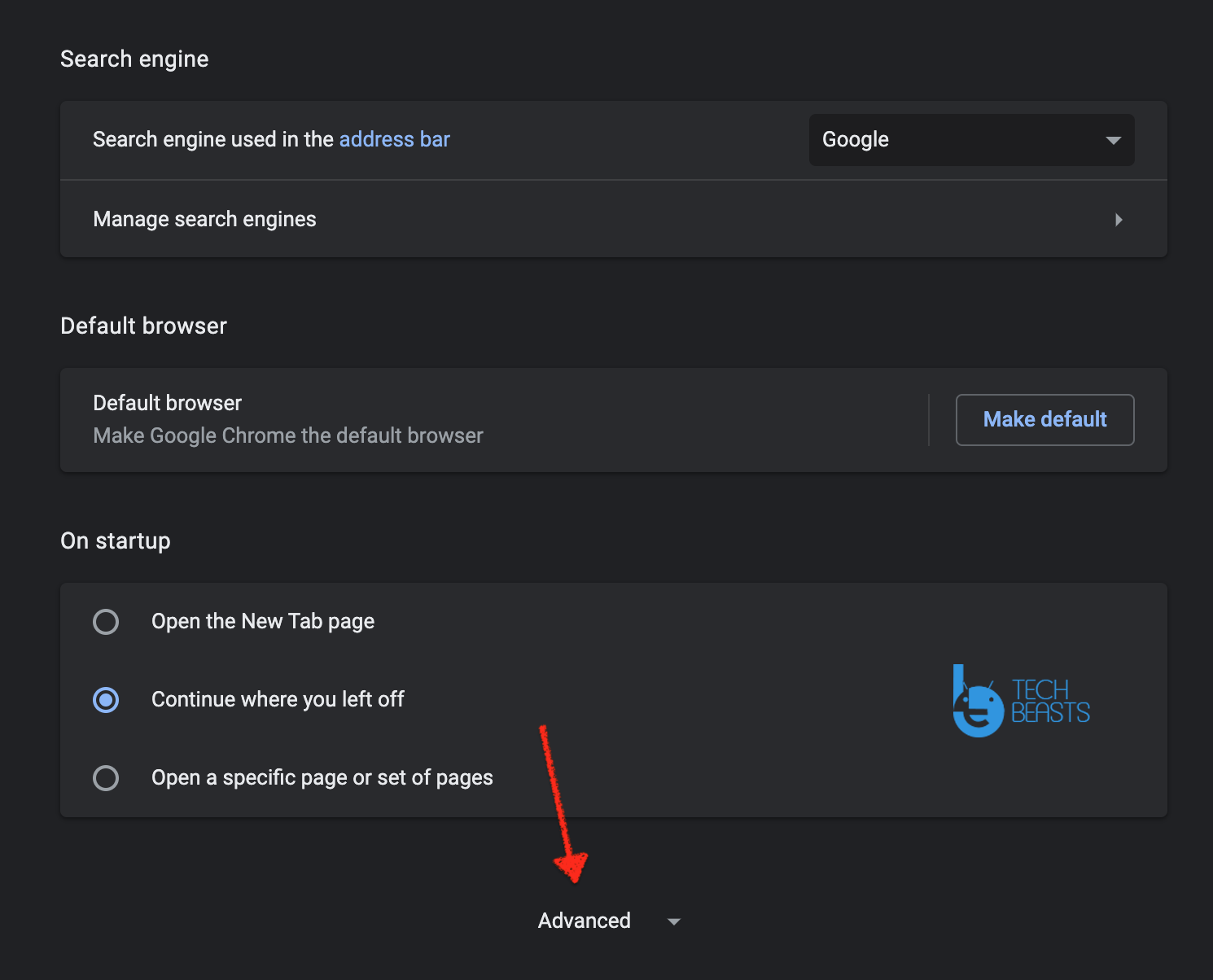
Step2: Scroll down the Settings page, click Advanced.

Unblock Down­loads in Chrome

Step3: In the Privacy, disable the option next to Safe Browsing.

Chrome will not block downloads after making the changes above. Nor does it warn you of potentially dangerous or harmful sites that could be phishing to obtain personal information or infect the browser.

Unblock Automatic Down­loads in Chrome:

  • Chrome -> Settings -> Advanced -> Privacy & Secuirty.
  • Content Settings -> Automatic Downloads.
  • Toggle the Switch right next to ( Do not allow any site to download multiple files automatically ).

Security must be kept in the mind:

No matter how aware you are of the Internet, nobody can fully prepare for security breaches. Being on the Internet means being exposed. But that doesn’t mean that being carefree is also wise. If Chrome is blocking the download, it may be a good idea to investigate why.

Chrome can be a little paranoid. So you can omit the restriction. On the other hand, safe browsing definitely helps you a lot and it’s probably best to keep that in mind.

Let’s know what you think of it in the comments section below.

Stop Tiles From Resiz­ing in Group FaceTime [ How To ]

0
Stop Tiles From Resiz­ing in Group FaceTime [ How To ]

With the help of this guide, you will be able to Stop Tiles From Resiz­ing in Group FaceTime.

FaceTime has a handy feature that automatically expands panes when people start talking. Apple calls it Automatic Prominence and this functionality can be indispensable if dozens of people participate. But if FaceTime group calls are busy, you may want to prevent the tiles from resizing or moving on the screen of your iPhone or iPad.

Stop Tiles From Resiz­ing in Group FaceTime

People often talk to each other during group conversations and with automatic Prominence, it can get annoying. The constantly increasing and decreasing tiles are not pleasant. If you don’t like the feature, it confuses it or you just want to stop using it for an important group conversation, consider disabling it.

Enable FaceTime On iPhones In Saudi Arabia

How To Stop Tiles From Resiz­ing in Group FaceTime:

So, let’s see how you can prevent the resizing or walking of the cards in the FaceTime group by disabling the Automatic Prominence function. You’ll also find workarounds for some other FaceTime-related technical issues, so read on.

Update your iPhone or iPad to latest iOS:

Before turning off automatic resizing or moving tiles in the FaceTime group, you need to update your iPhone or iPad to iOS 13.5 or iPadOS 13.5 respectively. Otherwise, you won’t find the option to disable Automatic Prominence in FaceTime settings.

To make sure your device is up to date, open the Settings app on your iPhone or iPad, tap General, then tap About. You should see the current version of iOS or iPadOS next to the software version.

If you have iOS / iPadOS 13.4 or earlier installed, go back to the previous screen, tap Software Update, then tap Download and Install to update your device with the latest system software.

Disable Automatic Prominence on iPhone or iPad:

To disable Automatic Prominence on FaceTime group calls, you have to dive into the Settings app on your iPhone or iPad. Once the function is disabled, the size of the FaceTime tiles will no longer be adjusted automatically or the screen will move to the next participation in a group conversation.

Again, you need to disable your iPhone or iPad on at least iOS 13.5 or iPadOS 13.5 or later to disable the automatic Prominence function.

Step1: Settings.

Step2: Settings screen.

Step3: FaceTime.

Step4: Turn off Speaking.

Automatic prominence is now disabled. While you prevented FaceTime from automatically adjusting tiles, you can still manually zoom in on people by tapping on the tiles.

If you want to enable the feature later, follow the previous steps and turn on the switch next to Speak in Automatic Prominence.

So that’s all. This is how you can Stop Tiles From Resiz­ing in Group FaceTime on iPhone & iPad.

NSWhatsApp 3D APK for Android Latest 2020

0
NSWhatsApp 3D APK for Android Latest 2020

Download the latest version of NSWhatsApp 3D APK for Android. A perfect WhatsApp mod to use the enhanced features that usually don’t come with the original WhatsApp.

NSWhatsApp 3D APK

NSWhatsApp 3D:

WhatsApp is the preferred instant messaging and chat application and is the most popular messaging app in the world with around 1.3 billion active users worldwide. Does this mean that this is the best chat app out there? It is not necessary because there is a lot of competition on behalf of LINE, Kik, Facebook Messenger, Telegram, Viber, Skype …

But it is not our intention to compare them all here and now, but we will introduce you to one of the many WhatsApp MODs that exist on Android. Another alternative among the many that have appeared in recent years, such as Plus, Transparent, OGWhatsApp, etc. We are talking about NSWhatsApp 3D.

Main Features of NSWhatsApp 3D:

These MODs provide the user with a variety of functions and features that are not available in the stable version of an application. These features don’t make big differences in performance, just a small adjustment that makes it more comfortable and gives the user more control over the application.

Following are the main features that you will get after installing the NSWhatsApp 3D APK on your Android devices.

  1. Function to automatically reply to messages when not available.
  2. New management options for WhatsApp groups.
  3. Interface customization: new control styles, call bubbles, notification signals, icons.
  4. Support for downloading WhatsApp themes.
  5. More advanced privacy features that allow us to hide our online status, our online status, the double blue checkmark. All this, without giving up the possibility of continuing to spy on our contacts.

What’s new in NSWhatsApp 3D 8.35 APK:

  • Running the base WhatsApp version 2.9.17.
  • New Emojis are added.
  • Swipe to Reply.
  • Group Calls.

Requirements:

Minimum Android Version Android 4.0.
Change Settings Enable Unknown sources


Download NSWhatsApp 3D APK for Android:

I have provided a direct link to download the latest version of NSWhatsApp 3D APK for Android. Use the following link and directly the APK on your device. It will help you install NSWhatsApp 3D easily.

Install NSWhatsApp 3D on Android:

First make a backup of your Chats and media, after that uninstall the base WhatsApp. Once done follow the instructions below.

Step1: Download the WhatsApp Aero APK APK from the link above and make sure you directly download WhatsApp Aero APK on your device.

Step2: Locate the APK and Tap on it to start the installation. Follow the on-screen instructions to proceed.

Step3: Once installed, Launch WhatsApp Aero APK on your device and set up as you normally do while installing WhatsApp first time on your Android device.

That’s all.

FM WhatsApp APK v8.35 for Android (2020 Version) Anti-Ban 2020

0
FM WhatsApp APK v8.35 for Android (2020 Version) Anti-Ban 2020

Download FM WhatsApp APK v8.35. There are many popular WhatsApp MOD available in the market and to be honest every one of them is worth trying. But today, I have got a new MOD which is not that famous as compared to GBWhatsApp or WhatsApp Plus. However, this WhatsApp MOD is developed by Fouad Mokdad, a well-known developer which is famous because of Fouad WhatsApp. This new WhatsApp MOD is called FM WhatsApp and here in this post, we are providing you the latest FM WhatsApp 8.35 APK.

Why should you use FMWhatsApp APK?

As you already know, this application is an update of the original WhatsApp. But why should you use it? The answer to this question is simple; for increased visibility and cool features, not found in the previous app. This app provides the freedom of customization, allowing you to customize the app to your liking. For example, if you don’t like the green light from the previous app, you need a WhatsApp Check HERE team to update it in the update. This facility can make you feel good.

The sole purpose of this update is to provide more resources, friendly links, and more.

Read more: GBWhatsapp Apk Download Latest Version (Updated)

FM WhatsApp does the same as all the other WhatsApp MOD’s do but this one comes with awesome jaw-dropping features. The basic purpose of FM WhatsApp is to let you run two WhatsApp accounts on a single Android device. Those who are using Dual-SIM device, FM WhatsApp is the best solution to run two WhatsApp account. All the main features of FM WhatsApp are listed below. Moreover, don’t forget to check What’s New in FM WhatsApp 8.35.

FM WhatsApp APK

Main Features of FM WhatsApp:

  • Privacy and Theme modifications
  • Supports audio and video Calling with new UI
  • Hide the Last Seen option
  • Show “Online / Last Seen” on the main screen
  • Themes Store with 100+ Styles to download
  • Choose from 30+ Ticks & Bubbles styles
  • No need of loading for a media preview
  • Send video size up to 1GB (instead of 32MB)
  • Add up to 250 characters in your status field
  • Click and copy anyone’s staus
  • Change app launcher and notifications icon
  • Big emojis, Ban proof and much more!

What’s New in FM WhatsApp v8.35: [ New ]

  • Updates to base version 2.20.123.
  • New quick actions.
  • Reduces the size of the APK and improves the app’s performance.

Download FM WhatsApp APK: [2020]

Use the Following Link to download the latest version of FM WhatsApp APK v8.35. This is the latest version released in 2020, all the Changelog is posted above.

Version Info:

App NameFMWhatsApp
Version8.31
Total Downloads3,000,000+
App Size53.92 MB
Package Namecom.fmwhatsapp
Last UpdatedMay 16, 2020
Android Version Requires4.0+

Old Versions of FM WhatsApp:

Install FM WhatsApp APK v8.35:

  1. Download the latest version of FM WhatsApp APK. 
  2. Download the file to your phone straight away, or copy it to your phone from your PC.
  3. Now on your phone, go to settings > security > allow unknown sources > check this.
  4. Now using a file manager, locate the APK file that you just copied or downloaded.
  5. Tap the APK file and finish installation using the on-screen instructions.
  6. Once the installation process is completed, you need to activate your FM WhatsApp account the same as the way you did on the official WhatsApp.
  7. Once installed, access the newly installed application through the app drawer.

You Might Like:

WhatsApp Plus Reborn APK V1.93 for Android Devices

0
WhatsApp Plus Reborn APK V1.93 for Android Devices

WhatsApp was taken down and after that, we have seen tons of replica of WhatsApp Plus with different names. But today I have the latest version of WhatsApp Plus which is called WhatsApp Plus Reborn. It’s the same as WhatsApp Plus and you will get the main features of original WhatsApp Plus in this MOD. In this article, I will tell you all about WhatsApp Plus Reborn and you will be able to download the latest version of WhatsApp Plus Reborn APK.

WhatsApp Plus Reborn APK

WhatsApp Plus Reborn:

Aren’t those apps currently run by modern Android smartphones? Messaging client, a Google service, Facebook social networking applications, and the most popular application: WhatsApp. This application of instant messaging and chat extended and used by many users, even if we think that this is not the best tool of the genre, we must almost use.

As a result, the most avid developers meet in a series of modified versions of the MOD or the original applications for sending messages, emoji, child, photos, or videos, such as WhatsApp Plus Reborn, in this way “official application in various forms. New features of the additional restrictions on the types of compatible files or their sizes.

Main features of WhatsApp Plus Reborn:

WhatsApp Plus Reborn is not new in any way, it was launched back in 2016 but at that time it didn’t get the limelight. Moreover, WhatsApp Plus Reborn has to compete with the likes of YOWhatsApp, GBWhatsApp, FMWhatsApp, and more. So it got washed away but now after using it I can still say that WhatsApp + reborn hasn’t lost its touch.

Following are the main features of the WhatsApp Plus Reborn, these will help you understand why you should download WhatsApp Plus Reborn APK and give it a try.

  • Easily send all the multimedia content to your contacts.
  • You can add up to 50 participants in your group.
  • Anti Banning.
  • Tons of Themes you can choose from.
  • Add unique colors to your notifications.
  • You can hide your online status.

Download WhatsApp Plus Reborn APK:

Since WhatsApp doesn’t authorize editing their source code without there permission. That is why MOD’s like WhatsApp Plus Reborn is not available on the Google Play.

Moreover, in order to use such MOD’s you have to go with the APK and that’s what I am providing. You can download the latest version fo WhatsApp Plus Reborn APK from the following links below.

Install WhatsApp Plus Reborn:

Step1: Download the WhatsApp Plus Reborn APK from the link above and make sure you directly download WhatsApp Plus Reborn on your device.

Step2: Locate the APK and Tap on it to start the installation. Follow the on-screen instructions to proceed.

Step3: Once installed, Launch WhatsApp Plus Reborn on your device and set up as you normally do while installing WhatsApp first time on your Android device.

That’s all.

WhatsApp Aero APK v8.35 Android [ 2020 Latest ]

0
WhatsApp Aero APK v8.35 Android [ 2020 Latest ]

I am back with another WhatsApp mod and it’s called WhatsApp Aero. In this post, I will tell you all about WhatsApp Aero and also you can download the latest WhatsApp Aero APK v8.35 for your Android devices.

WhatsApp Aero APK

What’s WhatsApp Aero?

If we look at most WhatsApp mods, we will see that they are all too similar ( same functions and features), since most of them are based on the GBWhatsApp. And if not, then these Mod’s are often not as good as we would like. But this does not apply to WhatsApp Aero, a mod for an instant messaging and chat application that has significant visual changes and is offered as an upscale client.

Read more: Download WhatsApp Mix APK

We’ll discover capacities like those of different MODs yet with a unique tasteful touch. To start off, the interface has experienced significant changes, thusly, it’s perhaps the best alternative for any individual who needs to get their hands on a different sort of WhatsApp.

WhatsApp Aero Features:

  1. The interface is customizable, change it as much as you like.
  2. Privacy comes with tons of options.
  3. Send Larger files, Documents, Videos, Images, etc.
  4. Own Theme store.

What’s New in WhatsApp Aero APK v8.35:

  • Bug Fixes and Improvements.

Requirements:

Minimum Android Version Android 4.0.
Change Settings Enable Unknown sources


Download WhatsApp Aero APK v8.35 Android:

Since it is an unofficial WhatsApp Mod, you cannot download it from Google Play. You need to go with the WhatsApp Aero APK and you can download it from the following link.

There is no need to worry since you are downloading an app from an unknown source. Because after testing WhatsApp Aero APK on our devices, then we posted it here. There are no antivirus and hidden Ads.

Install WhatsApp Aero on Android devices:

Step1: Download the WhatsApp Aero APK from the link above and make sure you directly download WhatsApp Aero on your device.

Step2: Locate the APK and Tap on it to start the installation. Follow the on-screen instructions to proceed.

Step3: Once installed, Launch WhatsApp Aero on your device and set up as you normally do while installing WhatsApp first time on your Android device.

That’s all.

WhatsApp Mix APK v8.40 for Android [ 2020 ]

0
WhatsApp Mix APK v8.40 for Android [ 2020 ]

Download the latest WhatsApp Mix APK v8.40 for Android from the following links. Just to start with, WhatsApp Mix is an unofficial mod of original WhatsApp.

WhatsApp Mix APK

What is WhatsApp Mix?

As I have told you that WhatsApp Mix is Mod of original WhatsApp and it allows you to do tons of customizations. Not only that, WhatsApp Mix is packed with a plethora of features that we want in original WhatsApp but we can’t have them.

Consistently there are increasingly more WhatsApp MODs to be downloaded. Among the most well-known ones, we need to call attention to WhatsApp Plus, GBWhatsApp, and OGWhatsApp yet, in addition, other intriguing improvements of any semblance of WhatsApp Mix that is here to offer us the specific perspective on its developer about what the most famous texting and talk app on the planet should resemble.

Read more: YOWhatsApp (YoWA) APK V9.70.1 for Android [ 2020 ]

What’s more, most likely its principle advantage with respect to the MODs that we’ve referenced is that it’s significantly more adaptable with regards to offering us customization alternatives, particularly those that influence its designs. Each new form consolidates new capacities that extend the ones accessible in the base APK.

Now that you know what’s WhatsApp Mix, let me go on and tell more about its feature and what makes it better than others.

WhatsApp Mix Features:

We’re not discussing features and functions that are going to change WhatsApp definitely. however, there are some features that are going to make our user experience significantly more wonderful with regards to visiting and sending messages. This is a rundown of the most significant highlights you’ll discover in this app.

  • Anti-Ban.
  • Hide Last Seen.
  • Themes.
  • Easily Hide Chats from others.
  • Download Status and Stories without installing any third-party app.
  • New Themes can be downloaded from WhatsApp Mix Server.
  • You can change the double tick style and also the chat bubbles.
  • There is no limit when you are sending a video to others.
  • Send 90 Images at a time.
  • Status Character limit is increased.
  • Hide your name while forwarding messages.
  • Copy the status of other contacts.

There you go, if you want to enjoy WhatsApp with extra features, WhatsApp Mix is the one for you. Since it is an unofficial mod, you cannot download it from Google Play. But you can download it from here, use the following links and you will be able to download WhatsApp Mix APK v8.40 for Android.

Download WhatsApp Mix APK v8.40 for Android:

Click on the following link and it will take you to the download page of WhatsApp Mix APK. From there click on the download button and your downloading will begin. Please try to download WhatsApp Mix APK directly on your Android devices.

Install WhatsApp Mix on Android:

Step1: Download the WhatsApp Mix APK from the link above and make sure you directly download WhatsApp Mix on your device.

Step2: Locate the APK and Tap on it to start the installation. Follow the on-screen instructions to proceed.

Step3: Once installed, Launch WhatsApp Mix on your device and set up as you normally do while installing WhatsApp first time on your Android device.

That’s all.

YOWhatsApp (YoWA) APK V9.70.1 for Android [ 2020 ]

0
YOWhatsApp (YoWA) APK V9.70.1 for Android [ 2020 ]

Download the latest YOWhatsApp (YoWA) APK for your Android devices from the links below. Also, learn how to use YoWA APK on your Android devices.

YOWhatsApp (YoWA) APK

What’s YOWhatsApp (YoWA)?

YoWA is an unofficial WhatsApp mod that permits you to customize this well-known cross-messaging platform, with a ton of new features and options that you don’t have in the official app.

YoWA has different subjects to look over, and you can customize every one of your discussions, giving everyone a unique background. What’s more, you’ll approach heaps of emojis, have the option to send full-size images and videos, and send different images without a moment’s delay (sending up to 700 all the while). This app likewise permits you to hide contact names and increment the text dimension.

Read more: Download WhatsApp Transparent APK 

Other than all the stylish upgrades and new highlights, YoWA works precisely equivalent to a typical adaptation of WhatsApp. At the end of the day, you can call any of your contacts, send instant messages, voice messages, images, videos, and so on. You could undoubtedly trade the essential WhatsApp customer for this improved form and start messaging your companions very quickly.

As I have told you earlier that YOWhatsApp (YoWA) is an unofficial mod of WhatsApp. That means you can’t find it on Google Play. But you can download YOWhatsApp (YoWA) APK from the links provided in this post.

Read more: FM WhatsApp APK v8.31

Main Features of YoWA APK:

  • YoWA allows you to control your privacy. You can set who can call you, who can check your status, and so much more.
  • The new text font, size, we change them and multiply.
  • Android Emoji includes Oreo.
  • Send all the files like APK, quantity, PDF.
  • User interface with smoother lines.
  • You can send up to 700MB size files using YoWA.
  • Performance-wise YoWA WhatsApp is way better than original.
  • And the PIN code to, and through, and I took advantage of the thick shadows of a specific place or shape of the fingerprint.

So now you know what you will get when you will start using YOWhatsApp (YoWA) on your Android devices.

It’s time to download the latest version of YOWhatsApp (YoWA) APK form the following links below. Keep one thing in mind, it’s an unofficial version of WhatsApp and you only can download it from third-party sources.

Download YOWhatsApp (YoWA) APK V9.70.1 for Android:

Use the following link below and download YOWhatsApp (YoWA) APK V9.70.1 directly on your Android device.

Download

Install YOWhatsApp (YoWA) APK:

  1. Download the YOWhatsApp (YoWA) APK from the link above and when the downloading is completed, you will be notified. Tap on it to start the installation.
  2. Heed the instructions on the screen and you will be able to install YOWhatsApp (YoWA) APK.
  3. Once installed, you need to set up your YOWhatsApp (YoWA) account in the same manner as you normally do. When installing the official WhatsApp.

That’s all.

Jailbreak iOS 13.5 without Computer (iPhone & iPad)

0
Jailbreak iOS 13.5 without Computer (iPhone & iPad)

Jailbreakers, rejoice! Jailbreak for iOS 13.5 is finally here. Yes, you heard that right. It is extremely easy to Jailbreak any iPhone or iPad running on the latest version of iOS/iPadOS. The new Unc0ver 5.2.0 has seen the light of the day. You can now Jailbreak your iPhone or iPad easily via Unc0ver 5.2.0. The best part about this tool is that it can be downloaded without a computer too. So basically, you can Jailbreak iOS 13.5 without a computer and that too within a few seconds. Before I show you the steps to Jailbreak iOS 13.5 without PC, let me tell you a little about the new Unc0ver tool.

Unc0ver 5.2.0

The new Unc0ver 5.2.0 offers a semi-tethered Jailbreak solution for all iOS 11 – iOS 13.5-powered devices. This includes all iPhones and iPads powered by Apple’s A12 or the A13 chip. This new Unc0ver is based on the 0day exploit which is discovered only once a device is shipped. The 0day exploit is a software/hardware vulnerability. Unc0ver’s developer pwn20wnd took it to twitter to tease the new Unc0ver 5.2.0. A couple of days after the first teaser, the final version of Unc0ver 5.2.0 is finally here. The developers have tested this new tool’s stability and released it only once they found it fully working. 

The officially suggested methods to download Unc0er and Jailbreak iPhone include AltStore & Cydia Impactor involvement. If you do not own a computer, you won’t be able to use the AltStore or Cydia Impactor to install Unc0ver 5.2.0. In such a case, you would need a method that will let you download Unc0ver 5.2.0. without a computer. You can find such a method right here and Jailbreak the iOS 13.5 on the go.

Preparations to Jailbreak iOS 13.5 without PC

  • Your iPhone must be running iOS 13.5. If it’s running iOS 13.3, 13.4, 13.4.1, update it to iOS 13.5 right away.
  • If the “Request Desktop Website” is enabled on your device, turn it off from Settings > Safari > Request Desktop Website > Disable it.
  • Open this guide in the Safari Browser on your iPhone/iPad.

Jailbreak iOS 13.5 without Computer

  1. On the iPhone or iPad, open the App Valley page inside the Safari browser.
  2. Click on “Get” under Unc0ver 5.2.0 and then click on Get again.
  3. When App Valley asks for installation, click on install and then click on Download.
  4. Unc0ver will be installed now, wait for the installation to end.
  5. Now go to Settings > General > Device Management > Click on Unc0ver (side internet service or something similar) > Trust > Trust.
  6. Open Unc0ver now and click on Jailbreak.
  7. Your device will ask for a reboot once the process is complete.
  8. Reboot the device and check if you have Cydia.
  9. If you don’t have Cydia yet, turn on Airplane mode on the device, open Unc0ver and click on Jailbreak again.
  10. Unc0ver will finish the process and reboot the device again.
  11. If you are still unable to find Cydia, open Unc0ver and click on Jailbreak again.

Remember that Jailbreaking can take several tries, so don’t lose your cool and press the Jailbreak button again and again until you see Cydia. Once you see Cydia, you are good to go ahead.

Once you see Cydia, connect to the WiFi on your iPhone/iPad and follow the procedure given next.

Signing Unc0ver with ReProvision

  1. Open Cydia on the iPhone/iPad.
  2. Click on Sources > Add > Type this: https://repo.incendo.ws > Add source.
  3. Once the source is added, click on Return to Cydia.
  4. In Cydia, find the incendo repository now and go to All Packages inside it.
  5. Now find “ReProvision” in the list and click on it.
  6. Click on Modify > Install – If ReProvision asks for SpringBoard Restart, click on it.
  7. Wait for ReProvision to be installed now.
  8. Open ReProvision on the device now and click on the Dismiss button to remove the cover.
  9. Enter your Apple ID & Password in the ReProvision app now.
  10. Now click on Unc0ver once it appears inside ReProvision, ad click on Sign.
  11. If you see any error, just go to ReProvision > Troubleshooting > Manage Certificates > Remove Device from ReProvision.
  12. Sign Unc0ver by repeating steps 9 & 10 again and it will be signed this time.

Final Notes

That’s all. Now you have the Unc0ver running on your iPhone. The Unc0ver is signed and it cannot be revoked anymore. You do not need a computer anymore to re-jailbreak your device as the ReProvision will always let you Jailbreaking using that Unc0ver app on the iPhone straight away. If you run into any kind of problems while following these steps, feel free to reach out to us using the comment section below. Also, don’t forget to check out the Best Free iOS 13.5 Jailbreak Tweaks.

In the meanwhile, take a look at the following tutorials:

The 3 Best Smartphones on the Market

0
The 3 Best Smartphones on the Market

best smartphones on the marketSmartphones have added a great deal of convenience into our lives. We use them to check emails on the go, purchase things online, capture photos and videos, communicate with each other, video chat, play games, and browse the internet, among others. However, technology changes almost every day. And if you own a smartphone, it’s highly advisable to replace it every year, so that you can remain in sync with current trends. This can also become expensive if you are upgrading yearly With that said, Nowloan has provided the 3 best smartphones on the market in 2020.

Samsung Galaxy S20 Ultra 5G

Without a doubt, the Samsung Galaxy Ultra 5G is one of the best smartphones on the market. While its price may appear a bit hefty, it’s packed with numerous features and functionalities, which means you are not only getting a quality product but you will also get great value for your money. Just like its name suggests, this forward-looking business smartphone comes with 5G technology, which translates to better and enhanced connectivity. It comes with two cameras – a 108MP camera and a 48MP camera. Its display is powered by super AMOLED technology, which delivers stunning visuals. And with its 120 Hz refresh rate, you are assured of a seamless visual experience. Samsung has equipped it with a Qualcomm Snapdragon 865 processor, which is renowned for its remarkable performance. And with a battery capacity of 5000 mAh, you will have enough power to get you through the day.

OnePlus 8 Pro

The OnePlus 8 Pro is a great flagship phone which delivers an amazing responsive performance. It’s equipped with a quad-camera at the back, which provides numerous photography options and features. Unlike previous iterations, this smartphone comes with wireless charging. Its wireless charging feature is so powerful that it can get your phone from 0% to 30% in less than 30 minutes. Under the hood, the OnePlus 8 Pro features a Snapdragon 865 chipset, paired with 12GB of RAM. It also comes with 5G connectivity. As noted above, its equipped with 4 rear cameras, which you can use to capture different photos and videos. It also comes with a 4510 mAh battery, which should last you at least a day when fully charged.

LG V60 ThinQ 5G

Are you looking for a classy, stylish, and a performance-oriented smartphone? If so, then you should check out the LG V60 ThinQ 5G. It comes with a large 6.8-inch display, which provides a comfortable viewing experience. Whether you are browsing the web, watching videos, or tracking your analytics on an excel sheet, you are assured of a great viewing experience.

For the camera system, you will get a wide-angle camera and a standard camera at the back, as well as a telephoto lens for video creation. On the front is a 10MP camera, specifically designed for taking selfies. Similar to other smartphones in this range, the LG V60 is powered by a Snapdragon 865 chipset, which delivers exceptional performance.

While the LG V60 may not have as many features as the other smartphones in its class, it remains an interesting and competitive phone. You will love its 5G connectivity, reverse wireless charging, long battery life, and 120Hz display. In short, you are getting a great Android device at a competitive price.

Closing Remarks

While the above 3 smartphones have been highlighted as the best, it doesn’t mean that your options are limited to them only. As you may probably know, people have different needs and personal preferences when it comes to gadgets. Therefore, if you are on the market for a new phone, take your time to explore different options, and then purchase one that aligns best with your needs and preferences.

70+ Best Free iOS 13.5 JailBreak Tweaks

0
70+ Best Free iOS 13.5 JailBreak Tweaks
iPhone 11 Pro

Take a look at 70+ best free iOS 13.5 Jailbreak Tweaks. These tweaks will work with all iOS 13.5 devices jailbroken via Unc0ver 5.2.0. Furthermore, these are Cydia & Sileo compatible tweaks. Before you go through the best free iOS 13.5 Jailbreak Tweaks, let me tell you a little about iOS customization.

Best free iOS 13.5 Jailbreak Tweaks
iPhone 11 Pro

Jailbreak & Jailbreak Tweaks

When you Jailbreak an iPhone or iPad, you basically access the system files of your device. Once you have this access, you have full control over iOS. This allows you to modify and customize the device the way you want. Jailbreaking, in simple words, means bypassing all the limits set by the device manufacturer. It is usually meant for power users who cannot stick to the stock features and UI offered by Apple. You can change everything from the functionality of the buttons to the UI elements on a device that is Jailbroken.

To perform any kind of customization on such a device, you need tweaks. Tweaks are basically the apps or scripts that run by accessing the system files. Such apps are offered in stores like Cydia and Sileo. For those who don’t know, Cydia comes with Unc0ver, and Sileo comes with Chimera. You will get one of these stores based on which tool you have used to Jailbreak your device. Both Cydia and Sileo have thousands of Jailbreak Tweaks including Paid and Free. Unfortunately, not all of those tweaks are guaranteed to work. For this very reason, you always need to know which are best and free iOS Jailbreak Tweaks and which ones are compatible with your specific iOS version. In our case, we will be discovering the free iOS 13.5 JailBreak Tweaks.

iOS 13.5 JailBreak via Unc0ver

If you have been living under a rock for the past two days, then let me tell you that iOS 13.5 JailBreak is already here. Pwn20wnd, the developer of the Unc0ver tool announced Unc0ver 5.0 a couple of days ago. Unc0ver is already on its version 5.2.0 now. With the new Unc0ver, you can Jailbreak any iOS device running any signed iOS version from iOS 11.0 to iOS 13.5. The new tool can bypass limits on all devices powered by A12 and the A13 chipset too. You can either install Unc0ver 5.2.0 via AltStore, or you can also download the Unc0ver 5.2.0 IPA via Cydia Impactor.

Over 70 Best Free iOS 13.5 JailBreak Tweaks

Tweak Name Repository
2Dock BigBoss
Accent BigBoss
AnyKeyTrackPad Packix
AVLock Packix
BlankPass Packix
Cask 2 Packix
CastSwitcher Bigboss
CCSupport Bigboss
ClearCall Packix
ClearWidgets BigBoss
ClearDock12 Packix
ColorMeNotifs Packix
Cowbell Packix
Cylinder BigBoss
Dark Keys Dynastic
DeleteCut BigBoss
DNDMyRecording Packix
DockSpring Packix
DontManageMyNotifications BigBoss
Dragspring Packix
EasyEditAlarms Packix
EZSwipe Packix
FiceDock 13 Packix
FluidTabs Packix
GlobAlarmSettings BigBoss
HideKBSettings BigBoss
HideLabels13 BigBoss
HideNCText Packix
HomeBarSizer Packix
Icon Rename BigBoss
Iconvile Packix
iKnowTheTime Packix
Keyboard Accio BigBoss
LetMeDecline Packix
LMPAutoLockTime Packix
LonerCallButton Packix
LowerTheNotfis Packix
LowPowerDND BigBoss
Maila Packix
MenuSupport Packix
No3DLines Packix
NoDNDBanner Packix
Noire Packix
NoOlderNotificationsText Packix
OhMyFlash Packix
PillvVolume Packix
PowerModule Packix
QuitAll Chariz
RealCC BigBoss
Rofi BigBoss
RoundedMolecules BigBoss
Safari Features BigBoss
Sakal Packix
SendDelay BigBoss
SITUM Packix
SizeFinder BigBoss
SlideToShowNotification BigBoss
SolidMessagesBanner Packix
SpotCC Packix
SpotClearOnClose Packix
SpotOn Packix
StayDown BigBoss
StickAround BigBoss
Tap Tap Lock BigBoss
Tempus Romanum Packix
TransparentNotif BigBoss
Vinyl BigBoss
VolumePercent Packix
WeatherGround Chariz


Repositories

  • https://repo.packix.com
  • https://repo.dynastic.co
  • https://repo.chariz.com
  • BigBoss Repo is pre-installed.

Install best iOS 13.5 Jailbreak Tweaks

  1. Jailbreak your iPhone or iPad.
  2. Open Cydia on the device.
  3. In Cydia, click on Sources > Edit > Add > Add the repository.
  4. Install your favorite tweak from the installed repository now.

Final Words

That’s all with all of the best iOS 13.5 Jailbreak tweaks. I hope you guys find this list useful. Some of the very popular tweaks include Five Dock, Cast Switcher, Tap Tap Lock, and Manilla. Make sure to try these along with other tweaks. If you run into any problems, feel free to reach out to us through the comment section below.

What is SaaS Trends 2020? and its Future

0
What is SaaS Trends 2020? and its Future


SaaS is a business model in which consumers pay for the use of cloud software. The affordability and wide range of features offered by SaaS cloud enterprises are attracting more and more organizations. According to Gartner, SaaS revenue is expected to reach a whopping $ 151 billion by 2022. The SaaS market has already reached maturity in many ways, but cloud software still accounts for less than 20% of enterprise software costs. Since the cost of cloud software is still significantly lower than the cost of enterprise software, the further growth of the SaaS industry in all areas and directions is expected.

This site – LITSLINK, provides an overview of SaaS development services you can use to reach the highest effectiveness for your business.

So what does the future of SaaS look like?

Vertical SaaS

The term “vertical SaaS” has come into use with the advent of companies developing software for a specific industry. Unlike the classic “horizontal” players, providers of vertical SaaS-solutions are ready to offer the client cloud services adapted to their field whether it is construction, healthcare, banking, or information technology.

From SaaS to PaaS

Companies working with SaaS gradually grow and reach a high level of development and implementation of their technologies. Meanwhile, their main goal is not to grow the client base, but retain users with the help of innovative solutions. Therefore, the platform as a service (PaaS) has become a widely used approach on the market. More and more companies are expanding the capabilities of original products and offer additional applications and services.


A great example of PaaS is Salesforce’s platform. It was created to simplify the development and deployment of cloud applications and websites. Another example is Hubspot. This company offers solutions such as CRM and task management to improve business processes. These are just a few examples of SaaS-based companies that also provide PaaS services to their clients. Their ultimate goal is to become market leaders in their niche. More and more companies that apply  SaaS to their business are becoming major market players. In the coming years, many of them are expected to adopt the platform as a service model as well.

Security and Private Cloud

Security will remain to be an important issue when it comes to SaaS. This fact is reinforced by the adoption of the General Data Protection Regulation and other rules regarding the privacy of the users’ data. The more people use the Internet for business and personal purposes, the more breaches take place in the digital landscape. Thus, personal and corporate data might appear to be at risk.

In addition, remote workers collaborate with companies through unencrypted networks that are more vulnerable to hacker attacks. To mitigate security risks, SaaS companies strive to come up with the best security solutions like Pagely’s Secure WordPress Hosting. For example, Pagely developed PressArmor, a security architecture that strengthens and protects its WordPress network, equipment, and applications. The main goal is to prevent and reduce risks for customers.

Artificial Intelligence

AI plays a greater role than ever in marketing. In the future, even greater dependence on AI and predictive analytics is expected. There are over 300,000 business chatbots on Facebook Messenger. By 2020, 80% of enterprises are expected to deploy chatbots and use them to enhance the interaction between a client and a company.

Chatbots benefit businesses and users at the same time. They work for you around the clock and provide quick answers to requests. They can help attract visitors to your site and turn leads into customers. Chatbots are also being developed to provide more personalized service. This hyper-personalization can help customers get through the sales funnel.

Machine learning also has an impact on the development of the SaaS industry. ML allows applications to increase efficiency and automate processes. For B2B marketers, this can lead to an increase and improvement in leads.

Artificial intelligence has also strengthened human capabilities to increase efficiency and productivity. Today you don’t need to keep records or do repetitive tasks manually, AI will do it for you. Saas optimized AI solutions for enterprises, which have led to significant improvements in speed, automation, and even security. AI  chatbots that are now widely used by various SaaS organizations have helped boost customer service. Studies show that AI is transforming SaaS solutions, which by the end of the decade could increase global GDP by 14%.

Hybrid cloud deployment

Client-service software was the only option for enterprises for more than a decade. But as we approach 2020, more and more SaaS companies have begun supporting hybrid cloud delivery.

The hybrid cloud integrates private and public clouds. Saas companies can now place their data in accordance with security requirements or auditing, thereby using a cost-effective public cloud while maintaining confidential data in a private cloud. This cloudy trend not only simplified the business but also helped to effectively protect users’ data from hacker attacks.

Enhanced Use of Social Media in SaaS Marketing

Social media is usually far below the list for organizing B2B sales. We are seeing an increase in social efforts (and increased budgets) to reach the target audience. While Millennials and other young professionals are moving to more meaningful B2B roles, social networks are playing an increasingly important role. Social sales account for more than 60% of revenue in most technology industries, including B2B SaaS marketing.

This year, SaaS will become even more personalized. The market for SaaS solutions is growing rapidly, largely due to the flexibility and high profitability of the niche.