Home Blog Page 66

Download APEX LEGENDS for PC
0
Download APEX LEGENDS for PC

PUBG mobile launched by ‘Tencent’ in last few years spread like wildfire, conquering through almost every mobile out there and was managed to make an annual turnover of 30 million dollars. So EA has decided to tie the laces up and get down to the royal rumble of Battle Royale games that are focused on ultimate survival and launch a brand new game Apex Legends. APEX LEGENDS for PC..Here is the detailed guide about the latest PC version game APEX LEGENDS.

APEX LEGENDS for PC

Apex Legends is a tactical squad-based battle royale that has wishes to galvanize the outlands. It tests one’s ultimate skill of survival, you win or you die. EA has done a lot of homework on what the people actually want and has come up with an exciting interface and thrilling game experience. Moreover, apart from the EA’s nature of charging money, this game is totally free of cost. This post will decipher the pc requirements and the key features of its gameplay.

APEX LEGENDS for PC

PC REQUIREMENTS AND OPTIONS

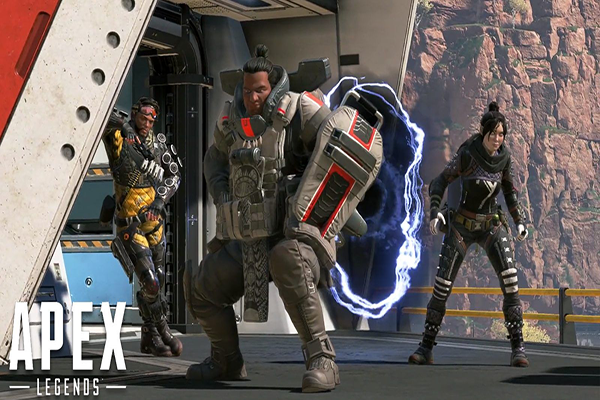
Unlike PUBG PC which is claimed to be an unfinished master piece, since it asks a lot to run smoothly, ‘Apex’ comes out to be an optimized one. EA has focused on the number of users all around the world and has provided the ability to the game to run with some basic requirements also.
APEX LEGENDS for PC

MINIMUM REQUIREMENTS

Minimum requirements are:-

OS: 64-bit Windows 7

CPU: Intel Core i3-6300 3.8GHz / AMD FX-4350 4.2 GHz Quad-Core Processor

RAM: 6GB

GPU: NVIDIA GeForce GT 640 / Radeon HD 7700

GPU RAM: 1 GB

HARD DRIVE: Minimum 30 GB of free space

Those requirements don’t look bad when it comes to a multiplayer game with such features and basic detailing.

RECOMMENDED REQUIREMENTS

The minimum requirements will be able to run the game just fine. For the gamers out there those who wish to boost up their gaming experience these are the recommended:-

OS: 64-bit Windows 7

CPU: Intel i5 3570K or equivalent

RAM: 8GB

GPU: Nvidia GeForce GTX 970 / AMD Radeon R9 290

GPU RAM: 8GB

HARD DRIVE: Minimum 30 GB of free space

Downloads

It’s great if one is having all the best specs possible but the game also provides the in-game setting options that will also help to optimize the game performance and will fire up the experience.

It possesses graphic controls like adaptive FPS controls, adaptive sampling, and anti- aliasing with different options to choose. It also has a range of aspect ratio to choose from with a feature for the color-blind users. What’s fascinating is has some special provisions like converting the text chats into speech and vice-versa, but at present, it is only available in English only.

Lastly wrapping up with all the basic options like spectate, various DPI settings for mouse, graphic detail and volume settings and additional provision for gamepad control with sensitivity.
APEX LEGENDS for PC

GAMEPLAY

The gameplay is the key of every multiplayer game available. Apex Legends has a lot of giving away in its treasure chest. Listing few:-
APEX LEGENDS for PC

LEGENDS

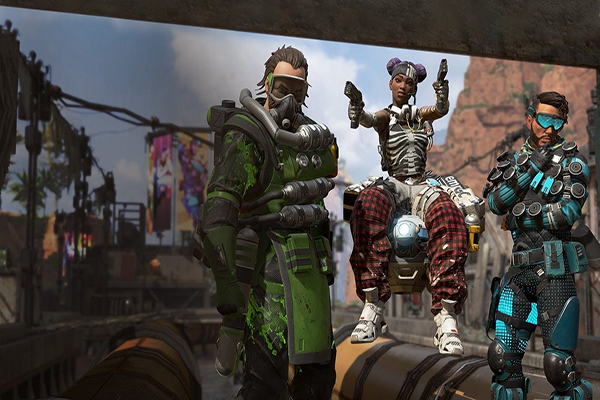
As the title suggest this spectacle is nothing without the legends and larger than life characters. Each and every character has its own special abilities and trump feature while in action.

Gibraltar

One will never want to mess with this big guy, whose presence can be felt for every passing second in a round. He is equipped with heavy gun carrying ability and inclined to heavy and strong impact whenever he fires.

Mirage

He is the fan favorite jokester including the one and only ‘shroud’, one of the skilled and popular gamers around the world. Mirage has great command on holo-technology and that makes him a master of deception. He will make you wonder which one is real as he has the ability to deploy the decoys to distract the enemy.

Bloodhound

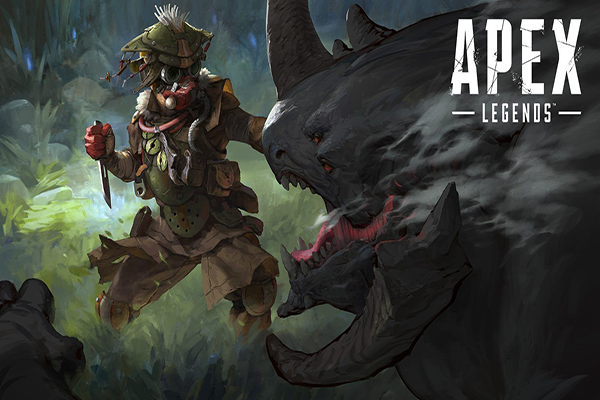
Stealth is the key to this character. He is a mysterious hunter that quietly stalks their prey and the prey is dead. The target will be having no idea when and from where it will hit.

Wraith

The tormented character who trusts the voices in her head and has the ability to surf through multiple dimensions. She’s the doctor strange in this game. Peek-a-boo and the enemy is eliminated.

Bangalore

The weapon expert and the offensive powerhouse. She’s quick and gets the work done. She pierces the enemy heart with countless bullets, without running out of ammo.

Lifeline

The medic on the grounds. Her life saving and package carrying ability is a game changer in critical situations.

Pathfinder

He is a scouting expert equipped with a zip line and a hook. A scouting expert that will see the enemy long before he sees him.

Caustic

A complete sociopath killer that uses his highly toxic chemicals and his prey run out of breath while he envies his or final moments.

MAPS

Apex doesn’t have an option to choose maps to play in. Right now it contains only one map called ‘king’s canyon’. Unlike PUBG maps like Erangel and Shanhok which you will be an eagle to find an opponent, here one is well exposed. So one has to plan accordingly to make any move. But the varied landscape does offer you various challenges to face and as the rule suggests you have to be in the circle as it shrinks.

It all starts with a drop. A drop master is selected among all the team members and the drop master who decides where to land. It is important to pick a place with appropriate loot to land since one may find a fight in the first step only. So players should try to get all the elite gears as possible.

ARSENAL

Apex arena constitutes of some robust arsenal and gears. Starting from agile SMGs, heavy hitting shotguns to deadly light machine guns and the ultimate energy guns, you name it, apex has it all.

TRANSPORT

If one feels like you are cornered or got stuck in the storm then he or she can rush to the transportation towers and fly away. Like fornite, Apex provides a futuristic jet pack to fly around.

RESPAWN AND REVIVAL

It is crucial for the entire squad to stay alive. So one when knocked down he or she can be revived. In worst case scenario if one dies then the team players have the ability to pick up the banner cards and rush to respawn sites and call the dead teammate back to the ground but it will leave the entire team exposed and the new player will not have any gear to start with.

CUSTOMIZATION

The key to win is to survive but the true glory comes with the legend style. As one climbs up high it will provide more and more options to customize the guns gears and appearance. The ranks will be displayed on the in-game banners with the kills to show who the boss is.

EA in collaboration with ‘Respawn’ has put a lot of efforts and has done a hell lot of homework to make this game exciting. It has already drawn much attention and remaining is to wait and see how the game rolls out.

Also Read:

Instagram vs Instagram lite: What’s the difference?

Instagram vs Instagram lite: What’s the difference?

Instagram vs Instagram lite: What’s the difference? GO ahead, read this detailed article about the comparison of Instagram with its Lite version.

In the past years, the owners Facebook has launched a platform to share all your photos and videos called ‘Instagram’. With time it managed to gain a lot of popularity and came up of with a lot exciting feature that we might have dreamed of back then. Honest opinions say that it is the only exciting social networking platform left.

Instagram vs Instagram lite

With the verge of the launching of the skinnier version of facebook like facebook lite, Instagram also turns down the low configured applications for the phones having a low specification called Instagram lite.

This post will clear the idea of what you are getting and what are you missing out in this version of the application.

Basic Interface

  • First thing first, as the prime motive of every other lite version of an application is to reduce the usage of memory and use of effective data connectivity.
  • Instagram uses around less than 500KB of the memory space and works flawlessly even in poor network connectivity too. While the main app consumes a big chunk of memory which is more than a hundred megabytes and can be seen struggling to load the posts when encounters low connectivity.
  • The unforgettable part of Instagram is its stories. No doubt on the rumors about the snap chats copied feature but has worked out more efficiently for Instagram. So this feature remains equal in both the apps. So you can see the posted stories of the one you are following and the one who is having an open account.
  • Both the versions have the same activity feed. No difference can be seen in the font size or quality of the photos. Just like the main application you can flawlessly check the activity feed about your posted photos and so.
  • Instagram lite doesn’t provide a wider window to manipulate your photos. Since it has a limited edit window consisting of resizing and crop options only, unlike the main version that provided more options.
  • Another shocking feature which is missing in the lite version is you will not find the DMs. You seriously can’t send text messages to anyone in this. This feature can be a major drawback of this version.

But the developers have promised to walk through this loophole in the mere future. With few or more upcoming updates. Since it has been currently active in Mexico only and is yet to be launch in other countries.

Media Interface

  • No videos autoplay feature is available in this version like the main app use to keep playing the same video, again and again, you have scrolled up.
  • It allows you to post photos in your feed with some restrictions. You are allowed to post a limited amount of photos. The option to post videos is yet to come in Instagram lite.
  • You cannot share the post with other platforms like WhatsApp or Facebook and so on. The moment you tap those three dots, it will flash window with some basic options only, nothing fancy to show.
  • In the actual application, you were given the provision to see the featured stories of the accounts those you liked your posts just buy one tap on their bubble. This feature is also not available in the lite version.
  • The discover window of the main application is classy and so well classified and is well organized. You will find different categories of your searches, from the post, peoples to hashtags. This is all clubbed under one menu in the lite version and the interface also looks so outdated and boring also.

Downloads

Since there’s not much in the treasure chest of the lite version application to outshine the main one but anyhow it’s faster than the that and uses fewer data and memory. And remaining about all those missing features, it’s promised that it will be overcome in the mere future.


How to Clear OnePlus 6T Cache without losing data

0
How to Clear OnePlus 6T Cache without losing data

OnePlus 6T is the most incredible smartphone ever manufactured by the Chinese phone maker. The OnePlus 6T comes with industry-altering features packed inside a beautiful body. This phone has definitely won the hearts of millions. Some OnePlus 6T owners have reached out to us asking how they can clear the cache of their phone. This particular guide is for all those OnePlus 6T owners. In a while, you will learn how to clear OnePlus 6T cache without losing data. While approaching towards the method to clear OnePlus 6T cache, we will take a look at the spec sheet and features of this amazing smartphone.

Image by: TechBeasts

OnePlus 6T

OnePlus 6T was released back in October 2018. This phone is the successor of the OnePlus 6. The OnePlus 6T came with a brand new design language. OnePlus replaced the big notch with a waterdrop notch in this phone. The 6T has a 6.41-inch Optic AMOLED screen with a tiny notch fixed in the middle. The front facing camera is placed in this notch. This screen has a resolution of 1080 x 2340 pixels. The display ratio is 19.5:9. OnePlus 6T was the first smartphone to use the Gorilla Glass 6 for screen protection. Since this phone has a waterdrop notch, it blends into the display enhancing its beauty.

As far as the internal hardware of this phone is concerned, OnePlus 6T is powered by the Qualcomm Snapdragon 845 SoC and Adreno 630 GPU. It has a RAM of 8GB withthe internal storage of 128GB or 256GB. OnePlus 6T has a dual camera system at the back. There is a 16MP + 20MP camera. On the front, it has a 16MP camera. It has a 3700 mAh battery. OnePlus 6T also supports fast battery charging. This phone has an under-display fingerprint scanner too. OnePlus offers this phone in Thunder Purple, Mirror Black, and Midnight Black colors.

There is a McLaren edition of this phone too. The McLaren edition comes with a RAM of 12GB. It has an orange border between the body and the bezels of the phone. The McLaren edition of the OnePlus 6T is expensive as compared to the ordinary version.

That was all about the phone. Let us take a look at the types of cache associated with the OnePlus 6T and then learn how to clear it.

OnePlus 6T Cache

There are three types of cache memory in this phone. The very first cache is the cache of the phone. This is responsible for running all the apps and tasks on your phone. The cache helps your phone to boot up faster, load all the apps faster, and perform all the tasks faster. If your phone has started acting up, its performance has slowed down, the battery life is not as good, you should try clearing this cache. It can potentially fix the common problems on your OnePlus 6T.

After the phone’s cache, there is the browser cache. This cache is supposed to load the websites faster. The browser cache is also responsible for storing cookies, history, and all the files that have to do with the net surfing on your phone. If the websites are loading slow on your phone, or you want to get rid of the saved internet history, you can clear the browser cache to get rid of it.

The third cache is the application cache. This has to do with the processes going on inside an application. This cache resides in the settings of each application and it can be cleared by simply going to the settings of the phone. In case an application on your phone has started acting wierd, its giving force close errors, or its refusing to load, you can clear the App cache on OnePlus 6T to fix it.

Take a look at the steps given below to clear the OnePlus 6T Cache without losing data now.

Clear OnePlus 6T Cache without losing data

These are the steps to clear cache of OnePlus 6T. These steps will not hurt your data.

  1. Turn off your OnePlus 6T.

    Press the power button for a few seconds to shut down your OnePlus 6T.

  2. Boot your OnePlus 6T into the recovery mode.

    Now while your phone is powered down, press and hold Volume Up + Down + Power button to get into recovery mode. As soon as you see the recovery mode, let the keys go.

  3. Click on Wipe data and cache.

    In the recovery, click on “Wipe data and cache”. This will show you the next options.

  4. Now click on Wipe cache.

    Now you will see the “Wipe cache” option right in the middle. Click on Wipe cache to begin clearing OnePlus 6T cache.

  5. Click on Yes and Reboot your phone.

    As the phone asks Yes or No, click on Yes. This will clear OnePlus 6T cache and no data has been touched. Reboot your phone now.

Clear OnePlus 6T Cache

That’s all with the OnePlus 6T cache clearance. You have successful refreshed every single task on your phone. You should find a notable change in the performance and battery life of your OnePlus 6T after this. If you wish to clear Browser or Application cache, follow the steps given below.

Clear App Cache on OnePlus 6T

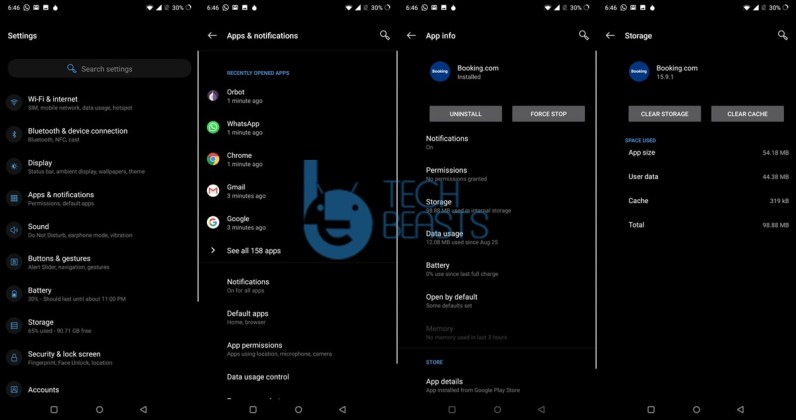
  • Open Settings on your OnePlus 6T.
  • In Settings, click on Apps & notifications.
  • Now click on See All Apps.
  • You will see a list of your installed apps now.
  • Chose the application who’s cache you want to clear.
  • Now in the app settings, click on Storage > Cache > Clear Cache.
  • Restart the phone now. App cache will be cleared.
Clear Application Cache on OnePlus 6T

Clear Browser Cache on OnePlus 6T

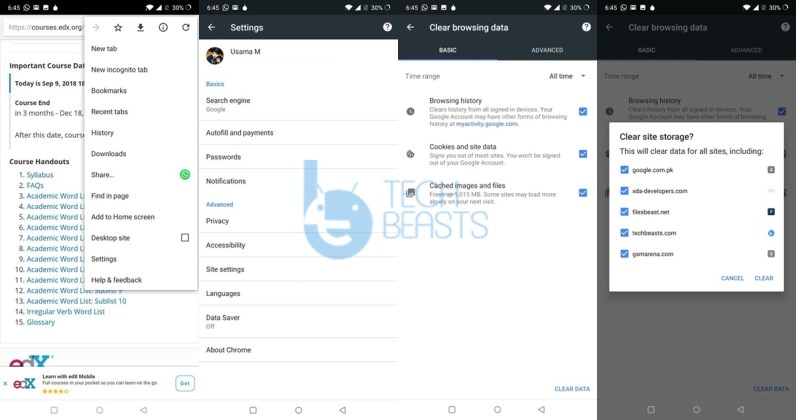
  • Open Google Chrome Browser on your OnePlus 6T.
  • Click on the menu button on the top-right corner.
  • Now go to Settings > Privacy > Clear Browsing Data.
  • Select the Data/Cache you want to clear.
  • Click on Clear Data button now.
  • Close the browser and reopen it. Cache will be cleared.
Clear Google Chrome Cache on OnePlus 6T

Wrap Up

That’s all folks. I hope you guys found this guide useful. If you are experiencing any kind of issues on your OnePlus 6T and you want us to do a guide on it, feel free to reach out to us. I will try my best to sort out the issues and get back to you. Stay connected.

Facebook vs Facebook Lite: Which is better?

Facebook vs Facebook Lite: Which is better?

The chronicles of Facebook is no longer a secret to today’s world. Mark Zuckerberg led a foundation of an absolutely perfect social networking site back in 2004. It is an awesome platform to connect with people all around the globe with whom you have a probability of meeting even less than the probability of getting struck by lightning, fascinating, isn’t it? Facebook has been a stepping stone for many major events, starting from presidential elections to signing an inevitable petition. No matter where you are you will feel connected. However, the developers unfold a new version of this remarkable application called ‘Facebook Lite’.

Facebook vs Facebook Lite

Now let’s grab a quick tour on how these two applications apart from being developed from a single source are different from each other.

Facebook vs Facebook Lite

SPACE

The ability to consume extremely low affordable space is the lifesaver for the lite version of this app. While the main application consumes more than 50 MB the lite version consumes a reasonable space of 435 KB only.

RAM

Since Facebook has been in action for such a long time so back then not everyone could afford phones with high-end specifications and most of them are still in use. So the consumption of RAM is something that can’t be ignored.

The main application uses about 150MB to 300MB of the temporary memory, it might not seems much as a whole but for a single app is considerable. Now the facebook comes to the picture, which uses less than 150MB of the total memory.

DATA

Facebook deliberately launched the lite version to target those countries where there is an issue with the internet connection. So this feature gives the lite version to work perfectly with 2G connection also while the actual version can be seen struggling with it.

The main application consumes more space and that forces you to download the updates every other day, that may lead to consuming 40 to 35 MB of data. Which you won’t be bothered about in lite

BATTERY

The main application can be a battery hawk when it comes to power consumption. The lite version consumes much much less power than the actual version as it is not bloated with a hell lot of unnecessary features which are discussed further.

INTERFACE

You may or may not find any larger differences between the two applications. But when taken a closer look, lite seems to have comparatively small-sized text and is kept aside of animations and has a smooth function.

As everything comes with a price, facebook lite is anchored with few drawbacks too. Out of which is the layout. It looks grainy and old fashioned. On the scale of multimedia resolution when both the versions are compared, lite looks grainy. It’s like two videos games of high and low graphics content and detailing.

MESSENGER

The main app can really be evil in this part. As it forces you to download messenger externally in order to access the chat feature. But in the lite version, it has the in-built messenger feature that allows you to chat with your friends without any further download.

But stickers aren’t supported in lite, unfortunately, which is a key point of the main application. You may use emoticons but via symbols and your creativity.

As innovations are the key to development, so the developers were talented enough to invent such type of version which has more advantages than cons and is able to process data much faster than the original app. To conclude, it’s an exceptional app to opt for favorable circumstances.

Downloads

Don’t forget to check out: Twitter vs Twitter Lite: What’s the difference?

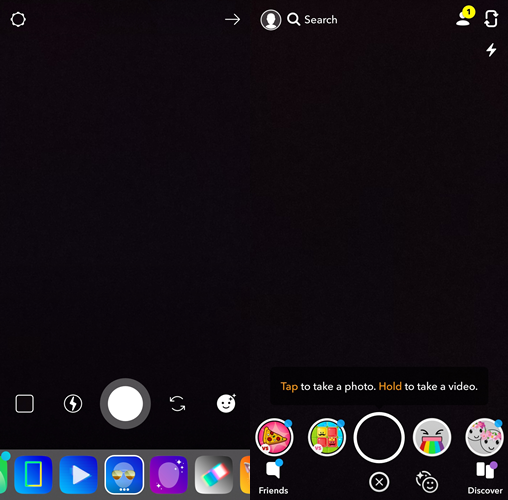
Snapchat Stories vs Instagram Stories: What’s the difference?

Snapchat Stories vs Instagram Stories: What’s the difference?

Snapchat Stories vs Instagram Stories: Here is a quick comparison of various feed the applications provide.

Long gone are those days when the literal meaning of stories was supposed to be some printed words on a few pages. Now in this tech era of the 21st century, great tycoons like Snapchat and Facebook are entirely changing the scenario. Just like the arch rivalry between two competitive teams, Instagram and Snapchat have been colliding head-on for quite a few times. A lot of rumors popped that Instagram actually hacked and managed to steal the algorithms. But to be very very clear there is so such thing into existence, I mean how ridiculous is this.

Snapchat Stories vs Instagram Stories

Since there is not much difference between the story feature in both the platforms, so in defense Instagram convinced everyone that the feature was so mesmerizing that they took it. Thus the title of ‘who introduced first’ goes to none other than Snapchat.

I know there’s been a lot of ‘Facebook-owning-thing’ with Instagram since it was bought by Facebook. But honestly, I feel that out all the social networking apps Instagram is the only one in the race that’s able to retain the fun.

WHAT IS A STORY?

Now moving on to the difference between Snap stories and Insta stories let’s understand what exactly a story is? When it’s a kind of innovation that allows you to share photos videos with your friends and loved ones. That has a life span of  24 hours only. This feature helps the user to post certain things for a certain period of time, unlike posting on social media which remains unless and until you delete it.

WHO IS USING WHAT?

As stated earlier one can seriously be able to find out the difference between the versions. But it highly depends on the user and how he or she is using it.

Snapchat Stories vs Instagram Stories


While Instagram can be a social silo since more than 300 millions of user uploads stories in a day. Instagram is quite open when it comes to sharing.it allows you to tag friends and anyone who is your follower or if your account is open can spontaneously respond to your stories, hence it’s a great way to start a long conversation that may change your life. On the other hand, Snapchat can act like some secret service agent. It focuses on a private conversation between you and your friend. It will feel more like a personal feed than sharing.

You can not only share but also can witness what your friend shared a few moments before. The option to discover stories is moreover the same in both the apps but with different names.

Miscellaneous

Now the most exciting feature of stories is the use of AR filters. Everyone loves to have a puppy face or hearts bursting out of your head on valentines day, cringe, isn’t it? Both the apps have this feature with a wider range of options to choose from.

In both, the applications you can add text, doodles, clip art or GIF to the photos or you can pin it in the shared video. Few additional features like polling, questions, countdowns are available in the updated version of Instagram and is yet to be accomplished by Snapchat.

Snapchat Stories vs Instagram Stories


Instagram                                                 Snapchat

What Instagram really miss is the streak feature that’s the selling point of Snapchat, which occurs once you send stories to friend consecutively for three or more days. Snapchat also notifies the user how many his or her snap was viewed and whether the screenshot is taken or not. Which you won’t find on Instagram. So, in short, you may be caught red-handed by the back end of Snapchat.

Apart from all the similarities and differences these two apps have. But the feature of sharing stories is a game changer, as it gives you a clear cut picture, how’s life for your friend. So it’s your choice with whom you wanna move but make sure you enjoy that.

Don’t forget to check out: WhatsApp Status vs Instagram Stories: Comparison

Download Samsung Galaxy A6s Stock Wallpapers

0
Download Samsung Galaxy A6s Stock Wallpapers
galaxy a6s stock wallpaper

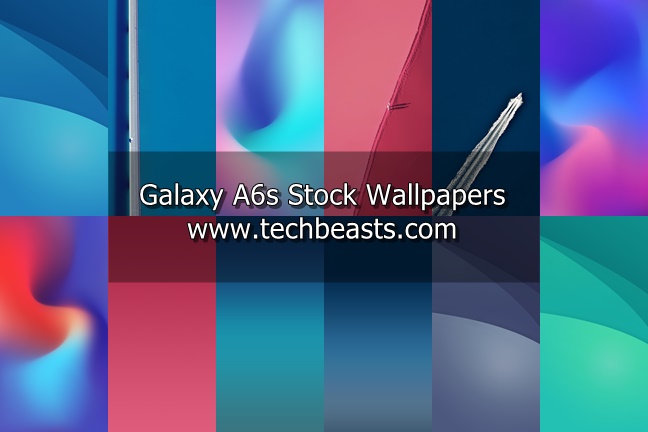
Galaxy A6s is a mid-range smartphone from the South Korean tech giant. Samsung released this smartphone back in October 2018. This phone has been around for a couple of months, but its wallpapers surfaced over the web just today. Wallpaper lovers can download Samsung Galaxy A6s stock wallpapers right now. There are 12 Galaxy A6s stock wallpapers in total. These Galaxy A6s stock wallpapers can be applied to any Android smartphone or an iPhone. Let’s take a look at the spec-sheet of the Galaxy A6s and then download its official stock wallpapers.

Galaxy A6s

Samsung Galaxy A6s was released for the Chinese audience originally. The phone comes with a 6.0-inches Super AMOLED screen. This screen has an 18:9 ratio. There is no home button on this phone. The resolution of this screen is 1080 x 2160 pixels. Galaxy A6s is equipped with the Qualcomm Snapdragon 660 SoC. This phone has Adreno 512 GPU.

Galaxy A6s has two Storage and RAM configurations. It either comes with storage of 64GB and RAM of 6Gb or 128GB + 6GB RAM. It has a dual camera system at the back. This system includes a 12MP + 2MP shooter. On the front, the A6s has a 12MP camera. Galaxy A6s has a whopping 3300 mAh battery inside. It also has a fingerprint scanner at the back. For connection and charging, it uses the USB Type-C. Galaxy A6s is offered in Black, White, Blue, Pink, and Red colors.

That was all about the phone. It’s time to download its wallpapers. As you scroll down, you will find the official stock wallpapers of the Galaxy A6s.

Galaxy A6s Stock Wallpapers

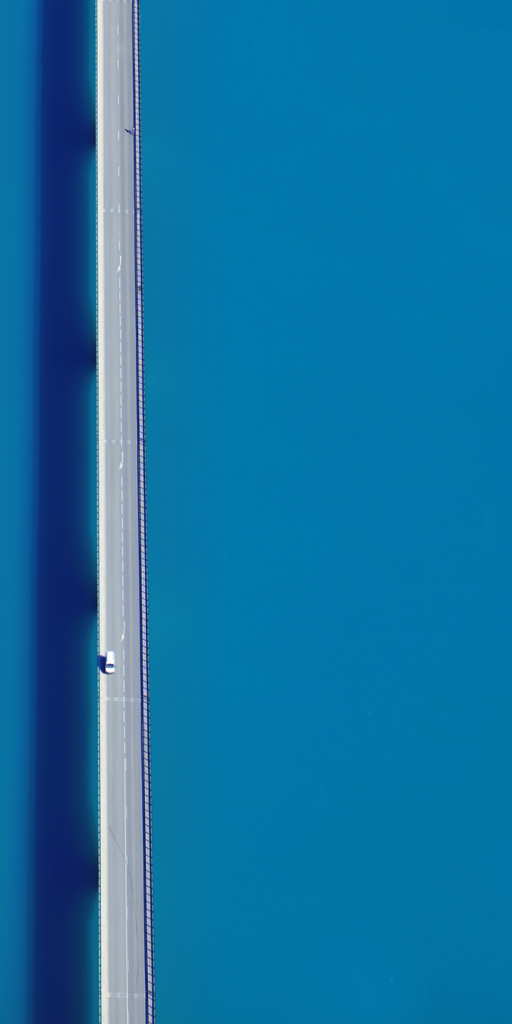
These are the wallpapers from the A6s. All these wallpapers have a resolution of 1080 x 2160 pixels. You can apply these wallpapers to any Android phone and on an iPhone too. To download the wallpapers, right click on the image and then click on “Save image as..”.

You can also download all these wallpapers from the all in one link given below.

Galaxy A6s All Stock Wallpapers: Download

Wrap up

That’s all with the Galaxy A6s’ wallpapers. If you want to download wallpapers of other Android smartphones, you can explore them in the stock wallpapers section of our site. These stock wallpapers are a good choice to beautify the display of your smartphone. If you have any queries or questions, feel free to reach out to us.

Download VMate for PC on Windows and Mac

0
Download VMate for PC on Windows and Mac

VMate is the famous video editor and downloader for smartphones. There is no desktop version of VMate video editor. If you wish to use VMate on your computer, you will have to follow this guide. The steps to download VMate for PC are given in this post. It is a matter of a minute to download VMate for PC. Before we start installing VMate for PC, it is important to learn a little more about this app.

VMate for PC

VMate – Video Editor

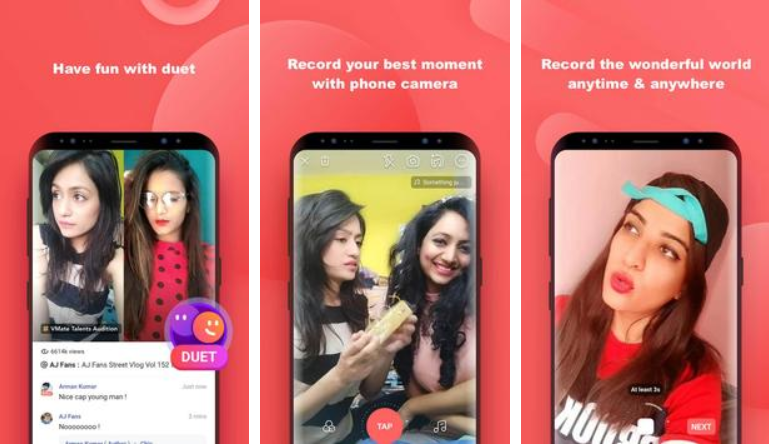
VMate is a feature-rich application for video creators. It will not be wrong to call this application a whole platform. VMate offers multiple features like Video Editing, Video Downloading, Video Sharing, Dubbing etc. The main feature of this application is the Video Editing and here is what you can do.

VMate can edit a video the way you want. It has all the options from adding music to color grading your videos. Thousands of filters and video effects are provided to the video creators. VMate has some features similar to TikTok. Creators can pick up a clip from a Bollywood or Hollywood movie and create a reaction video. Users can also use dialogues to lipsync showing off their acting skills. Apart from this, the sound collection in VMate is huge. There is a music library loaded with some authentic sounds and songs from Bollywood and Hollywood movies.

VMate Downloader

Apart from the Video Editor, it has a Video Download too. You can download videos from YouTube, Facebook, Twitter, and all other online platforms. Downloaded videos are stored on the local storage of the phone or on your computer.

VMate for PC

Go social with VMate

VMate has a social platform too. This is where all the creators can connect with each other. Creators can share their clips on the timeline of VMate. Other creators from around world can see your work and appreciate it if they like it.

VMate comes for free on Android. There are no hidden costs in this app. This is why it has become so popular that it has hit over 10M downloads. It’s time to get back to what we are here for. Go ahead to download VMate for PC without any further ado.

VMate for PC

These are the steps to download VMate for PC on Windows 7/8/10 and MacOS/OS X. VMate for PC will run smoothly on Desktop PC and Mac.

  1. Install BlueStacks 4 or Nox App Player.

    First of all, download BlueStacks 4 and install it on Windows 10. If you are using MacOS X, download and install Nox App Player.

  2. Open the emulator and set up Google Account.

    Open the newly installed emulator. It will ask you to add the Google Account. You can either add your existing Google Account or a new account.

  3. Open Google Play Store and install VMate.

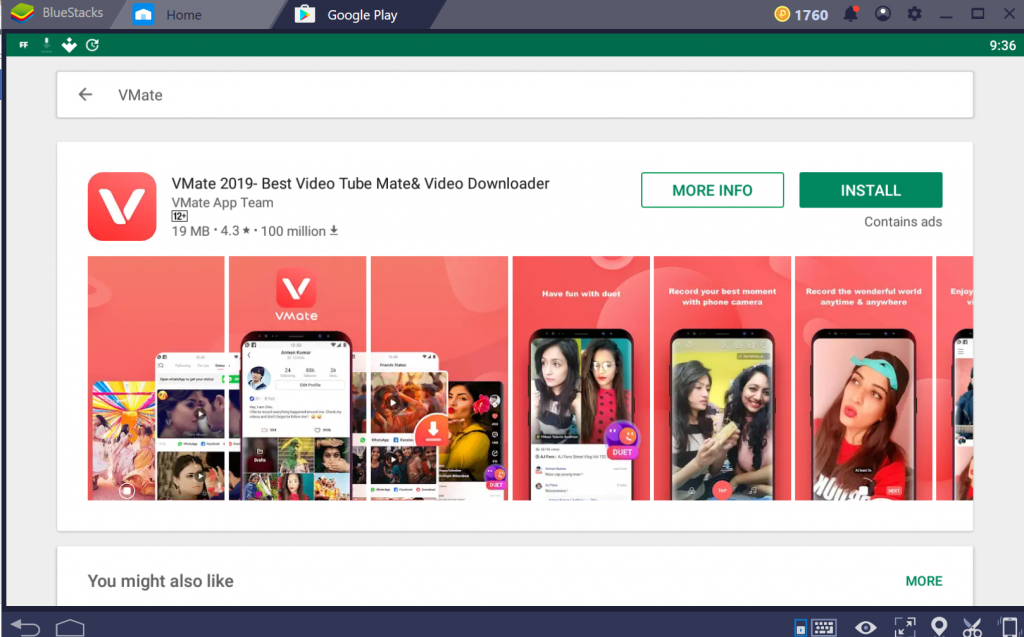
    After setting up the Google Account, go ahead and open the Play Store. In the Play Store, search for “VMate”. As soon as you find VMate 2019, install it.

  4. Launch VMate, edit the videos and download them.

    You are all set to start using VMate now. Open it and start editing your videos. Interact with thousands of other creators. Download the videos straight to your computer now. That’s it.

VMate for PC
VMate for PC

Wrap Up

As you have now successfully installed VMate 2019 for PC, you should be able to use it freely. Remember that VMate for PC will work only inside your computer. It will not download the videos to your computer’s local storage. All the videos that you download will appear in the file manager of BlueStacks 4 or Nox App Player. If you need help with anything regarding the emulator or VMate, feel free to drop your queries below. I will try my best to get back to you as soon as possible.

How to disable/hide Notch on Android phones

0
How to disable/hide Notch on Android phones

This is your one-stop guide to disable/hide Notch on Android phones. I have added the tutorial to hide notch on almost all the phones that come with a notch.

2 years ago, the trend of bigger displays and smaller bezels made its way to the smartphone industry. Companies like Samsung and Huawei came forward with their displays having 18:9 screen ratio. At that time, the Android phone makers started removing the home button and other hard navigation keys from their phones. Android’s founder, Andy Rubin launched his own smartphone named as Essential Phone. The Essential phone came with a water-drop notch maximizing the display size. This was a whole new concept in the smartphone world. After these design changes, all eyes were on Apple.

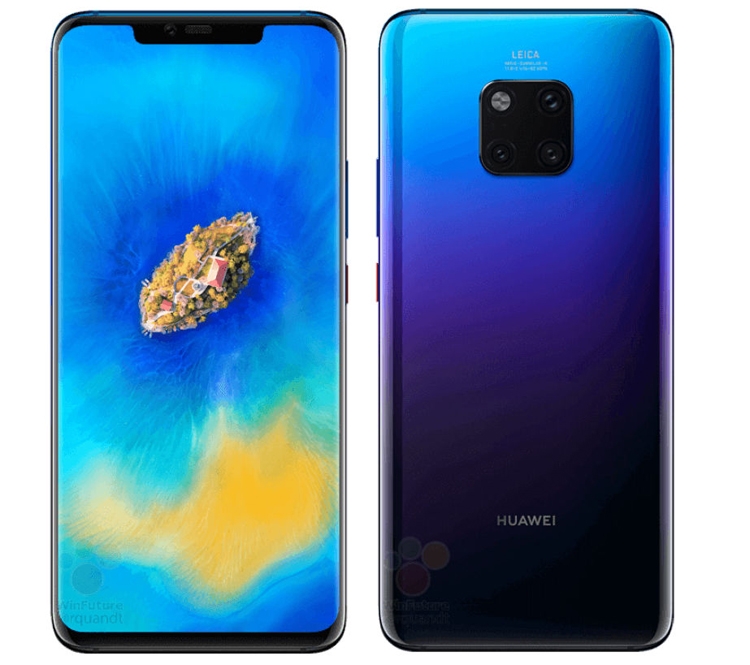
Mate 20 Pro with Notch

Apple – The Notch Initiator

Apple launched its iPhone X, iPhone 8, and iPhone 8 Plus in 2017. The iPhone 8 and iPhone 8 Plus had the same old design as the previous iPhones. However, the iPhone X was something completely new. The iPhone X came with a screen having a 19:9 display ratio. Apple achieved this ratio with the help of the notch in the middle of the screen. The iPhone X came with very minimal bezels. At first, it looked like the notch is going to face the wrath of the audience. The notch was criticized, however, as the time passed on, the notch acceptance increased and finally, everyone started embracing notch.

Android phone makers – Let’s copy the ugly notch!

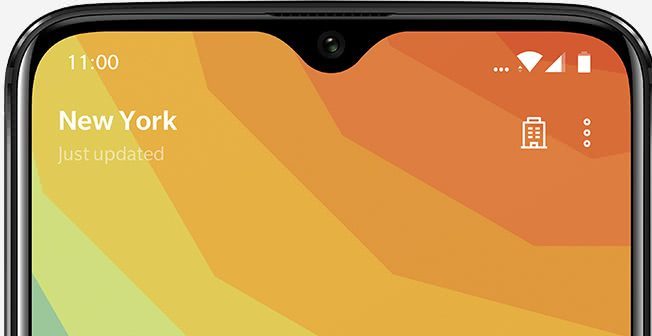
OnePlus 6T Waterdrop Notch

The acceptance for notch increased further when almost all the Android phone makers except Samsung went ahead and copied Apple to bring notch on their phones. These manufacturers include Huawei, Xiaomi, Vivo, OnePlus, ASUS, and even Google. Google, in fact, decided to go a step ahead and introduced the ugliest notch that we could ever imagine on a smartphone. Now that the notch trend was going in a full swing, Android manufacturers decided to opt out of it and go with the waterdrop notch that we initially saw on the Essential Phone. The waterdrop notch looks good, but it is still there and it interrupts your full-screen experience on the phone.

Customizable notch on Android phones

The notch on iPhones cannot be modified, because that’s Apple. Notch on Android phones is still acceptable because you can always turn it off. Be it the full Apple-like notch or the waterdrop notch, you can disable it. Disabling the notch changes the display ratio to 18:9. After disabling the notch, the display cutout vanishes making it easy for you to watch anything in the full screen or playing a game without any visual disturbance.

Android Phones that have a notch

Here is a list of all the Android phones that have a notch. These are over a 100 Android phones which have copied the notch concept.

Xiaomi

  1. Redmi Note 6 Pro
  2. Pocophone F1
  3. Mi A2 Lite or Redmi 6 Pro
  4. Mi 8 Lite
  5. Mi 8
  6. Mi 8 Pro
  7. Mi 8 SE
  8. Mi 8 Explorer

Huawei

  1. Mate 20 Pro
  2. Honor 8X
  3. Y9 2019
  4. P Smart+ or Nova 3i
  5. Hoor Magic 2
  6. P20 Pro
  7. P20 Lite
  8. Honor Play
  9. Mate 20 X
  10. Mate 20
  11. Nova 3
  12. Mate 20 Lite
  13. Honor 10
  14. P20
  15. Honor 8X Max
  16. Honor 9N or 9i
  17. Mate 20 RS Porsche Design
  18. Honor Note 10
  19. Honor 8C

OnePlus

  1. OnePlus 6
  2. OnePlus 6T

Vivo

  1. V11 Pro
  2. Y81
  3. Y95
  4. V9
  5. Y83
  6. V11i
  7. Y93
  8. Y83 Pro

Oppo

  1. F9
  2. F9 Pro
  3. A3s
  4. F7
  5. RX17 Pro
  6. A7
  7. RX17 Neo
  8. R15x
  9. R17
  10. A5
  11. K1

LG

  1. V40 ThinQ
  2. G7 ThinQ
  3. G7 One

Lenovo

  1. S5 Pro
  2. Z5

Asus

  1. Zenfone 5z ZS620KL
  2. Zenfone 5 ZE620KL

Google

  1. Pixel 3XL

Motorola

  1. One Power
  2. One (P30 Play)

Realme

  1. Realme 2 Pro
  2. Realme 2
  3. Realme C1

Disable/hide Notch on Android phones

How to hide notch on Xiaomi

  1. On your Xiaomi phone powered by MIUI, open Settings.
  2. In Settings, go to Full-Screen Display.
  3. Now click on the option appearing next to “Hide Screen Notch”.
  4. The Notch will be now disabled.
  5. Enjoy your phone without the notch now.

How to hide notch on Huawei

  1. On your Huawei phone, go to Settings.
  2. In Settings, go to Display Settings.
  3. Now click on More Display Settings > Notch.
  4. If you can’t find the More Display Settings, you will find the Notch settings straight away in the Display Settings.

    Notch Settings – Huawei Mate 20 Pro

    Notch Settings – Huawei Nova 3i
  5. Now click on the button appearing next to “Hide Notch”.

    Notch Settings – Huawei Mate 20 Pro
  6. The Notch will be gone now. Enjoy the phone with a good display.

How to hide notch on OnePlus

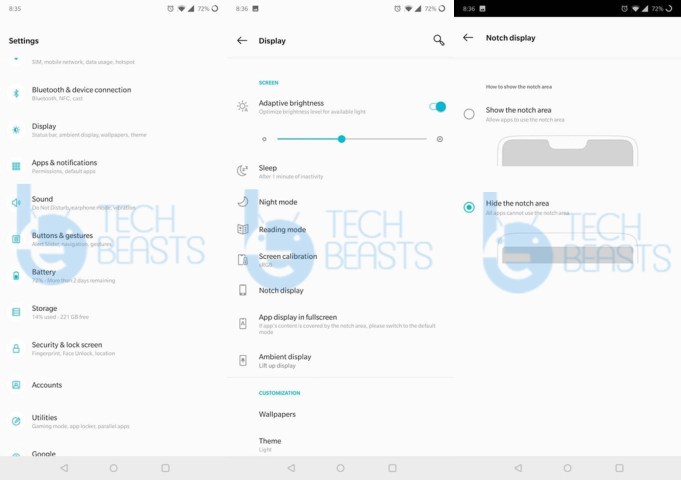
  1. On your OnePlus 6 or OnePlus 6T, open Settings.
  2. Now go to the Display Settings.
  3. Under the Display Settings, open “Notch Display”.
  4. Now click on “Hide the notch area” to disable the notch.

    Notch Settings OnePlus 6/6T
  5. That’s it, the Notch is gone now.

How to hide notch on Oppo

  1. On your Oppo Phone, open Settings.
  2. In Settings, go to Display & Brightness.
  3. Now open App Display in Full Screen.
  4. Change the settings to hide the notch now.
  5. That’s all.

Now, this feature will remove the Notch from a particular application on your phone. If you want to remove the notch from the entire display, you will have to install an application called Nacho Notch. Nacho Notch adds the Hide Notch feature to the notifications panel of your phone. You can simply pull the notifications bar and click on the Hide Notch option to get rid of the notch. Download Nacho Notch and install it to remove Notch from your Oppo Phone now.

How to hide notch on Vivo

  1. Open Settings > Display & Brightness.
  2. Now click on “Third-party app display ratio”.
  3. Click on the application that you want to hide the Notch from.
  4. Now click on “Safe Area Display”.
  5. Notch will be gone from that application now.

Note: Just like Oppo, the Notch will be gone from particular applications only. To remove the Notch completely from the display, get the Nacho Notch application (link give above next to Oppo tutorial) and hide the notch via that application.

How to hide notch on Asus

  1. On your Asus Zenfone, open Settings.
  2. Now in Settings > Display.
  3. Click on “Hide notch”.
  4. The notch will be gone now. That’s who simple it was.

How to hide notch on LG

  1. Open Settings.
  2. In Settings > Display.
  3. Now click on “New Second Screen”.
  4. You will see the Notch options now.
  5. Now click on custom and select the colors you want to replace the Notch with.
  6. Save the settings. That’s all. The Notch has been removed.

How to hide notch on Realme

  1. Open Settings.
  2. In Settings, go to Display & Brightness.
  3. Now click on “App Display in Full Screen”.
  4. You will find a list of applications now.
  5. Now disable the Notch for your desired application.
  6. If you want to remove Notch completely from the phone, you will have to install the Nacho Notch. Follow the method given below for that.

How to hide notch on Google Pixel 3XL

  1. First of all, open Settings.
  2. Go all the way down and open About Phone section.
  3. Tap the build number 7 times to enable Developer Options.
  4. Now get back to settings and open Developer Options.
  5. Under the Developer Options, find the “Display cutout” option.
  6. Open the Display Cutout settings and select “Hide”.
  7. The Notch from your Pixel 3XL will be gone now. Enjoy!

How to hide notch completely on Nokia, Oppo, Vivo, Realme, Lenovo, and Motorola

All the companies which are mentioned above in the heading, they allow removing notch from a particular application. If you want to remove notch completely from the phone by one of the above-mentioned phone makers, you will have to opt for a third party application. The best application that we have for this purpose is Nacho Notch. It does not require root or any other specific permissions. All you have to do is to install the application and disable the ugly notch on your phone. Follow these steps.

  1. Download and install Nacho Notch – Google Play Store.
  2. After installation, pull down the Notifications panel of your phone.
  3. Access more icons to find the “Hide notch” option.
  4. Drag the Hide notch option to the main notifications icon now.
  5. Now click on the hide notch button to disable the notch.
  6. You will get rid of the notch this way. That’s all.

Conclusion

That’s all folks. That’s how we can say goodbye to the infamous notch on our Android handsets. I hope that you guys find this tutorial helpful. If you have any other queries, feel free to reach out to me through the comments section below. Stay connected!

Best Gameloop/Tencent Gaming Buddy Alternatives for COD and PUBG Mobile

0
Best Gameloop/Tencent Gaming Buddy Alternatives for COD and PUBG Mobile
Tencent Gaming Buddy Alternatives for PUBG Mobile

Update: 11/12/2019: In October 2019, Tencent Gaming Buddy was rebranded as Gameloop. These are now the best Gameloop/Tencent Gaming Buddy Alternatives for PUBG Mobile and COD Mobile as well.

Tencent Gaming Buddy is the official PUBG Android Emulator. Gaming Buddy’s purpose was to provide the PUBG Mobile players with the best possible experience on their computers. However, it did not work up to the expectations for some gamers. This is why the gamers started looking for Tencent Gaming Buddy Alternatives. All the PUBG Players can find the best Tencent Gaming Buddy Alternatives in this post. Before taking a look at the Tencent Gaming Buddy Alternatives, it is important to know more about this emulator.

Tencent Gaming Buddy Alternatives
PUBG Mobile on Tencent Gaming Buddy


Gameloop/Tencent Gaming Buddy

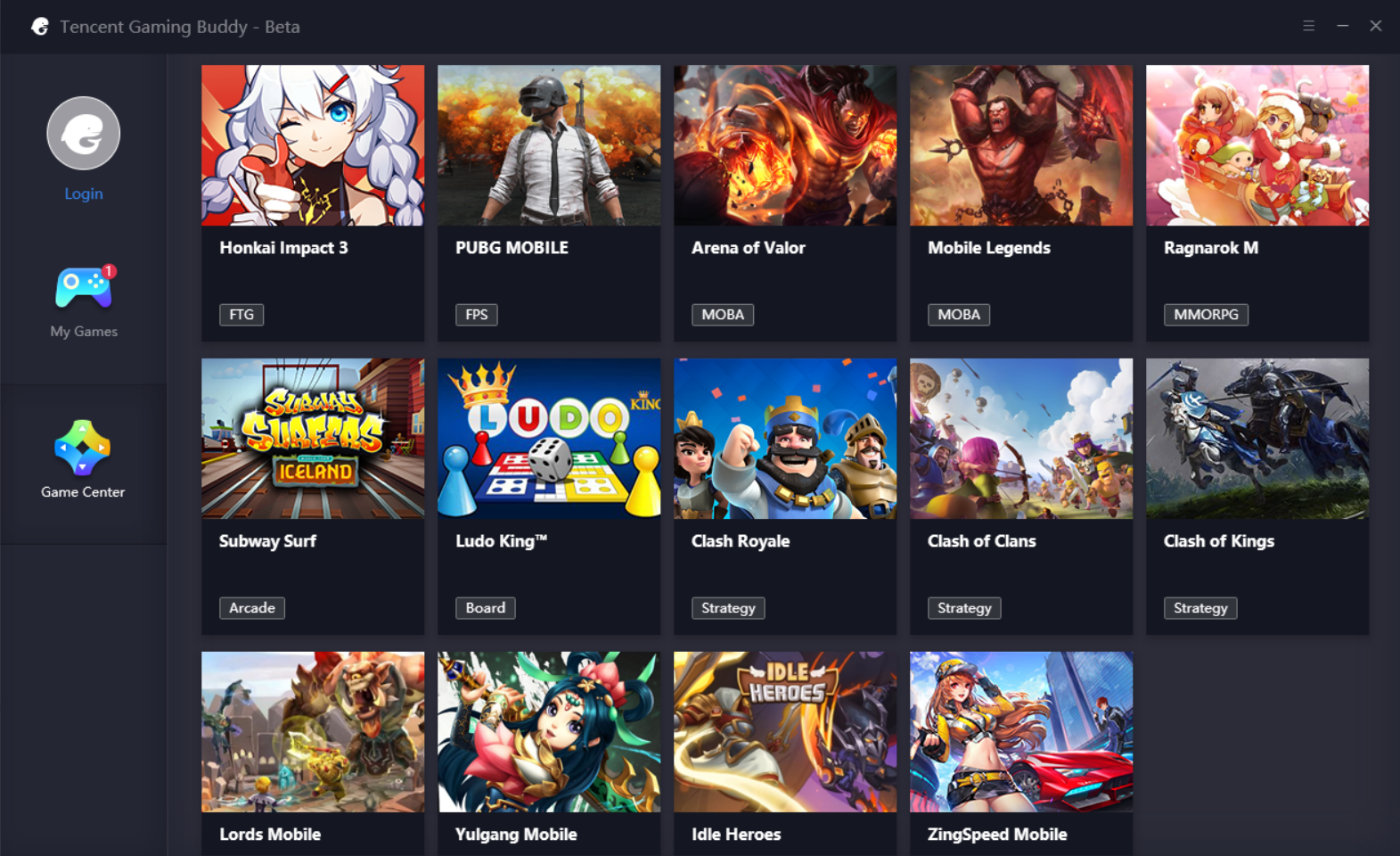
Tencent Gaming Buddy is different from your ordinary Emulators in a number of ways. At first, this Emulator was built for PUBG only. The support for 13 other games was added to this emulator later on. The Display, Engine, and Basic settings in this emulator are there to enhance PUBG Mobile only. The emulator comes with the controls that will take the PUBG Mobile experience to a whole new level.

Tencent Gaming Buddy Alternatives
Extra games in Tencent Gaming Buddy

Tencent Gaming Buddy only runs a few games. It does not run any Android application. Furthermore, there is no Google Play Store in it. The 14 default games will be installed from Tencent’s servers directly. There is a Google Installer in it. The purpose of the Google Installer is to install the Play Games only. Play Games will bring sync your PUBG Mobile with the Tencent Gaming Buddy. This way, you will not your game’s progress.

PUBG Mobile players can use their mouse and keyboard to play mobile version via Gaming Buddy. This definitely gives them an edge over those who are playing the game on mobile. This is not quite right in a sense, however, if you do not care about this fact, go ahead and play it off/ Furthermore, it supports Windows OS only. There is no Mac version of Tencent Gaming Buddy. It comes for free and can be downloaded in a matter of a minute.

That was a slight idea of the Tencent Gaming Buddy. Take a look at the Tencent Gaming Buddy Alternatives below.

Tencent Gaming Buddy Alternatives

If you are experiencing frame rate drops, stuttering graphics, or messy sound effects, you should try one of the Tencent Gaming Buddy Alternatives listed below.

BlueStacks 4 & BlueStacks

Tencent Gaming Buddy Alternative
BlueStacks 4 installing PUBG Mobile

The BlueStacks has been around for almost a decade. Before the release of Tencent Gaming Buddy, this was the most popular Tencent Gaming Buddy Alternative. BlueStacks’s latest version, the BlueStacks 4 is packed with industry-altering features. It gives you a real Android device experience on your computer.

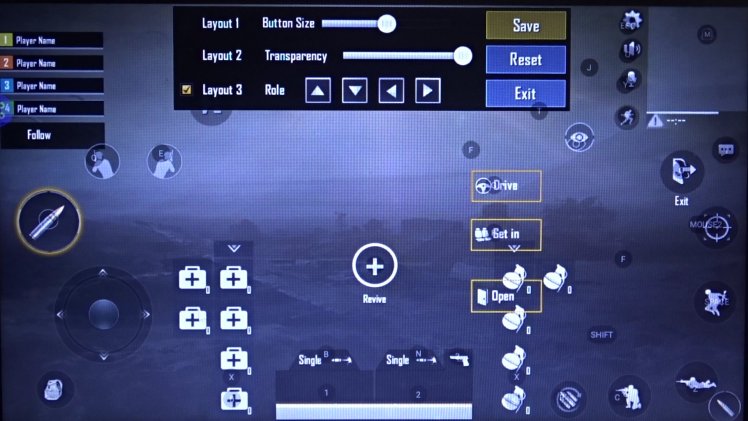
For games like PUBG Mobile, BlueStacks 4 offers extended controls and display settings. Users can map the keyboard according to their liking. BlueStacks 4 comes with features like Screenshot and Screen Recording which is kind of an essential tool for PUBG Mobile gamers.

The best part about BlueStacks is that it has a Mac version too. The old BlueStacks still works on Mac. So if you are planning to play PUBG Mobile for PC on a Mac-powered Laptop or Desktop PC, BlueStacks is your best choice. This emulator is based on the Android 7.1.2 Nougat.

BlueStacks also comes for free. You can download BlueStacks 4 from here and BlueStacks from here.

Nox App Player

Tencent Gaming Buddy Alternative
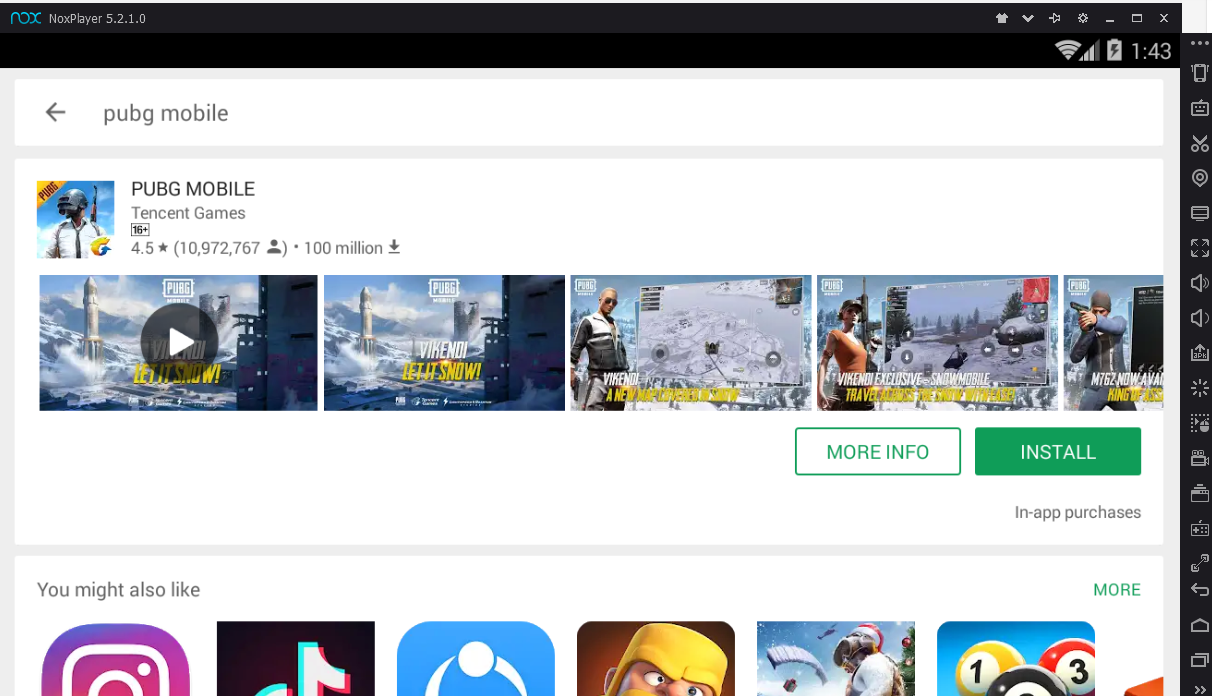
The Nox App Player installing PUBG Mobile

Nox App Player is more like a virtual Android tablet running inside your computer. The UI of the Nox App Player is close to stock Android. Like the BlueStacks, it can also run all the Android apps and games on computers. Nox App Player is based on Android 7.1.2 Nougat as well. It comes for free. Both the Windows and Mac users can find Nox App Player for their ecosystems.

Nox App Player also gives gamers the option to map the controls. A mouse can be used in gaming too. If you are not happy with the BlueStacks, this is the emulator you should get your hands on. PUBG Mobile Players who are not liking the BlueStacks on Mac, Nox App Player is the best Tencent Gaming Buddy Alternative for them. I am personally not a big fan of Nox App Player that is why I am putting it here next to the BlueStacks. You can download Nox App Player from here.

Phoenix OS

Phoenix OS is not exactly an emulator. It is more like a whole themed-OS. Phoenix OS cannot be installed like the BlueStacks 4 or the Nox App Player. You will have to create a separate partition to install it. You can either install it on your computer in a new partition or you can use a USB stick for it.

Tencent Gaming Buddy Alternative
Phoenix OS showing PUBG Mobile


Phoenix OS comes with its authentic UI and features. It makes the best use of Android’s open-source nature. It supports all Android applications and games made to date. The basic features like keyboard mapping are available in this emulator too. Since it is much more than an ordinary emulator, it definitely gives you a better experience too. The reason for this emulator to fall at number 3 in this list is the fact that its installation is not as easy as it should have been. You can download Phoenix OS from here.

MEmu Emulator

The last one on our list comes with a special treatment for PUBG Mobile. MEmu is also one of the most popular Android emulators. It focuses on making a way for Android games on Windows-powered computers. MEmu offers special keys for PUBG Mobile. There is an F-hotkey to attract PUBG Mobile gamers. The extended key control, graphics settings, and sound effects are enhanced specifically to make the gamers fall in love with PUBG Mobile.

Tencent Gaming Buddy Alternative
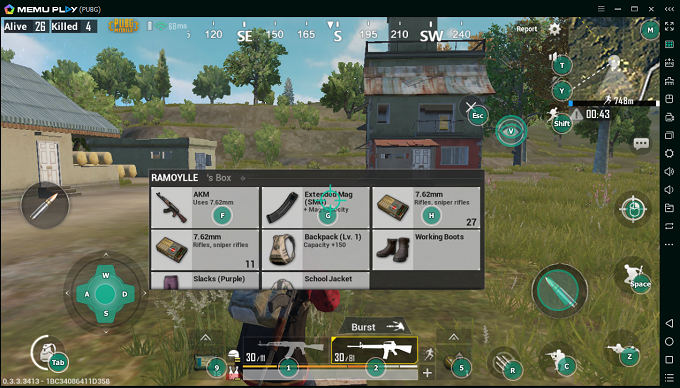
MEmu showing PUBG Gameplay

In case you are wondering, the F key is there to make you feel like you are playing the desktop version of PUBG on your computer. In the original desktop version of PUBG, you use the F key to perform actions like picking up a weapon, looting the crates, opening the doors, or getting inside a vehicle. This specific feature can be replicated only on the MEmu emulator.

MEmu can be downloaded from here. After downloading MEmu, all you have to do is to download PUBG Mobile from the Play Store. You can start playing PUBG Mobile on MEmu right away.

Final Words

So, that was it with the list of best Tencent Gaming Buddy Alternatives. I hope that you find these alternatives useful. If you have any questions regarding one of the emulators listed above, or regarding the PUBG Mobile, feel free to ask them below. I will try to get back to you as soon as I get your message. Stay connected!

WhatsApp vs WhatsApp Business: A better version?

WhatsApp vs WhatsApp Business: A better version?

Who’s the BOSS, WhatsApp or WhatsApp Business..? Get a grip of it here in this detailed article…WhatsApp vs WhatsApp Business.

When you say there should be a fine line between having a personal life and that of a professional one. Intermixing of both the vital elements can be vital and can give you nightmares at the same time. So when you talk about professionalism it should be applicable to the virtual version of your life too.

WhatsApp vs WhatsApp Business

There’s a lot of intermediating applications that can provide an open platform to connects you directly to your customers for the clarity and transparency purposes. So WhatsApp being exquisitely popular so it’s owners have decided to land into the heat zone by launching a professional version of called ‘WhatsApp Business’.

Social media is a big revolution for variable distance communication. From Abacus to Apple everything is portrayed for public use and Whatsapp is one among them. It is one of the worthy corners of connection with friends and family for free. This is the adless, individual or group messaging app used for voice and video calls, sharing media files, documents, and user location. It was founded by Jan Koum and Brian Acton in Feb ’09. Being procured by Facebook exactly after 5 years, now has a base of 1.6 billion active users. Whatsapp web has also brought up a huge market by desktop accessibility.

WhatsApp vs WhatsApp Business

In September 2017, it has announced a project of WhatsApp business which is launched in the early days of 2018. This is an exciting phase for marketers where the lead generation is streamlined and able to produce cost-effective solutions especially for the small business development who cannot afford to land pages and extend their market.

It is a new version of WhatsApp having fewer changes in the interface. Products from facebook are also shared directly to it with a specific share icon. It allows you to create an auto-reply, specifically when you have a lot of messages to reply.

Whatsapp business is almost having the same features as of personal one excluding the section for business settings in the settings section.

Comparisons

The interface of both the version is nearly the same. Facebook was convinced to keep the interface pretty straightforward and smooth. But serving an entirely different purpose. However, the logos are different for the sake of recognition and to avoid any sort of confusion.

Profile settings

In this space, you can showcase your business address, category, location, description and email, and website address. And the option to mark your location is so benevolent.

Statistics

This feature is just similar to “info” feature in the personal one. It is all about how many people you send your message, how many people had read it and how many replied to it. It describes the figure of your daily activities.

Short link

These are used to make your business easy. It is just a normal link to get redirected to your page or group. It also has a default message customizer which is to be pre-filled by the customer.

Away message

This particular feature is to be activated when you are not active or inoperative. It has a customized message service which is to be sent directly. So, when you are busy at work this will be the ample option for you. Another smart move is it doesn’t work in groups as they are always indulging with there products. This will be the best option when you are attending a meeting or traveling long distances.

Greeting message

This awesome feature is helpful to attract your new customers through a greeting message for the first time or the people who are messaging 14 days after contacting you. It will so fascinating to welcome all new customers in a different way, it helps to connect with them easily.
This is also a customized message service helping out to manage too many fresh accounts day to day. It is also the easiest way to promote your business content.

Quick replies

When you are dealing with a business or a consultant or a mediator, there will always be some common questions and queries to catch about, and copy-pasting all the same answers is a whole rubbish thing ever. Here comes this eminent feature to solve this problem. Here you can add your common questions such as education, facebook details, course work, etc by starting it with a slash symbol(/). Type your keywords and questions drafted in this section and save your time.

PROS AND CONS

The arrival of WhatsApp Business came with a lot of advantages which were missing in the conventional application. Listing which, you can have a business profile with your landline number also. Which wasn’t available in the main app. Yet it will release you from the burden of not getting one time passwords.

The message casting is also available in WhatsApp Business, which will assist you to access your chat through the website also.

One of the major drawbacks is, no matter it allows you to have two different applications in one phone but you have to register from two different numbers. Probably good news for all the telecommunication service providers, since this app compels you to have two numbers to manage your business online.

Since it is a new application so it is still in a developing stage. The developers are struggling and collection valid data to add new and essential features to the application. Since it misses few and important features like ‘Auto Response’and it also fails to deliver the analytics.

Since growth it the important part of every business so it’s highly vital to keep your track since growth is an essential tool.

To wrap up, it’s a good initiative taken by Facebook. Even though it has some cutting edge on features but still is in a developing stage and is hoped to get well in future.


Downloads

These are well defined and planned for user drafted interface in communicating for different business types.

WhatsApp vs Viber: Choose the best!

WhatsApp vs Viber: Choose the best!

WhatsApp vs Viber: Confused between WhatsApp and Viber. Struggling to find an appropriate and optimum result even after surfing through a hell lot reviews and comments? The first thing you can do is to go to the play store and download both the applications since both are completely free of cost. And you can have the self-analysis or you can stay in tune.

So here is the side by side comparison of WhatsApp and Viber that might help you out to reach a final destination.

WhatsApp vs Viber

INTERFACE

Viber has a vivid and rich interface but it’s the perfect example that, ‘too many chefs ruin the food’. Since Viber is bloated with a lot of applications and features so it looks cluttered and makes it complicated for the user. On the other hand, WhatsApp decided to keep the plain smooth and effective interface. It perfectly conveys the minimalistic feature but can be a bit boring too with all those unchangeable green colored banners.

DATA SHARING

Both the applications support sharing photos songs, documents, and videos, however, the clarity is compromised and have a limited quota when it comes to sharing file. If you are fond of stickers then Viber can actually vibe with you, as it provides a wider range of sticker packs, in order to make your chat interesting and that variety is missing in WhatsApp.

Whatsapp allows you to put pics and videos as your status,  that will help others to depict your mood or how well your day went. This feature is yet to be available in Viber.

COMMUNICATION

As both the application serves their sole purpose of sending text messages voice notes effectively. They also support voice and video calling. In that context, Viber has a key advantage since it provides crystal clear HD voice calling and has more experience than WhatsApp.

WhatsApp still struggles with reconnecting the dropped calls and shows connection issues for the maximum time.

Mirror forecasting is available in both the applications. Live message transfer can be seen from the WhatsApp official website and in Viber separate chrome extension is available.

The extra edge Viber posses are the feature of self-destructing messages. That allows you to share photos and videos with the recipient for a specified time and will vanish of its own. Which you won’t find in WhatsApp.

Group chats are available in both the applications, whenever you have to make an important announcement or want to connect with a number of persons in one chat room.

SECURITY

WhatsApp is always proud of its end-to-end encryption and brags about how secure the connection is. It also claims that you and your recipient are only two persons involved who are able to see those messages. Apparently, it’s hard to believe after the data leak scam to Facebook recently.

Viber also has the end-to-end encryption and is equally safe, there’s nothing to worry about. But with popularity comes the trust value factor that Viber doesn’t have.
CONNECTIVITY

Both the application can work flawlessly over 2G, 3G, 4G or WiFi networks. However, it is rumored that WhatsApp uses a little less data than Viber maybe because of its simplified interface, yet to be confirmed.

However, the quality of the video calling entirely depends on your networks strength.

Downloads

You see there is a close call when it comes to choosing which application is better. I personally suggest to experience both the applications and go with whatever your gut says to do.

WhatsApp Status vs Instagram Stories: Comparison

WhatsApp Status vs Instagram Stories: Comparison

The feature of sharing photos, videos or GIF file for a lifetime of twenty-four hours have been one of the most popular thing happening lately. We all know how much the prodigy Mark Zuckerberg loves stories. So after buying WhatsApp for a tremendous amount, he ordered to add the stories feature there also but under a different name called ‘Whatsapp Status’. Now people have been wondering that in spite of having the same owner how these features are different from each other. Well in this following article I am going to note down a few differences between these two iconic features.

WhatsApp Status vs Instagram Stories

WhatsApp Status vs Instagram Stories

The first highlighting difference is the level of privacy. Whatsapp stories can be visible to the people those who are in your contact list can only see your stories only. And you can also select who can see your stories.

While in Instagram if you keep a public profile everyone is free to view your stories and can reply to it, however, this feature can be controlled by certain steps.

  • You can have a private profile, that means only your followers are able to view it.
  • You can go to your followers and select those, from whom you want to hide your stories.
  • Both the applications allow you to show you’re the level of creativity as they have the feature of to add doodles on your photos with a range of colors. But Instagram takes you to a whole new level as it has a lot of brushes starting from glowy or fairy brush or thick and so on.
  • The cutting edge that Instagram posses are the AR So honestly you can turn to every animal you once wished for in your childhood. From dogs kittens to retro French lady, you name it into has it all.
  • Unfortunately, this feature is yet to be available for the users of WhatsApp. But we can rely on the developers that this might be joining the application in the mere future.

Miscellaneous

  • Instagram stories are more fun to experience with the exciting features like boomerang or rewind or the type of superzoom. Which allows to manipulate your captured videos and make it more interesting for the viewers.
  • On the other hand, WhatsApp approach is pretty straightforward and simple, and honestly, it shouldn’t be blamed. As before all this, it was merely a place where everyone used to write inspirational quotes only.
  • Instagram is really good to play with the algorithms of artificial intelligence. It also offers you to pin clip arts, texts or mentions in your videos and it moves along with the place it has pined. And yet again it’s also not available in the WhatsApp status.
  • And lastly, the WhatsApp status has maintained its dignity by having the type option. But Instagram yet again steals the show as this feature is also available in it but with better default backgrounds and better font types.

Downloads

As you go through, WhatsApp stories yet have nothing to show something extraordinary, and Instagram completely outshines it with a far margin but it’s just the beginning. Since it’s one of the most popular applications in this entire world. So let’s hope for the best.