Home Blog Page 44

Harry Potter Wizards Unite Location Hack iOS w/ iPotter [iOS Joystick]

1
Harry Potter Wizards Unite Location Hack iOS w/ iPotter [iOS Joystick]

Learn about the best working Harry Potter Wizards Unite Location Hack for iOS devices. This works for both iPad and iPhone. In this particular guide, we’re going to use iPotter to get Fake GPS Location on Wizards Unite. It is by far the most efficient and reliable solution.

Harry Potter WU Review

Augmented Reality games are a blend of mobile gaming and real-life world exploration. It turns the world around you into a fantasy world. Mobile screen is the only lense through which you can experience this amazing world. 

In order to play this game, players need to turn on GPS location and then walk around to find rare items, challenges and magical locations. This includes the likes of inns, fortresses, greenhouses etc. Moreover, explore the city to farm XP, unlock portkeys and capturing confoundables. 

You get the gist of it, right? HPWU encourages its players to walk around in the city and make gaming healthy again! It is one of the most innovative concepts and it first broke out with Pokemon Go few years back. It’s a fresh start and this time Harry Potter nerds can have a go at it. 

The only limitation while playing it is the driving. It does not allow players to gain any form of XP when driving. This is implemented so that players don’t get distracted while driving and get into accidents. Therefore, as soon as the movement speed goes beyond a certain limit, it warns players to stop driving and get on foot again.

What’s iPotter Location Hack and how does Harry Potter Wizards Unite Fake GPS work?

In order to understand this, you need to know a simple concept. When GPS is turned on, the device continuously updates your current coordinates. HPWU, in this instance, gets those location coordinates. These coordinates move the in-game character on map shown on phone. You’ll notice that whenever you move in real-world, your mini wizard avatar inside the game moves as well. 

What iPotter does is that it inputs Fake GPS location coordinates to the iOS device. Therefore, game thinks that you’re actually moving in real-world. This is also called location spoofing. 

iOS Joystick

This is an added tool to make the Harry Potter Wizards Unite fake Location hack even easier. If you turn on the iOS Joystick inside iPotter’s settings, it adds a analog-like joystick on-screen. Now, when you move the joystick, it changes GPS coordinates depending on your moving location. The joystick then feeds those coordinates to game. Finally, the character starts moving inside map. This turns the AR game into a regular game with movement joystick.

The best part is that you can actually change movement speed. Tune it up to 2x or 4x. It really helps, trust me!

Choose a starting point – Teleporter

Another cool feature is teleporter. Since we are using Fake GPS for Harry Potter Wizards Unite already, why not take it a step further! Whenever starting to play the game, drop the pin on the point from where you want to start walking actually. It could be near a fortress or inn that you know about. Similarly, use Teleport function to jump from one location to another instantly.

WARNING: We’d like to inform you that location spoofing is not encouraged by the game developer. Those who are caught may get banned for a week initially. Repeated use may result into permanent ban. Therefore, always use it with care. Finally, we are not responsible if something goes wrong!

How to use iPotter for Harry Potter Wizards Unite iOS Fake GPS Location Hack

This a step-by-step guide (with pictures) to help you understand everything clearly. Read each step carefully.


Guide to install and use iPotter Location Hack on Harry Potter Wizards Unite iOS (iPhone + iPad).

Uninstall Harry Potter WU from your device (if installed from App Store already).

Since we are going to use a modified version, you cannot use the one from App Store.

Download and install iPotter on your iOS device. Full method is linked below.

Click Here to read full guide on how to download and install iPotter IPA file.

Once it is installed, launch Wizards Unite from App Drawer.

This is the same regular icon. You can launch it from main app drawer.

Enter all of your account details to login. Or sign up with a new account.

If you don’t have an account already, then sign up for ministry of magic here.

Once you’re past the sign-up screen, open Game settings menu.

This will open up the iPotter settings screen.

Set the preferences here according to your liking. Also enable iOS joystick from here.

This screenshot shows an array of settings. Modify them according to your liking.

Close Settings. Long press on main game screen to show iOS joystick here.

It may not appear automatically. Therefore, long-press the screen to show it up.

Move the joystick around. You’ve successfully enabled fake GPS Location hack for Harry Potter Wizards Unite.

That’s pretty much. Now move around the world and farm as much XP as possible.

Conclusion

This is a cool option. We can play Harry Potter WU without moving. All sounds fun but this game is not meant to make you sit inside a room for hours. Use this cheat only to do some cumbersome tasks. Otherwise, make a group of friends and go out to enjoy it the way it’s meant to be. Best of luck!

Click Here to read more guides, tips and tricks for HPWU

Download iPotter IPA for iOS [No Jailbreak – Location Hack]

0
Download iPotter IPA for iOS [No Jailbreak – Location Hack]

Learn how to download iPotter IPA for iOS devices. Either install iPotter on iPhone / iPad directly or use Cydia impactor with Mac or Windows. It is the best working Harry Potter Wizards Unite Location Spoofing hack for iOS. 

Game Overview

In order to understand how this Harry Potter Wizards Unite location cheat / hack works, you need to know game mechanics first. For those, who have already played PoGo, it is a piece of cake. However, a lot of Potter Nerds have just joined the AR Madness. Yes, HPWU is an Augmented-Reality (AR) based game. This means that it combines the elements of 3D graphics on phone and real-world into one playable masterpiece.

When you’re past the basic game setup and finally a member of ministry of magic, the real fun begins. The main game screen shows a map, that depicts real-world roads and buildings. However, these location are modified and look different within game’s map. This is the first step towards AR game. This game uses your GPS location to load the map of that area. Map is modified with items like traces, creatures, inns, fortresses and greenhouses. You can tap on these items and they’ll load a whole new world on phone screen.

When moving the phone’s camera around, you’ll see different creature positioned in real-world. This is the mix of mobile gaming and real-world. Therefore, you have to walk around in streets and find items, challenges and ingredients for yourself. This world is filled with lot of interesting wizards tasks for you. Take on these and quickly level up to highest ranks.

What is iPotter and how is it a Harry Potter Wizards Unite Location hack?

We have explained why this game uses GPS location. It requires you to walk around the streets and collect magical items. However, unlike PoGo, you cannot drive to complete tasks. Only walking counts! Otherwise, all progress and travelling is wasted. Moreover, walking helps you collect more XP, unlock portkeys and so on. 

iPotter IPA is a Harry Potter Wizards Unite Location hack or some may call it Location spoofing. What it actually does is, fool the phone’s GPS into thinking that you are moving. In reality, the player is just sitting in his house and using the joystick to move around. The iOS joystick keep changing your GPS location. The game registers it as if you’re actually walking around in the streets. Therefore, iPotter GPS Location spoof allows you to complete walking tasks without taking a single step!

Warning

Location spoofing is highly discouraged by developers. If anyone is caught doing it, they may be banned for 1 week. If same player is caught faking location again and again, the ban may turn permanent. Therefore, always be careful with this and more importantly, do it at your own risk.

How to download iPotter IPA and install it on iPhone & iPad

There are two methods for it. The first method is fairly straightforward and easy to understand. Second method makes use of Cydia impactor to sideload iPotter IPA in iOS devices. You can choose whichever works best for yourself.

Guide to download and install iPotter IPA on iOS (iPhone and iPad).

Open Safari browser on your iOS device.

This method may not work on third-party browsers.

Enter “ipotter.app” in address bar and tap Enter.

We are going to download IPA file from here.

Once the page is fully loaded, scroll down and tap on “Direct Install”.

It downloads and install app on your device.

Allow the permission when installing iPotter IPA from website.

iPhone and iPad will ask you to give permission to website for installing it. Allow it.

Open Apps Drawer and check download progress of iPotter here.

You’ll see the regular app installation animation here.

That’s it! You have successfully downloaded and installed iPotter IPA on your iOS device.

What comes after this and how to use it? Keep reading to find out.

Alternate: Sideload iPotter IPA via Cydia impactor

For those who like to do things in more adventurous ways, here is the full guide (picture by picture) to sideload iPotter IPA on both iPhone and iPad.

  • Install latest version of iTunes on your PC.
  • Download iPotter.ipa directly. Official Link | Mirror 
  • Next up, install Cydia impactor. Windows | Mac
  • Open Cydia impactor app on your PC.
  • Connect your iPhone or iPad via lightning cable to computer.
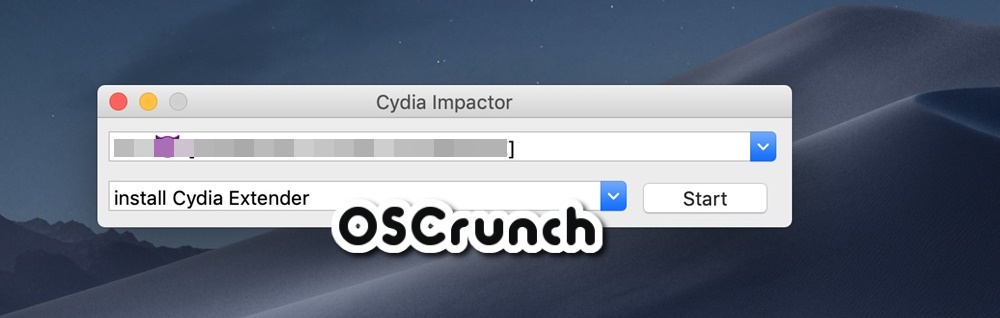
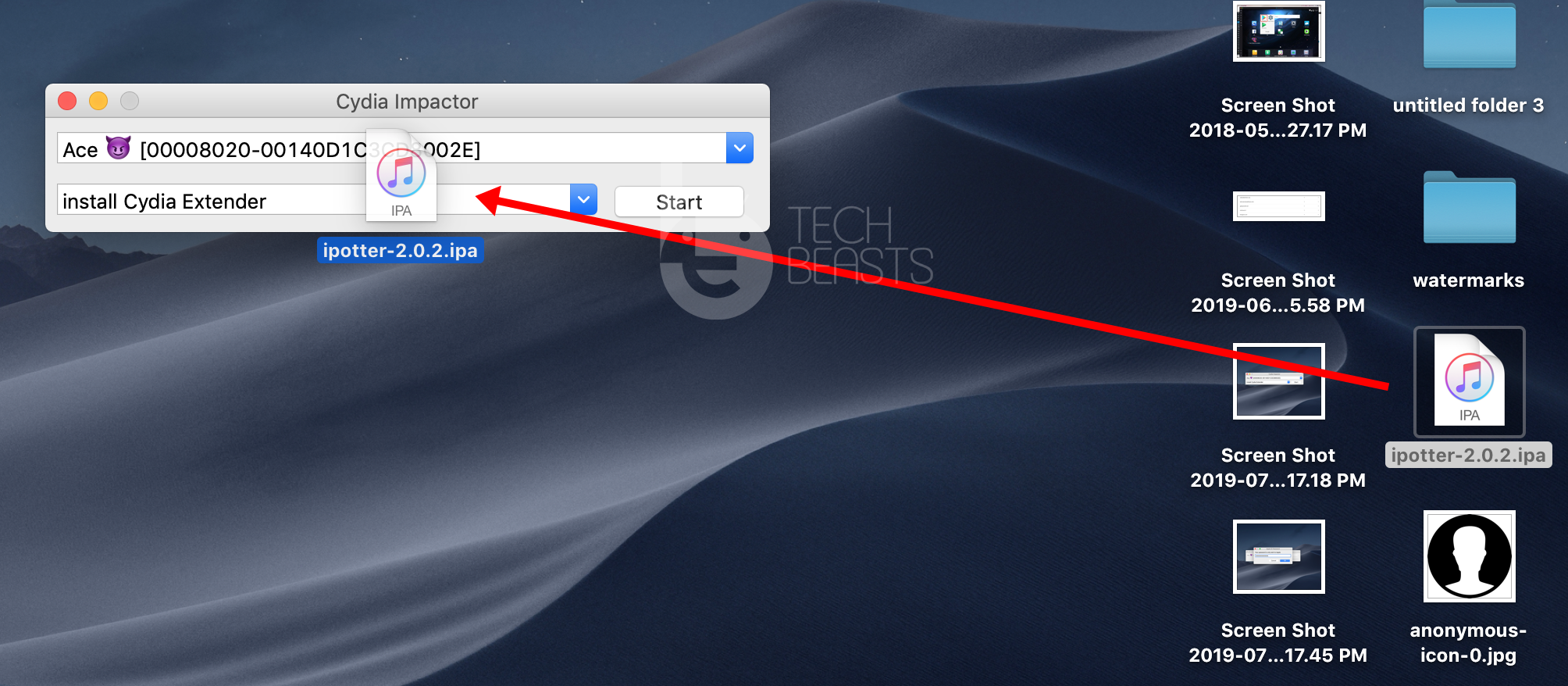
  • Select your connected device from drop-down menu.install ipotter ipa via cydia impactor
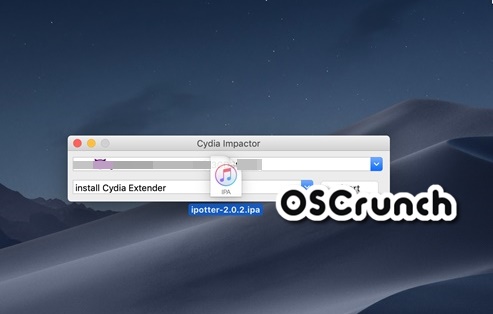
  • Drag the downloaded iPotter IPA file onto Cydia.sideload ipotter iphone ipad
  • Click on Start.
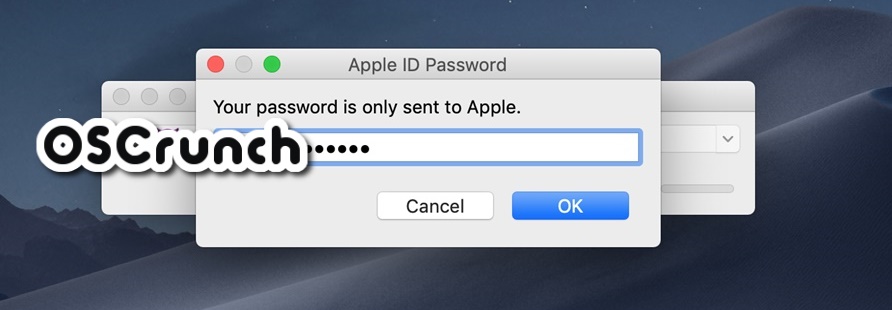
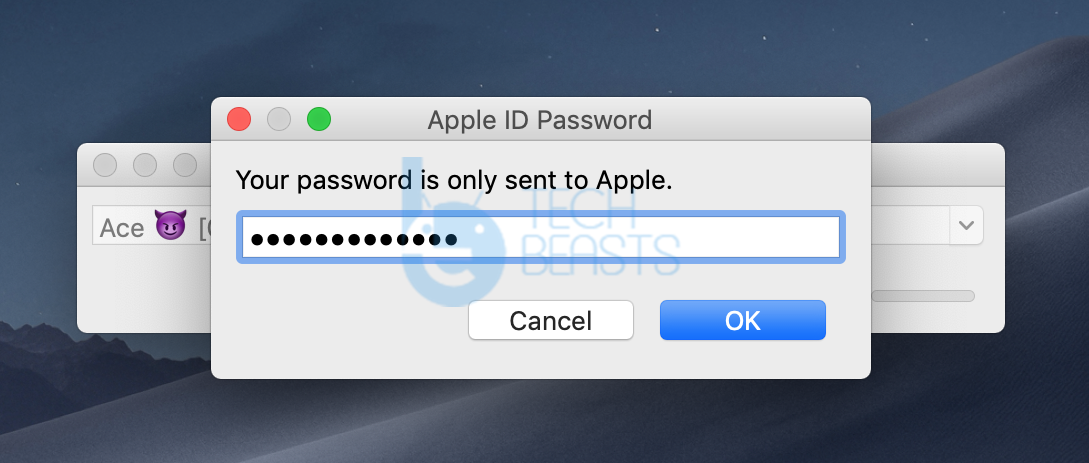
  • Enter Apple ID in next step. It is necessary.cydia impactor apple id password
  • In case of an error, open Apple ID login menu on your computer. 
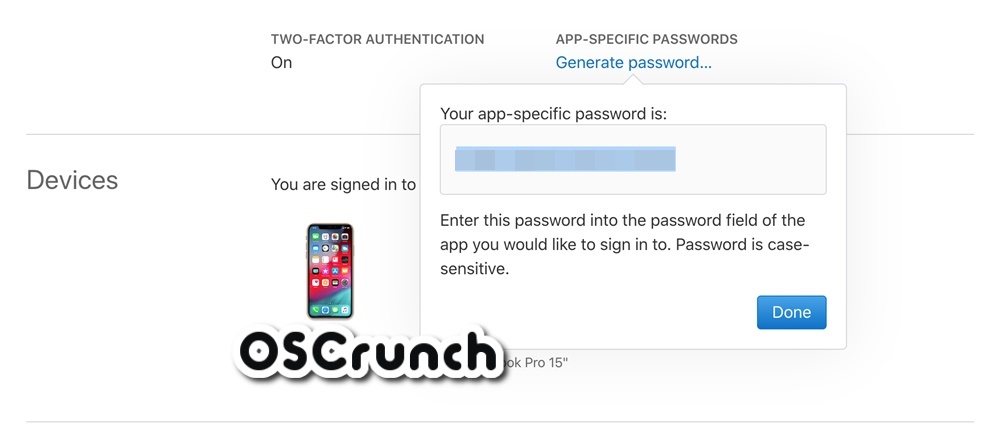
  • Navigate to Security Settings > App Specific Password.app specific password generator
  • Use this password with your Apple ID where it showed error last time.
  • The installation process will be completed within a minute.
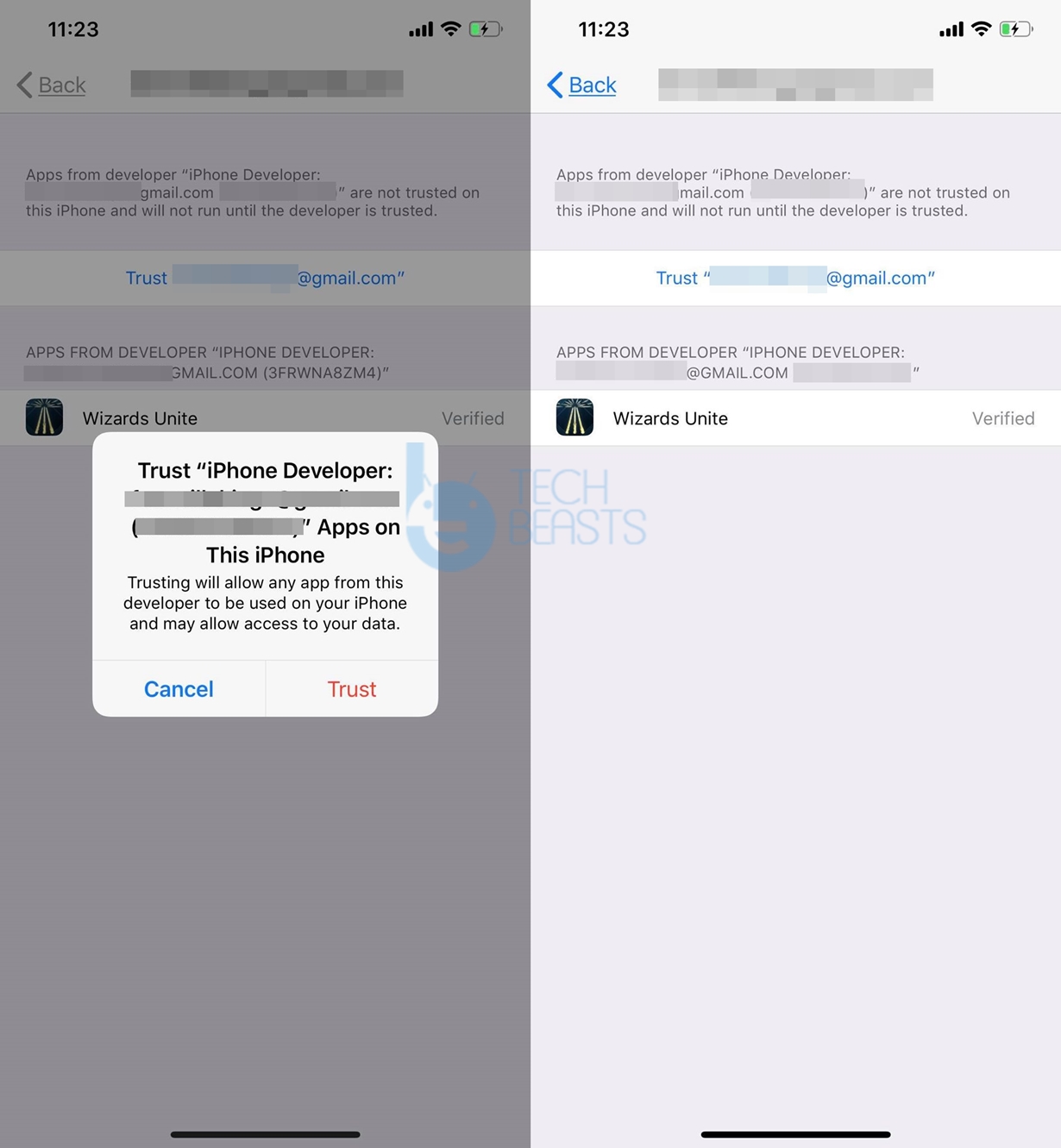
  • Now go back to your iPhone, head over to Settings > General > File Management > Wizards Unite and tap on “Trust”.ipotter ipa trust iphone
  • That’s it! It was pretty easy… wasn’t it 😉

What’s next?

Now that all tools are installed and ready to use, follow the guide below to learn how to use iPotter to do Location Spoofing on Harry Potter Wizards Unite.

Click Here to read the Guide

We wish you best of luck!

Click Here to read more guides, tips and tricks for HPWU

How to Sideload iPotter using Cydia Impactor [No Jailbreak]

0
How to Sideload iPotter using Cydia Impactor [No Jailbreak]
iPhone XS Max with iOS 13 - Using iPotter to change location and add JoyStick

This is the guide to sideload iPotter using Cydia Impactor. iOS and iPadOS users can sideload iPotter using Cydia Impactor on Windows or Mac-powered computers. Before you learn how to install iPotter via Cydia Impactor, let me give you an idea of this tool.

iPotter

iPotter is a tool created by Harry Potter Wizards Unite enthusiasts. You can easily guess where this name “iPotter” comes from. The tool is designed to help lazy HPWU gamers to play the game without moving. iPotter comes with 2 basic features. It can help Harry Potter Wizards Unite gamers spoof their location. It can also add a JoyStick to move the character virtually. These are the two most wanted features by any AR-game player. Back in the days of Pokemon Go, we saw similar tricks coming out, but, as usual, the developers really don’t like this idea and they keep coming after gamers. We have already seen several releases of iPotter. Thankfully, the current version of iPotter works fine with iOS and iPadOS.

Sideload iPotter using Cydia Impactor
iPhone XS Max with iOS 13 – Using iPotter to change the location and add JoyStick

The beauty of iPotter is that it doesn’t require Jailbreak. Yes, you heard it right. There is absolutely no need to Jailbreak your iPhone or iPad in order to spoof Harry Potter Wizards Unite location. With the help of iPotter, you can quickly finish all the tasks leaving your friends far behind on the leaderboards.

In case you are interested in how iPotter works, let me answer this. iPotter visually teleports your device to another location. It fakes the GPS coordinates of the device. This way, the servers of Harry Potter Wizards Unite read the spoofed location. For example, you can take your character to London while sitting in Malaysia. The JoyStick, on the top of this, helps you walk your character. iPotter gives you the ability to Auto-walk the character. If you think that your character moves too slow, you can change the speed in the settings of iPotter. The iPotter is the only working application to spoof Harry Potter Wizards Unite location on iOS. It is also the only HPWU JoyStick app at the moment.

Harry Potter Wizards Unite players can follow the simple steps given below to sideload iPotter on their iPhone or iPad. Sideloading basically means installation. In other words, this guide is about how to install iPotter using Cydia Impactor. So, don’t just get confused there.

Sideload iPotter using Cydia Impactor

  1. First of all, make sure that you have the latest version of iTunes installed.
  2. Download iPotter IPA on your computer.
  3. Download Cydia Impactor on your computer: Windows | Mac.
  4. Install Cydia Impactor now.
  5. Open Cydia Impactor.
  6. Connect your iPhone or iPad to the computer now.
  7. From the drop-down of Impactor, select your connected iPhone/iPad.
  8. Now drag the iPotter IPA and drop it onto the Cydia Impactor and click on Start.
  9. Enter your Apple ID details in the Impactor.
  10. If it gives you an error, open login into your Apple ID on computer > Go to security settings > Get the App-specific password.
  11. Now enter the App-specific password with your Apple ID.
  12. iPotter Sideloading will start now and end in a minute.
  13. On the iPhone, go to Settings > General > Profiles and Device Management > Click on Trust <your Apple ID> > Once again, click on Trust. That’s all.


Note: The iPotter sideloading guide will work for all iPhone(s) and iPads. This includes all iPhones running on iOS 13 or lower and also all version of iPadOS. You can get iPotter on iPhone 6, 7, 8, X, XS, XS Max, XR, and all existing iPads.

Install iPotter on iPhone via Cydia Impactor
Playing Harry Potter Wizards Unite with iPotter

iPotter using Cydia Impactor
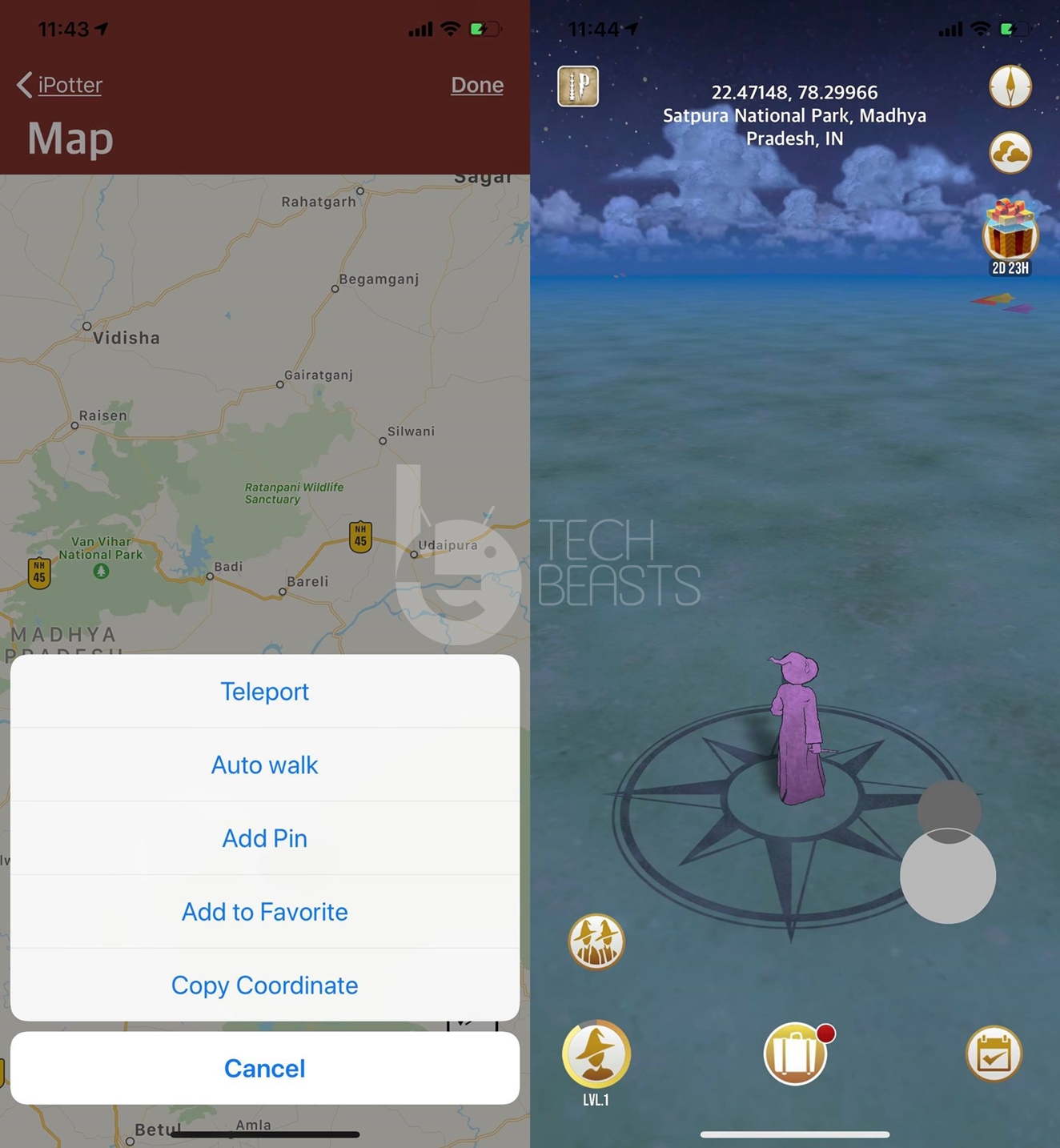
Using iPotter to Teleport, Auto Walk, Adding Pin, or adding JoyStick

Download iPotter using Cydia Impactor
iPotter Settings and Map

Launch Harry Potter Wizards Unite on your iPhone now and complete the initial process. Once you are in the game, go to its settings. You will find Map, JoyStick, Speed, and other settings there. That’s all. You are all set to use iPotter. This is how you can spoof Harry Potter Wizards Unite location on iOS via iPotter.

While you use this trick to surprise all of your HPWU buddies, keep in mind that the developers of the game are always on the hunt for players who cross the limits. If you get caught, you will simply lose your HPWU account for 7 days. Doing it for the 2nd time will keep you from playing for another 30 days. Doing the same thing for the third time will result in permanent loss of HPWU account. So, if you decide to go this way, make sure that you are doing it at your own risk.

For any queries and questions regarding iPotter or HPWU, feel free to reach out to us through the comments section below. I will try my best to get back to you as soon as possible.

List Harry Potter Wizards Unite Potions Ingredients & Master Notes

0
List Harry Potter Wizards Unite Potions Ingredients & Master Notes

Here is a complete list of recipes for all Harry Potter Wizards Unite potions. It includes Ingredients, their specific amounts and master notes. You can check out the list below to see exactly what you’re looking for.

SOS Challenges in HPWU and foundables specifically require players to brew potions. This is one of key skills to learn if you’re to become a master in Harry Potter Wizards Unite. Whether you’re wondering what ingredients should you collect or what to discard, this list is going to help. You can plan the inventory according to which potions you may need to brew in upcoming challenges.

If you’re new to this game and wondering how to brew potions, then visit this PAGE. It contains all the answers and then some extra info to help out.

harry potter wizards unite potions ingredients master notes

Harry Potter Wizards Unite Potions, Ingredients & Master Notes + Effects & Duration

Here is a brief overview of what this information actually means. The ingredients are the actual materials that you need for a potion’s complete recipe. This includes varying amounts of 4 unique items. 

Master Notes are like cheat codes. If you apply them in correct order, then total brewing time is reduced by 15%. This is especially useful if you’re already getting late for some task or challenge.

The effects of potions describe what a potion does in Wizards Unite game. The duration tells for how long these effects will last. Both of these metrics are very important so that you don’t actually waste potions without knowing what they do. The duration is super important as well since it saves you from wasting time. Or using it at wrong time. We took the help of WUHub to collection this information for you.

Baruffio’s Brain Elixir

Below is the information on ingredients for Baruffio’s Brain Elixir along with its effects and master notes.

  • Ingredients – Leaping Toadstool x2 + Frog Brain x1 + Runespoor Egg x1 + Powdered Dragon Claw x1
  • Effects – Get double XP from wizarding challenges, traces and Portkeys.
  • Duration – 30 minutes
  • Brewing Time – 3 hours
  • Master Notes – Clockwise + Pinch-in + Horizontal x2 + Pinch-out + Shake

Wit-Sharpening Potion

Get the exact ingredients for Wit-Sharpening Potion with master notes to reduce brewing time.

  • Ingredients – Ginger Root x4 + Newt Spleen x3 + Ground Scarab Beetles x1 + Armadillo Bile x1
  • Effects – Increase effect or damage done by spells against elite foes by 50%.
  • Duration – 3 Spell casts
  • Brewing Time – 4 hours
  • Master Notes – Pinch-out + Vertical x2 + Multiple Taps

Dawdle Draught

Check out the recipe; ingredients for Dawdle Draught Potion in Harry Potter Wizards Unite.

  • Ingredients – Valerian Root x2 + Sopophorous Bean x1 + Butterscotch x1 + Hermit Crab Shell x1
  • Effects – Reduce chances of counfoundables fleeing with foundables. It gives player a better chance to complete trace.
  • Duration – 3 Spell casts
  • Brewing Time – 6 hours
  • Master Notes – Shake + Clockwise + Counter Clockwise x2 + Pinch-in

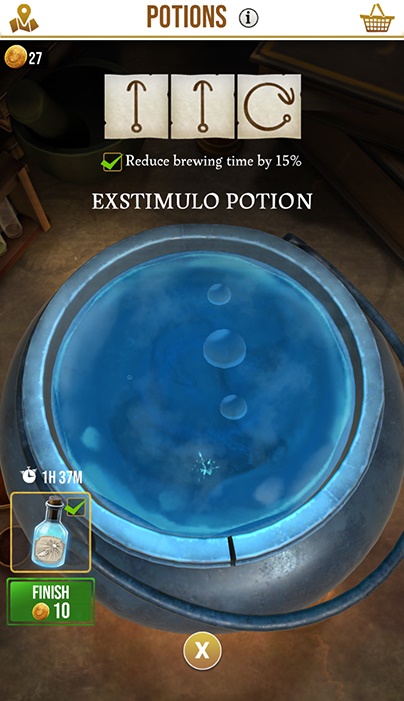
Exstimulo Potion

Here is all information regarding Exstimulo Potion ingredients, master notes and its use.

  • Ingredients – Bitter Root x1 + Re’em Blood x1 + Snowdrop x1 + Granian Hair x1
  • Effects – Improves spell cast in wizarding challenges and traces.
  • Duration – 3 Spell casts
  • Brewing Time – 2 hours
  • Master Notes – Vertical x2 + Clockwise

Healing Potion

It is one of the most important potions, especially for magizoologists. Therefore, memorize the ingredients of Healing Potion in Harry Potter Wizards Unite here.

  • Ingredients – Wormwood x1 + Bubotuber Pus x3 +  Dittany x2 + Dragon Liver x1
  • Effects – Quickly restores 35% of maximus stamina after taking damage.
  • Duration – Instant
  • Brewing Time – 2 hours
  • Master Notes – Pinch-out + Clockwise + Multiple Taps + Pinch-in

Invigoration Draught

Following are the ingredients for brewing Invigoration Draught. It helps out in wizarding challenges. It’s best to learn more about it.

  • Ingredients – Honeywater x1 + Vervaine Infusion x1 + Scurveygrass x1 + Lovage x2
  • Effects – Grants extra focus for casting strategic spells in wizarding challenges.
  • Duration – Instant
  • Brewing Time – 3 hours
  • Master Notes – Horizontal + Vertical x3 + Pinch-out

Memory Potion

Looking to farm some extra XP? Then learn the ingredients for Memory Potion. 

  • Ingredients – Fairy Wings x3
  • Effects – Gain extra XP from each trace completed.
  • Duration – unknown
  • Brewing Time – 2 hours, 15 minutes
  • Master Notes – Multiple Taps + Pinch-out + Horizontal + Clockwise

Potent Exstimulo Potion

It is super helpful in spell casts and improves your chances of winning difficult battles. Learn the Potent Exstimulo Potion Ingredients for tougher foes.

  • Ingredients – Bitter Root x4 + Snowdrop x6 + Re’em Blood x2 + Abraxan Hair x1
  • Effects – Improve your spell casts for wizarding challenges to super high level.
  • Duration – 5 Spell casts
  • Brewing Time – 8 hours
  • Master Notes – Vertical + Horizontal + Vertical + Counter Clockwise + Clockwise + Counter Clockwise

Strong Exstimulo Potion

It is slightly weaker than its potent variant. However, it is also easier to make. Following are the Strong Exstimulo Potion’s ingredients and other information.

  • Ingredients – Bitter Root x3 + Snowdrop x4 + Re’em Blood x1 + Abraxan Hair x1
  • Effects – Strong improvement in spell casts for traces and wizarding challenges.
  • Duration – 4 Spell casts
  • Brewing Time – 4 hours
  • Master Notes – Vertical x2 + Counter Clockwise + Clockwise

Strong Invigoration Draught

It is much powerful and useful as compared to normal variant of this potion. Below is entire information including Strong Invigoration Potion’s ingredients and Master Notes.

  • Ingredients – Honeywater x1 + Vervain Infusion x1 + Survygrass x1 + 2 Sneezewort x2
  • Effects – Gain 3 focus for strategic spells in wizarding challenges.
  • Duration – instant
  • Brewing Time – 6 hours
  • Master Notes – Horizontal + Vertical x3 + Pinch-out x2

Wideye Potion

Struggling with spell casts? Want to cast masterful spells? Then memorize the ingredients for Wideye potion. It can help beat challenges faster indirectly. You also get more XP.

  • Ingredients – Unknown
  • Effects – Get perfect Spell casts.
  • Duration – instant
  • Brewing Time – 30 minutes
  • Master Notes – Counter Clockwise + Shake + Clockwise x2

All Harry Potter Wizards Unite Potions Information

We have covered the information for all Harry Potter Wizards Unite potions that are in game right now. You can check this information. Moreover, you may keep this page saved and check it out whenever you need to check the ingredients, master spells or any other information of these potions. It is one of the most important tools in Harry Potter Wizards Unite. It may be boring, yes. But it’s certainly very handy!

Click Here to read more guides, tips and tricks for Harry Potter Wizards Unite

How to quickly brew Potions in Harry Potter Wizards Unite

0
How to quickly brew Potions in Harry Potter Wizards Unite

This guide shows how to speed up and quickly brew potions in Harry Potter Wizards Unite. These are one of mightiest weapons and sometimes even a requirement in case of foundables. Therefore, we’d love to guide you on how to make potions in HPWU. Moreover, there are some tips and tricks to speed up brewing potions in Wizards Unite.

The world of magic in Harry Potter Wizards Unite is directly inherited from books and movies. One of the key magical tools were Potions. These are magical liquids that wizards and witches brew themselves. Each potion possesses special powers and have unique effects on different creatures. 

We are going to explain all necessary parts of of this process to ensure that you understand it completely. Note that, since it requires gathering unique ingredients spread throughout the world, therefore you need to be efficient with how to use them.

We’d also like to mention that minimum required XP level to brew potions is 4. You cannot make potions at lower levels.

quickly brew potions harry potter wizards unite

Collect Ingredients of Potions to brew

Each potion in HPWU is made with 4 unique ingredients. However, the quantity for each of the item may vary. The requirements could look something like Wormwood, 3 Bubotuber Pus, 2 Dittany and 1 Dragon Liver for Healing Potion. In order to make this potion, you need precise amount of these materials. Otherwise, you cannot brew the potion.

The best way to collect ingredients in Harry Potter Wizards Unite is to complete levels in Fortresses, collecting them randomly from open world and so on. Finally, if you are just missing one or two ingredients, then buy them on-spot with gold coins. However, we don’t recommend using gold option every time since it is a very limited resource.

Finally, learn to manage your inventory. Don’t just collect and pack every item you find. While it may be enticing, it is actually not a good practice. Check the current and upcoming SOS challenges. Only try and collect ingredients that you’re gonna need for those. Otherwise, don’t waste space with something you don’t need. Some player may have 200 ingredients but not able to brew a potion. That is because none of the potions in that inventory form the perfect recipe for that potion.

Click Here to get full list of Ingredients for Potions in Harry Potter Wizards Unite

Learn the Master Notes for Potions in Wizards Unite

Each potion takes a certain amount of time to brew. This time corresponds to real-world time. When you apply a series of master notes to brewing process, the total time is reduced by 15% in most cases. It may seem not that significant to many but it actually helps a lot in long term.

What are master notes in Harry Potter Wizards Unite?

These are the signs that you either draw on the phone or register them through phone gyroscope. This includes the likes of Shake (shake phone), Pinch-in, Horizontal and more. You draw these symbols in correct way over the cauldron. Each correct master note is registered and shows up above cauldron in-game.

Once all master notes are applied, you see the confirmation for time-reduction with a tick sign. This means, it is working now! Congratulations.

Brew Potions quickly / Speed up Brewing in Harry Potter Wizards Unite

Now that, you know the essentials of brewing potions, now is the time to learn skills of masters. What sets noobs apart from masters? How much time they actually take to make it. 

In order to speed up brewing potions by 15% in HPWU, apply the correct master notes on cauldron. Then you’ll see a confirmation tick over it. Follow the list below to see list of correct master notes for all potions in Harry Potter WU.

Click Here to get full list of Master Notes for Harry Potter Wizard Unite Potions

That’s pretty much it. Now all you gotta do is to keep this page save and apply the correct master notes for any potion while brewing it. It speeds up the process for completing SOS Challenges like collecting fragments for foundables.

Click Here to read more guides, tips and tricks for Harry Potter Wizards Unite

Harry Potter Wizards Unite Formidable Pixies – Guide

0
Harry Potter Wizards Unite Formidable Pixies – Guide

This guide takes you through all you need to know about Formidable Pixies in Harry Potter Wizards Unite. How to find or spawn formidable pixies? How to defeat them? Which profession is best for pixies? We’ve got all the answers!

SOS challenges in Harry Potter Wizards Unite are fragments of the main plot. These challenges take you through the main story of why and how this calamity came upon us. A particular SOS challenge, “defeat 10 formidable pixies” is proving to a nuance for some people. Players are unable to find pixies in chambers to fight with. Otherwise, wrong type of pixies pop up. Some players may get stuck in completing this challenge for over 10 days. The reason being not able to find formidable pixies in fortresses and its ruins chambers.

harry potter wizards unite formidable pixies

How to spawn / find Formidable Pixies

These little creatures may seem small and fragile but don’ t be fooled by their appearance. It could prove very hard to find them, let alone defeating them. Therefore, we have collected some proven strategies to help spawn more formidable pixies in Harry Potter Wizards Unite.

Try Ruins Chamber 3

Each fortress contains several chambers. These chambers are filled with different kind of creatures for you to fight. Moreover, you get more or less XP depending on the level. A lot of players have reported that they are most successful in finding pixies inside Chamber 3 of fortresses. Therefore, if you are having trouble, try this next time.

Professors spawn more formidable pixies

Since professors deal most damage to formidable pixies, therefore, the game spawns more of these creatures for them. Therefore, if your current profession is either auror or magizoologist, then switch it to “Professor”. These are not permanent. Therefore, you may keep changing depending on whichever task is at hand. 

Try different types of Runestones

The runestones grand you access to fortresses and its chambers. In order to introduce multiple levels of difficulty, there are several types of runestones themselves. For example, if you activate L1 or L2 runestone, the resulting levels, creatures and rewards would be different for same fortress.

If you are having trouble finding pixies inside chambers, then try to activate a different level runestone. This will likely spawn new creatures for you.

Note: Formidable pixies are the third weakest breed of pixies in-game. There are 10 different types. Therefore, if a challenge states you to defeat certain level of pixie, defeating others won’t count.

How to defeat Formidable Pixies in Wizards Unite

Here are some stats for you to examine and learn the best way to defeat them.

Formidable Pixies Info

  • Stamina – 50
  • Power – 9
  • Proficiency Power – 10,000
  • Deficiency Power – 0
  • Defence – 0
  • Defence Breach – 0
  • Dodge – 5,000
  • Accuracy – 0
  • Spell – Stupefy
  • Affinity – Professors deal most damage to formidable pixie
  • Reward – Care of Magical Creatures (1 Abraxan Winged Horse Sticker)

It is clear from the stats that these creatures are not that hard to defeat. The only thing that you can do to make it easier, is to change profession to Professor. Not only more pixies will spawn but they deal more damage. Also try to hit masterpiece spell trace.

Click Here to read more guides, tips and tricks for Harry Potter Wizards Unite

Harry Potter Wizards Unite wands of movie characters

Harry Potter Wizards Unite wands of movie characters

Learn the combinations for Harry Potter Wizards Unite wands from your favorite characters in original series. These include the likes of Elder Wand, Harry’s wand, Hermione, Ron Weasley and so on. 

Much awaited PoGo style game for Harry Potter is finally out and it’s simply astonishing. The way whole gameplay is set up, you could literally play it forever. However, before continuing, there’s one thing that every Harry Potter fan must do; Choose their wands. It is the starting point for this series and one of most iconic moments. The game adaptation for this is a bit different though. In Harry Potter Wizards Unite Wands do not make a difference. They are not associated with power or special abilities. Therefore, it’s only a cosmetic accessory at best.

harry potter wizards unite wands

Guide to Harry Potter Wizards Unite Wands

Unlike the movies and books where wands choose their owners, the players design their own wands in-game. It is one of the few tasks as you start the game and try to sign up for ministry of magic. Instead of randomly signing any wand to players, they make their own. Here is how it works.

Following are the customizable options for wands in Harry Potter Wizards United

  • Wood
  • Core
  • Length
  • Flexibility

There are tons of options in each category for you to choose. Each of these come out with a unique output. Therefore, there are countless options for building a unique wand. 

Harry Potter Wizards Unite Wands combinations to make characters’ wands from movies & books

Even though there are countless options for building unique wands, die-hard fans like me would still want to have something similar. The fans of series have complete knowledge of the composition of these. However, there is still lot of incomplete knowledge and we are here to fill in it for you. Below are all major Harry Potter Wands combinations for Harry Potter Wizards Unite game.

Harry Potter

These are the settings / options to make Harry Potter’s wand in Harry Potter Wizards Unite.

  • Wood – Holly
  • Core – Phoenix feather
  • Length – 11 inches
  • Flexibility – Reasonably supple

Hermione Granger

Following are the options to make Hermione Granger’s wand in Harry Potter Wizards Unite.

  • Wood – Vine
  • Core – Dragon Heartstring
  • Length – 10 3/4 inches

Ron Weasley

Ron used two wands through the series. Here are combinations for both wands respectively listed below.

  • Wood – Ash
  • Core – Unicorn Hair
  • Length – 12 inches

Second Wand

  • Wood – Willow
  • Core – Unicorn Hair
  • Length – 14 inches

Albus Dumbledore

You may also know this wand as “Elder Wand”. Here’s how to make it in-game.

  • Wood – Elder wood
  • Core – Thestral tail hair
  • Length – 15 inches

Rubeus Hagrid

Unsurprisingly, his wand was one of the simplest!

  • Wood – Oak
  • Length – 16 inches

Voldemort

Here’s how to replicate the wand of Voldemort in Harry Potter Wizards Unite. If you are one of Tom Riddle fans, then have a go at it.

  • Wood – Yew
  • Core – Phoenix feather
  • Length – 13 1/2 inches

Minerva McGonagall

She’s one of the most competent professors in Hogwarts. We understand if you want to try and replicate her special weapon.

  • Wood – Fir
  • Core – Dragon Heartstring
  • Length – 9 1/2 inches
  • Flexibility – Solid / Rigid

Neville Longbottom

The unsung hero of HP series. Some say he’s the chosen one!

  • Wood – Cherry
  • Core – Unicorn Hair
  • Length – 13 inches

Draco Malfoy

His personality is shown to be easily bendable and misbehaved. Probably one of most complex characters in the series.

  • Wood – Hawthorn
  • Core – Unicorn Hair
  • Length – 10 inches

Cedric Diggory

  • Wood – Ash
  • Core – Unicorn Hair
  • Length – 12 1/4 inches

Viktor Krum

  • Wood – Hornbeam
  • Core – Dragon Heartstring
  • Length – 10 1/4 inches
  • Flexibility – Rigid

Remus Lupin

  • Wood – Cyprus
  • Core – Unicorn hair
  • Length – 10 1/4 inches
  • Flexibility – Pliant

James Potter

One of the few wizards that faced off against the one shows name shall not be spoken!

  • Wood – mahogany
  • Length – 11 inches

Lily Potter

Mother of Harry Potter. She died protecting her child. Some say the scar on his head is the sign of her everlasting love. 

  • Wood – Willow
  • Length – 10 1/4 inches

Garrick Ollivander

  • Wood – Hornbeam
  • Core – Dragon Heartstring
  • Length – 12 3/4 inches
  • Flexibility – Quite Bendy / Unyielding

Dolores Umbridge

  • Wood – Birch
  • Core – Dragon Heartstring
  • Length – 8 inches

Bellatrix Lestrange

  • Wood – Walnut
  • Core – Dragon Heartstring
  • Length – 12 3/4 inches

Conclusion

We are not sure whether it’s a good thing or not that we are not assigned wands randomly. This is probably good for the long run since it provides a lot of variety. Moreover, people won’t be able to sell accounts with special wands. We have collected the data for some of most famous Harry Potter Wizards Unite wands. These are taken directly from either movies, books or fandom pages. (Data taken from PotterMore) Therefore, some data may still be incomplete. However, we are sure that you can get best possible results with these options.

Click to read more guides, tips and tricks for Harry Potter Wizards Unite here.

Transfer Money From Paytm To Bank Account [ Without any Charges ]

0
Transfer Money From Paytm To Bank Account [ Without any Charges ]

Let’s tell you all, how to Transfer Money From Paytm To Bank Account and without any charges. You all are well aware of the Paytm app, a digital payment platform designed for India. You can use Paytm to transfer money, mobile recharge, DTH cable, metro card, landline, broadband, electricity, gas, and much more.

Transfer Money From Paytm

Paytm is the ultimate solution for all those who don’t want to carry cash or they don’t want to stand in lines to pay bills. Not only that, once someone transferred you the money on your Paytm. You can withdraw that amount directly into your bank account.

Read more: Best Ringtone Maker Apps for Android

In this article, we’ll tell you how you can withdraw or transfer Money From Paytm To Bank Account. Follow the instructions as we’ll tell you.

Things to keep in the Mind:

Requirements:
*Paytm works like Paypal, it will instantly transfer the amount into your bank account.
*You bank must be 3 days old, otherwise you won’t be able to receive funds from Paytm.
*In order to keep things in order, Paytm has a limit on transfers. Such as, you can transfer Rs.100 to Rs.5000 in a day.
*Your Email and Mobile number should be verified before you start transferring the payments.

Download Paytm for Android & iOS:


Transfer Money From Paytm To Bank Account:

Step1: Login to your Paytm mobile app on your smartphone. Provide your verified Email ID/Mobile Number.

Step2: Once you are logged in, Tap on Passbook option. On the next screen, you will be able to see your available balance in your Paytm wallet.

Step3: Right beneath the available balance you will see two options. ‘ Send Money to Bank ‘ and ‘Add money to wallet’.

Step4: Tap on Send Money to Bank option. On the next page, you have to provide the following details.

AmountAccount Holder NameAccount Number
You can provide any number between 100 to 5000.
Provide the first and the last name of the account holder.
Enter your back account number. After that you need to provide the IFSC Code, you can find it on your cheque book.

Step5: Before we proceed, make sure provided details are correct. Once you are sure and you have checked the details. Simply click on the send button.

Final Words:

This is how you can Transfer Money From Paytm To Bank Account without any charges. Please do tell me how was your experience and also feel free to ask me anything. I would love to help you with Payment transfer on Paytm. Also, It would be very nice, If you Share this article with friends and Join Techbeasts on Facebook and Twitter.

Samsung Galaxy Note 10 Screen Size

0
Samsung Galaxy Note 10 Screen Size

Want to know what will be the Galaxy Note 10 Screen Size? You can find the Galaxy Note 10 Screen Size and other details here.

We are only 1 month away from the official unveiling of the Samsung Galaxy Note 10. The rumor mills are up and running hot right now. Every single minute, we see a new rumor or a new leak regarding the next-gen Samsung Galaxy Note handset. While the biggest smartphone launch event approaches, we will continue getting more information and also keep guessing what’s going to be on-board. One of the most popular aspects of the upcoming Samsung Galaxy Note 10 is its screen size. A large number of users have been showing interesting in knowing what display size or sizes they will get on the Galaxy Note 10. We have done our due research to find the expected Galaxy Note 10 screen size.

First off, there are going to be 2 variants of the Galaxy Note 10. We will have a Galaxy Note 10 and a Galaxy Note 10 Pro. These 2 Galaxy Note 10 variants will have further 2 variants which will be the 5G phones. So, we will see 4 Galaxy Note 10 handsets.

All Galaxy Note 10 phones will come in different sizes, they will have a few basic differences while the main power resources will remain the same. Here is what we know about the Samsung Galaxy Note 10 Screen Size.

Galaxy Note 10 Screen Size

  • Samsung Galaxy Note 10 will have a screen of 6.3-inches.
  • The Samsung Galaxy Note 10 Pro will have a screen size of 6.7-inches.
  • These will be the curved displays.

Both these displays will be Dynamic AMOLED just like the one we saw on the Samsung Galaxy S10 Plus. These screens will have a WQHD+ resolution which is 1440 x 3040 pixels. The aspect ratio is expected to be 19:9 as these phones will have punch-hole front cameras.

The Galaxy Note 10 will offer better color accuracy and brightness. The Dynamic AMOLED displays have been designed to pop the colors more accurately. These displays also support HDR10+ which means you can watch online videos in an extremely high resolution with each scene-optimized separately. 

Other Galaxy Note 10 Specs

Samsung is reportedly launching its Exynos 9825 7nm processor with the Galaxy Note 10. Earlier, we saw the Exynos 9820 processor on the Galaxy S10 Plus, but that’s an 8nm processor. To make sure that Samsung doesn’t leave space for its competitors, it is bringing out its own 8nm chip this time around. The Note 10 models are also expected to have a RAM starting from 8GB going all the way up to 12GB. We will not see any 64GB storage variant. The Note 10 will have to start internal memory of 128GB which will go all the way up to 512GB. Rumors have the word that Note 10 will support UFS 3.0 storage standard. 

Galaxy Note 10 will have a 3400 mAh battery while the Note 10 Plus will have a 4500 mAh battery. Samsung is saying goodbye to the headphone jack. The phones will have a fingerprint scanner under the display. There will be no bixby key on the upcoming Note.

Note 10 will run on Android 9 Pie out of the box. It will be updated to Android Q later on. To know more about the Note 10 release date and pricing, you can read this.

That’s all for now. I hope that this answers most of your questions. Drop your thoughts about the Galaxy Note 10 in the comments section below.

Source

Use Android Phone to Verify Google Sign in on iOS [ 2SV ]

0
Use Android Phone to Verify Google Sign in on iOS [ 2SV ]

Let’s tell you how you can use Android Phone to Verify Google Sign in on iOS using 2SV. You all are well aware of the 2SV or two-step verification, which you can use nowadays in most of your social accounts. The thing is, it works the same like Yubi but in 2SV case, you don’t need any USB. Your Android smartphone will be used as an authentication device.

Android Phone to Verify Google Sign

There are many positive aspects of two-step verification but one particular aspect is the favorite of mine. When you are trying to sign in one of your Google services, you will receive a notification on your Android device. Follow the on-screen instructions and you will be able to log in. Why it’s my favorite, Now you don’t have to wait for the SMS code, in order to log in.

Now it works perfectly on Andriod but today, I will tell you how you can use an Android phone to verify Google sign-in on an iOS device. Heed the instructions provided below and you will also learn how you can set up 2SV on Android. Let’s get started now.

Use Android Phone to Verify Google Sign in on iOS [ 2SV ]:

Before we start, let’s check a few things which should be in order. Following are the requirements that you should meet before we proceed.

Requirements:
*Your Android device must be running Android 7.0 or higher.
*Two-Step Notification must be enabled.
*On your iOS device make sure you are running the latest version.
*Chrome must be installed on both Android / iOS Smartphones.

Set-Up Use your Phone to Sign In:

  • First, you need to head over to your Google account. Click on My Account, look for security Tab. There you will find different options. We are looking for ‘Use your phone to sign in’ and set up 2-Step Verification.
  • Click ‘Use your phone to sign in’ and you on the next screen, click on ‘Set It Up’ button located at the top of the screen. On the next screen, you will be asked to enter your Gmail password. Once done, you will be taken to the devices page. There you will see a drop-down menu with all of your smartphones which have the same Google ID.
  • All the devices which have the same Google ID you are logged in with will be selected automatically for Use your phone to sign in. In other words, all you have to do is add the same Google ID on your Android or iOS device and it will be used for the sign-in purpose.
  • Whenever you use that same ID on any new device. You will get a sign-in notification on your device, approved that and follow the on-screen instructions.

Set-up screen lock on your device:

It’s necessary to set-up a screen lock on your Android and iOS devices. The reason behind this, If you don’t have a screen lock enabled on your device. Anyone can use your phone and also they can use your device to Sign-in to your Google account.

Testing:

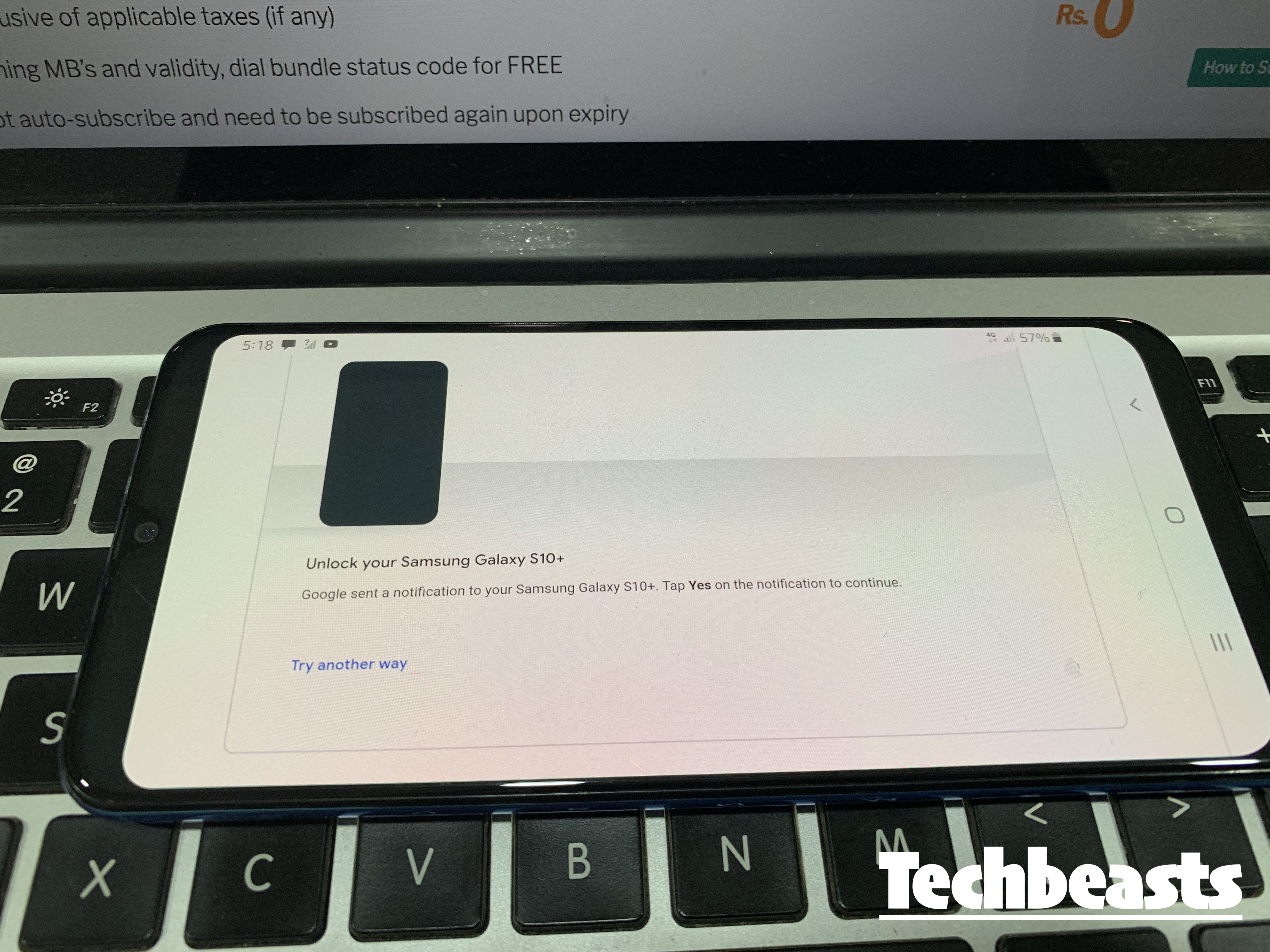
Now just to make sure things are working, I have tested it my self. I add my same Gmail ID on my Galaxy A50 and I received the Sign-in approval on Samsung Galaxy S10 Plus. You can check the following screenshots. Now same goes for iOS, all you have to do is try Signing-in on iOS using the same Email ID. After entering the password, you will get a sign-in approval on your selected device.

Samsung Galaxy A50 Screenshot:

  • Since Galaxy S10 Plus was selected on Google prompt. I got the Sign-in approval on it. Check out the following screenshot.

  • That’s all.

Final Words:

In order to Use Android Phone to Verify Google Sign in on iOS. All you have to do is to add the Google ID on an Android device and Google will automatically add that device to Google Prompt. Once it is done, Sign-in to your Google Account on the iOS device and you will get the Sign-in approval on Android.

When is the Samsung Galaxy Note 10 coming out?

0
When is the Samsung Galaxy Note 10 coming out?

Samsung Galaxy Note 10 officially going to be released on August 7

samsung note 10 coming out august 7

The latest update from Samsung confirms that its upcoming flagship Galaxy Note 10 will launch on August 7, 2019. 

Even since the original Galaxy Note was launched, it’s always been sitting on the top. It not only just changed how we perceived smartphones, but started a brand new era of phablets. Few years later, we are now waiting for the launch of Note 10. This is going to be a massive hit since Samsung are holding on to a lot of surprises for this one.

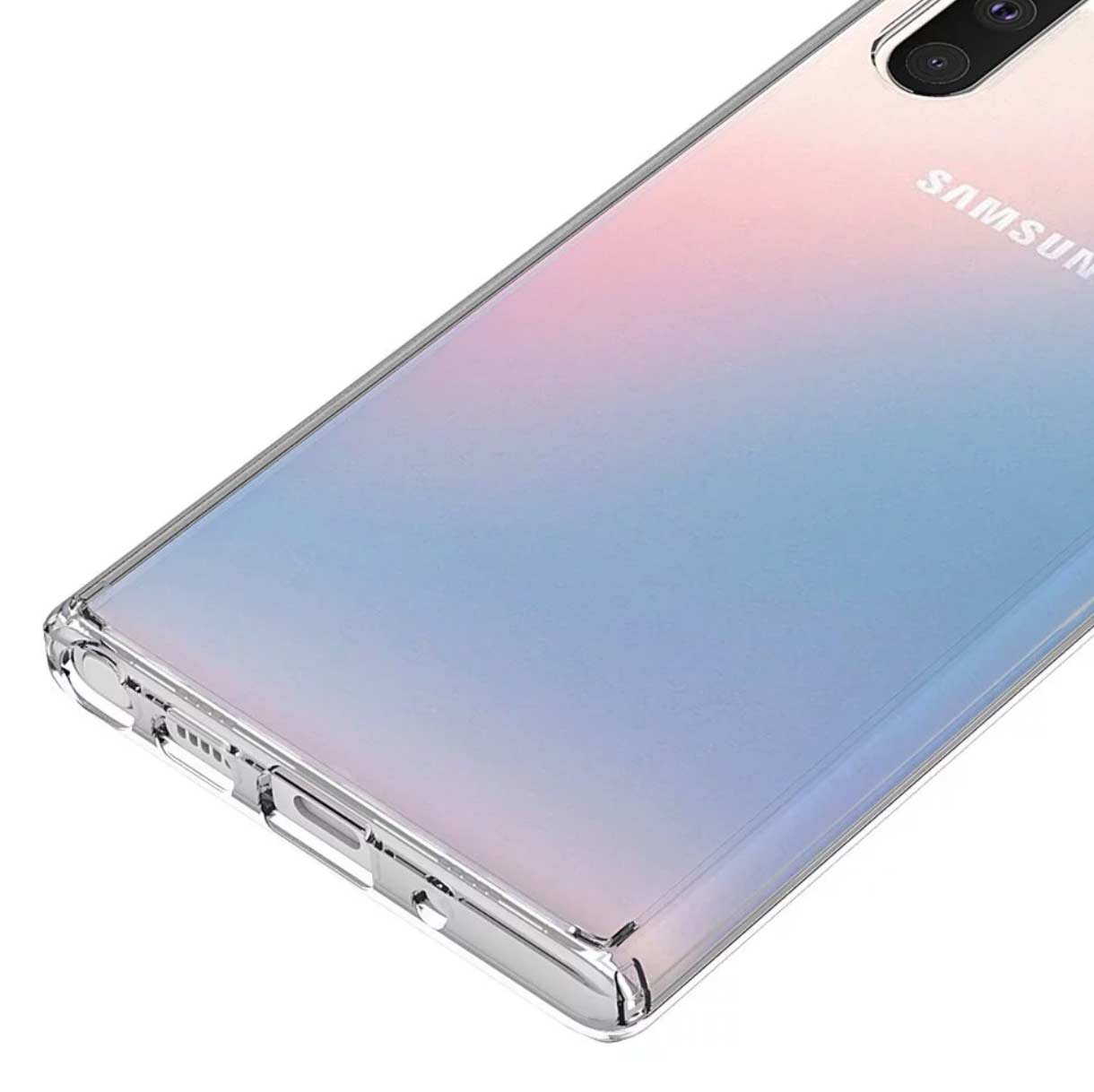
Galaxy Note 10 renders

Before a phone ever comes out, there are a bunch of leaks indicating what’s it gonna look like. Recently, we get to see what a phone is going to look like when case-makers leak on of their early products. Of course, before a phone launches, the manufacturers share design with case-makers so that they can sync their own launch dates with phone’s. Once in a while, such cases are leaked and they give pretty good idea of how the phone may look like.

Below are the renders for Galaxy Note 10. Have a look and see if you like this new design or not.

Source

Galaxy Note 10 Alleged Features

Here is a brief overview of what we can expect to see in the upcoming (probably best) smartphone of 2019.

Camera Setup: At front, there’s only a single punch-hole camera. Instead of being on the side like S10, it is now in the middle. I’m not really sure if it’s a good choice. The one on side looked much better to be honest. On back, again we’re going to see at least 3 lense setup. This includes, regular 48MP, telephoto and wide-angle lense.

The Galaxy Note 10+ or Note 10 Pro may sport an even more extravagant camera setup. We are not really sure about that. It may include a 3D depth sensor for real-time bokeh shots.

Note 10 has a headphone jack! Yes, it is currently rumored that our beloved flagship will stay true to its root still. Honestly, it may be the last phone ever to come with a 3.5mm headphone jack. Fingers crossed.

Ultra-fast 45W Charging: The current S10 and S10+ come with mere 15W chargers. This is not up to par with rest of the competition. Therefore, it would be really good to see if Note 10 has 45W or 50W charging capability. It’ll certainly be a huge plus point considering its huge battery pack.

We’re hoping for a better Face-Unlock… the fast unlock feature on S10 series was a complete disaster. It failed miserably. Moreover, the fingerprint unlock was not as good as we all had expected it to be. Therefore, this time around, Samsung must get this right or it’d be falling far behind Apple and other Android competitors like OnePlus and Huawei.

Conclusion

It is fully confirmed that Samsung Galaxy Note 10 will come out on August 7th, 2019. This is going to be one of biggest launches of this year. A lot of features and phone’s design are already leaked. However, we are still looking forward to the official launch and see what kind of new software and hardware features we’re getting.

Harry Potter Wizards Unite Location Spoofing using iPotter – iOS Joystick [no jailbreak]

0
Harry Potter Wizards Unite Location Spoofing using iPotter – iOS Joystick [no jailbreak]

This is the guide to Harry Potter Wizards Unite Location Spoofing using iPotter. I will also add iOS JoyStick for Harry Potter Wizards Unite.

Harry Potter Wizards Unite has become the most popular iOS and Android game at the moment. The AR-game by the makers of Pokemon Go has got all the gamers stuck with their smartphones right now. Harry Potter Wizards Unite, just like the Pokemon Go, urges the gamers to step out of their comfort zone to finish the given tasks. The tasks in Wizards Unite are mainly to bring the lost magical artifacts and creatures back into the world of magic. There is definitely a lot of hard work involved in this game.Harry Potter Wizards Unite Location Spoofing using iPotter

It is the unique gameplay which makes the games like Harry Potter Wizards Unite interesting. There are gamers who are willing to go places for the sake of their career in the HPWU. And then, there are the ones who go after shortcuts. The latter doesn’t even want to step out. They want to finish the game without moving. The Location Spoofers are the tools developed for such lazy gamers.

Lately, a large number of Harry Potter Wizards Unite players has started finding ways to fake their location. Faking the location moves your character from one place to another without any physical activity. This allows you to find the creatures in another country while you are sitting in your original location. The players have had a little bit of success finding such methods. We also tried finding one and luckily, we did figure it out.

While trying to spoof Harry Potter Wizards Unite location on my iPhone XS Max, I came across iPotter. I installed iPotter and to my surprise, it worked flawlessly. iPotter did not only let me change the GPS coordinates of my phone, but it also gave me a JoyStick in the Harry Potter Wizards Unite. FYI, the GPS coordinates, the Longitude and Lattitude are mocked by the location spoofer apps to fake the location. The combination of location spoofing and JoyStick made this the easiest AR-game for me. Harry Potter Wizards Unite Location Spoofing using iPotter

iPotter has been developed by a group of Harry Potter Wizards Unite enthusiasts. You can easily guess why this tool is named as iPotter. It uses a virtual teleporter to make your phone’s GPS to detect a new location. Since the Harry Potter Wizards Unite uses the same GPS, it also reads the same location. This is a great idea especially when you find none of the magical foundables in your area or country. You can try switching to other locations quickly to see if you find anything there. It is not like you will switch the location and you will find everything.Harry Potter Wizards Unite Location Spoofing using iPotter

Players have to walk there character around the field/ground to collect items or perform any given tasks. This part of the game is handled by the JoyStick. Originally, you would hold your phone in your hand and walk in the desired direction, but with the help of JoyStick, the physical walk comes to an end. Long-pressing the screen pops-up the JoyStick. You can move the JoyStick in any direction after that.

At first, it may seem like the character is moving too slow. In such a case, you can increase the speed of the character by 2x or 4x in iPotter’s settings. Furthermore, you can select Auto-Walk for the character which will also skip the use of JoyStick.

This definitely kills the original charm of the game, but if you are someone like me, who just wants to experience the game rather than mastering it, this tool is a good choice. It is totally up to you why and when you want to spoof Harry Potter Wizards Unite location. It is going to be your personal choice if you want to play Harry Potter Wizards Unite using JoyStick. Down below, you will find the method of Harry Potter Wizards Unite Location Spoofing using iPotter. This will also give you the iOS JoyStick.

Harry Potter Wizards Unite Location Spoofing using iPotter – iOS Joystick

  1. First of all, make sure that you do not have HPWU on your iPhone.
  2. Now download and install iPotter on your iPhone or iPad.
  3. After installing the iPotter, open Wizards Unite from the application drawer.
  4. Add all of your details in the game and proceed to the gameplay.
  5. Once you have the game-screen in front of you, open the settings of the game.
  6. You will find the settings of the iPotter now.hpwu location spoofing ios
  7. Its time to change the location, set the speed, or change other preferences.
  8. Enable the Harry Potter Wizards Unite JoyStick from the settings too.
  9. Get back to the game screen now.
  10. Long-press the screen for a couple of seconds to turn on the JoyStick.ios location spoofing harry potter wizards uniteharry potter wizards unite joystick ios


Also, Check: How to Sideload iPotter using Cydia Impactor [No Jailbreak]

Final Words

That’s all about spoofing location on Harry Potter Wizards Unite. Bear in mind that this guide will work for all available iPhones and iPads. It also works on all version of iOS and iPadOS. Also keep the risks in mind. Since the developers of HPWU are highly against the use of any out-of-the-box way to increase your HPWU method, it can land you in serious trouble. If you are opting for iPotter, make sure that you do not get caught. For any queries and questions related to the game or iPotter, use the comments section below.