Home Blog Page 243

Download iOS 10.3 Links & Install On iPhone 7, 6s, 6, Plus, SE, 5s, 5c, 5, iPad, iPod

0
Download iOS 10.3 Links & Install On iPhone 7, 6s, 6, Plus, SE, 5s, 5c, 5, iPad, iPod

Here’s How to Download iOS 10.3 Links & Install On iPhone 7, 6s, 6, Plus, SE, 5s, 5c, 5, iPad, iPod. If you are not a Pro then all you have to do is follow the steps to Install iOS 10.3 on iPhone, iPad, and iPod Touch.

iOS 10.3 Final IPSW

If you don’t want to go through with all this mess, you can use the easy way. Settings app (General > Software Update).

Download iOS 10.3 Links & Install On iPhone 7, 6s, 6, Plus, SE, 5s, 5c, 5, iPad, iPod:

Install iOS 10.3 Through OTA Update:

  1. Make sure that your Apple device is charged good enough to perform this whole action, which will take around 1 hour.
  2. Turn on WiFi on your Apple device now.
  3. Go to Settings > General > Software Updates.
  4. Your device will automatically check for iOS update, if the update is found tap on “Download” to download the iOS 10.3 update.
  5. Once the update is downloaded, your device will leave a notification, you can go to Settings > General > Software Update > Install it.
  6. It will install iOS 10.3 on your device in a few minutes.

Install Through iTunes:

  1. Download and install latest iTunes.
  2. Once iTunes is installed, plug-in your Apple device.
  3. Now open iTunes and wait for it to detect your device.
  4. As soon as your device is detected, click on “Check for updates”.
  5. If the update is available through iTunes, it will begin downloading and install it once done.
  6. That’s all.

How to update to iOS 10.3 using IPSW file:

Download iOS 10.3 final version IPSW links for iPhone, iPad and iPod touch devices.

  1. Once downloaded, open iTunes on your MAC or PC now.
  2. Connect your Apple device to your PC now.
  3. Once connected and detected in iTunes, click on “Restore iPhone/iPad/iPod”.
  4. It will let you select the IPSW file, select and sit back.
  5. Once installed, unplug your device and enjoy iOS 10.3 running greatly on your device!

All Done.

Images and specs for Moto X (2017) reveal a 5.5-inch display and a dual rear camera

0
Images and specs for Moto X (2017) reveal a 5.5-inch display and a dual rear camera

Rumors a new Moto X have been making rounds since last year. With the latest information at hand, it seems that we will be looking a new Moto X (2017) in a couple on months as new images and specs of the device have leaked.

In terms of specs, Moto X (2017) will feature a 5.5-inch display which is similar to what Z Play had. Under the hood, the device will be equipped with Qualcomm Snapdragon 625, hinting that this will be a mid range device. This will be paired with a 3GB RAM and 32GB of native storage. We may get a 64GB variant too. Along with this, the smartphone will feature a dual rear camera but the specs for that are not known.

Looking at the images we can see that Moto X (2017) will have a full metal body with a non-removable battery. The smartphone will also feature a front-mounted fingerprint scanner and  front-facing LED flash. More details about the device like its ‘expected’ release dates and other features will be revealed in the coming days. Knowing Lenovo, this is again going to be a solid mid-rage device focusing on both specs and design.

Via

iOS 10.3 Final IPSW Links [ Direct Download ]

0
iOS 10.3 Final IPSW Links [ Direct Download ]

Here’s how you can download the latest iOS 10.3 final version IPSW links for iPhone, iPad and iPod touch devices. If you are looking for What’s New in this 10.3, check the following.

The big thing for this update is rolled out is Apple File System, or APFS, as we have heard that Apple is updating all its devices to the latest Apple File System to patch up all the security issues.

In this new update, Apple added few improvements, now you can locate Airpods using Find My iPhone, few new ways added for Siri to work with payments.

iOS 10.3 Final IPSW

Download iOS 10.3 Final IPSW Links:

Latest Viber 6.8 update allows you to add funky stickers to your photos

0
Latest Viber 6.8 update allows you to add funky stickers to your photos

Viber has been on a roll lately with different new features. Two weeks back the company introduced two new features: Secret Chats and Message Backup/Restore. Now a new Viber 6.8 Update for iOS and Android allows users to add funky stickers to their photos, making things even more fun.

Users can add different stickers from the pack downloaded to their photos. The new update also adds new stickers which are exclusively designed for ‘Stickers on Photos‘. In this you get different stickers like beards, glasses, hats and several other designs. If you have used Snapchat and Messenger in which you can add different filters and stickers, you know how this feature works. Select the image and then in then choose the stickers that you want to spify up your photos with.

Viber is a very popular cross messaging platforms and users just last year sent 40 billion stickers. Given the new addition, this number will increase. Go ahead and see how you can add a creative twist with different stickers to your photos.

Via

Facebook testing out new new buttons and a new feature to cache videos for offline viewing

0
Facebook testing out new new buttons and a new feature to cache videos for offline viewing

Facebook is always tinkering around with different features and options through which they can make the platform even better. The company today is rolling out the Live Locations sharing feature on their Messengers app. Now the company is testing two new features: i) the Like, Comment and Share buttons are getting a design overhaul and ii) a new option in the App Settings will let users cache videos for offline viewing.

The new update comes to us by Android Police. What’s new with the redesign? The design changes aren’t that radical, but knowing users even that’s going to be a big deal. The Like, Comment and Share buttons are the same but now they are hollowed out. Taking a turn towards minimalism?

The second feature that is being tested is related to the video content on the app.  With the increased consumption of the video content on the site, the company is making changes to make the platform even more engaging. Instead of just saving links users will now be able to see videos offline as some of the videos will get cached. This option will work when users have not disabled the Autoplay feature. As Facebook is still testing this feature, you would not have this feature available to you yet.

Facebook and other companies continually test out different features, this does not mean that all the features get rolled out to the public. So, lets see if this update makes its way to us all.

Source

New bezel-less smartphone teased by Andy Rubin

0
New bezel-less smartphone teased by Andy Rubin

There is always something going around tech-town. New Twitter post by Andy Rubin teases at a new bezel-less smartphone. Bezel-less smartphones are the next big thing at the moment with different companies working towards making their devices just that.

Andy Rubin after leaving Google in 2015, registered a new consumer hardware company named Essential. Along with that Rubin informed that he will be working on an Android smartphone. For that purpose he has teamed up with formed Google and Apple employees who are working on the project.

Well if the new tweet by Rubin is something to go by we will be haring more about this bezel-less smartphone is the coming days. Xiaomi already has a bezel-less smartphone out with Samsung and Apple announcing new devices following similar design philosophy.

With this new development in play, we cannot wait to see what Andy Rubin and his team are working on.


Facebook rolling out Live Location feature to Messenger

0
Facebook rolling out Live Location feature to Messenger

Facebook today is adding another new nifty feature to make your life even much more easier. The company is rolling out the Live Location feature to their Messenger app globally. The update will be available to both iOS and Android.

The new Live Location feature will allow users to share their location in real time with their friends and family members. This is quite useful in situation when you want your family members to know where you are or how far away you are from home when you are making your way back at night.

You can share the location with just one person or a group of friends. How this feature works is quite simple. Just tap the new location icon in the conversation. You will be able to share your location with anyone for 60 minutes. As teh app works through Google Maps, it will let you choose for how long you can share your location. Along with that you can stop sharing your location anytime you wish.

Facebook is rolling out this feature out for users globally today. What do you think, do you find any users for this feature?

Source

Samsung bringing back refurbished Galaxy Note 7

0
Samsung bringing back refurbished Galaxy Note 7

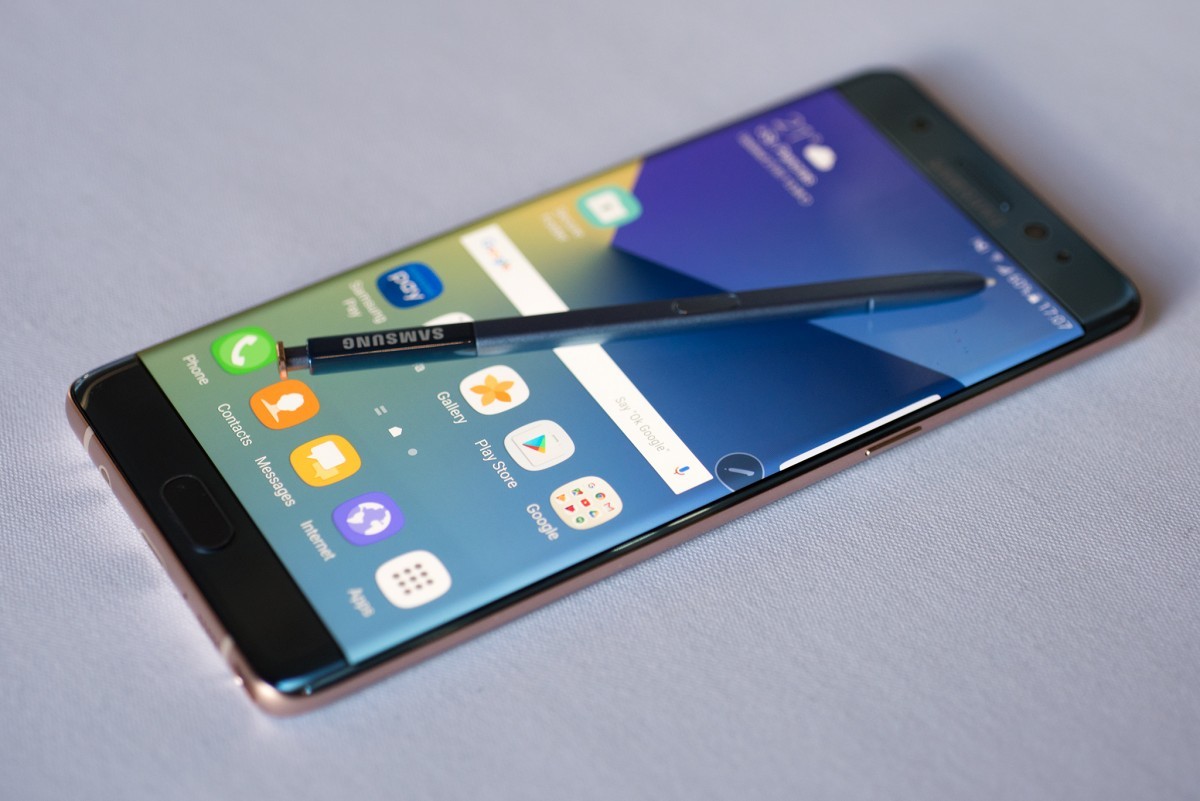
Samsung in an official blog post today confirmed that they are bringing back a refurbished Galaxy Note 7. A report out last month suggested that Samsung is planning to refurbish Galaxy Note 7 handsets and will be bringing them for the South Korean market.


 As there was no chatter regarding the bringing back Galaxy Note 7 , so we thought maybe Samsung has ditched the idea. Well that doesn’t seem to be the case as confirmed by Samsung. The company promises that they will be refurbishing Galaxy Note 7 an an ‘environment friendly way‘.

Right now it is not confirmed which markets it will come in as the company will have to get regulatory approvals and see local demands too. Samsung will be following ‘three principles’ to make sure that the devices are recycled and reused in an appropriate manner.

Firstly, the company will see whether the given devices can be refurbished or be used as rental phones. For this the company will again have to get their devices certified from the regulatory bodies and the get them out in the markets. Let’s see which markets Samsung chooses to take the plunge in.

If not, then at the second step the reusable components of the device will be looked at and detached for further use. Different components such a processors and camera sensors can be reused again r given to different units for testing. At the third step, different metals and other parts will be extracted. The process will follow environment friendly codes.

The refurbished smartphones will have a lower battery capacity and will feature a different rear. Samsung made the decision to recycle and refurbish the Galaxy Note 7 after their MWC event was crashed by Greenpeace protesters who wanted to know what the company will do to its 4.3 million Galaxy Note units.

Source


Samsung Galaxy S8 rumoured to feature a Sony IMX333 camera

0
Samsung Galaxy S8 rumoured to feature a Sony IMX333 camera

We are just two days away from the official announcement of Samsung Galaxy S8. Samsung has claimed that the new flagship marks a ‘new beginning‘. With a top notch design and specs in play, Samsung indeed is optimistic about the prospects. With most of the features known, the camera has been a little mysterious. A new rumor suggests that Galaxy S8 will feature a Sony IMX333 sensor.

This indeed is something new. We already did know that Galaxy S8 was making use of a 12MP camera but the Sony IMX333 sensor was not known. The Sony sensor is new and not even listed on the official website. If this is true, then Galaxy S8 will be the device in which the IMX333 sensor makes a debut with.

Samsung Galaxy S7 camera was quite impressive and if the Korean giant has followed the same pattern this time around, expect a stunning camera. All this will be confirmed on March 29 when Samsung unveils Galaxy S8 and Galaxy S8+.

Source | Via

What’s new with Android O?

1
What’s new with Android O?

Google introduced Android O, last week and made the Developers Preview for download. The Developers Preview works at providing Google feedback on their new update, along with that it also gives developers time to tweak their apps for the new Android Update. At the moment the supported devices are Pixel, Pixel XL, Nexus 5X, Nexus 6P and the Nexus Player. If you have any one of the devices, you can also test and see what got improved this time around. So, what new does Android O have to offer, let’s have a look at the different new features that we will get to see when Android O rolls out to our smartphones.

Background Limits for Apps

The new ecosystem will work on making the device more energy efficient, so that the apps running in the background do not drain all the battery power. So for that purpose Android O will put limits on what the apps can do in the background. The three areas that are targeted are: implicit broadcasts, background services and location updates. With this it would challenge developers to work on apps that do not drain the battery of the device.

 “The basic idea is that the system will automatically limit the active capabilities of background apps, in a way that won’t be detrimental to users while reducing overall resource use.”

Notifications Channels

With Android O, users will have more control over how they get notifications for different apps. This will gives users more control over how their notifications work. Users will be able to prioritize what type of notifications they can get first from an app. Along with that they can tinker with blocking ‘certain’ notifications, hence managing how things work out.

“Applications can create notification channels, which are categories that users can individually turn on and off. For example, Twitter could create separate channels for mentions, likes, follows, etc.”

Not only that users will also be able to snooze different notifications for 15 min, 30 min or eve an hour. This feature is available when users slide the notification. This would come in handy especially at times when we forget we have something important to look up to.

Picture in Picture Mode (PIP)

Picture in Picture Mode is now available on both smartphones and tablets. Users with Android O will be able to watch videos or continue with video calls while scrolling for content at the back. How this will work is that the video will shrink down into a floating window and the resume what they were doing.

Apps can put themselves in PiP mode from the resumed or a pausing state where the system supports it – and you can specify the aspect ratio and a set of custom interactions (such as play/pause).

Autofill API’s

Users make use of different password managers first to keep the information secure and second to make it easier to setup new apps when information regarding emails or other personal data is required. The Android O ecosystem will make things more convenient for users by providing them autofill support.

The autofill app stores and secures user data, such as addresses, user names, and even passwords.

Adaptive Icons

With Adaptive Icons, the app icons will integrate more smoothly with the device UI in Android O. The system will display icons in different shapes depending on the mask that the device selected. This means that now developers not have to do the extra work on the app icon.

The system also animates interactions with the icons, and uses them in the launcher, shortcuts, Settings, sharing dialogs, and in the overview screen.

Notification Badges

There is another change in how the notifications work with the apps. The apps will now be able to display badges on their icons on the numbers of unread or pending notifications. If you have seen apps in iOS work out before, this is quite similar to that.

Wide Gamut-Colors for Apps

Google will now offer a wider variety of colors so that developers can easily work on their apps and provide users with a more vibrant colors. For this it is important that the device supports such a feature. To work on displaying gamut images, apps will have work on their ’embedded wide color profile’.

Keyboard Navigation

Google promises that with Android O navigation through keyboard will become more streamlined. As the new update offers consistency and works towards providing users an improve experience. Now the UI will offer more ‘predictable model’ for different tabs that will assist users in navigation. Usually when things are not consistent across the platform it creates problems for the users.

Connectivity

With Android O, Google has introduced Wi-Fi Aware, that beforehand was known as the Neighbor Awareness Networking (NAN), this means that devices with compatible hardware and apps when nearby can connect with one another and transfer files and data at a high speed.

Improved Audio Quality

Given Google’s partnership with Sony, users can look forward to an improved audio experience as the new Bluetooth technologies will be integrated with Android O. With the new update you will be looking at the LDCA support. LDCA is Sony’s system that ensures better music quality over a Bluetooth connection.

Custom Shortcuts

This feature will allow users to add different helpful shortcuts through their System UI Tuner. This was introduced in Android M. Users will now be able to choose which different functions that they will use as shortcuts. Different shortcuts could pertain to launching apps, getting to some setting ot even opening up a new Chrome tab.

Revamped Setting App

With Android O, Google has worked on organizing the Settings app which before hand for first time users was quite confusing. Now the settings menu is much more organized, providing users with more convenience while navigating different options.

As Android O is still in the developmental phase and different tweaks are being worked on, we will be looking at a more refined user experience and an improved UI with the new update. Let’s see which different other aspects Google’s team will work on.

Source

Made Easy: Launch the camera by double tapping the power button in Galaxy S8

0
Made Easy: Launch the camera by double tapping the power button in Galaxy S8

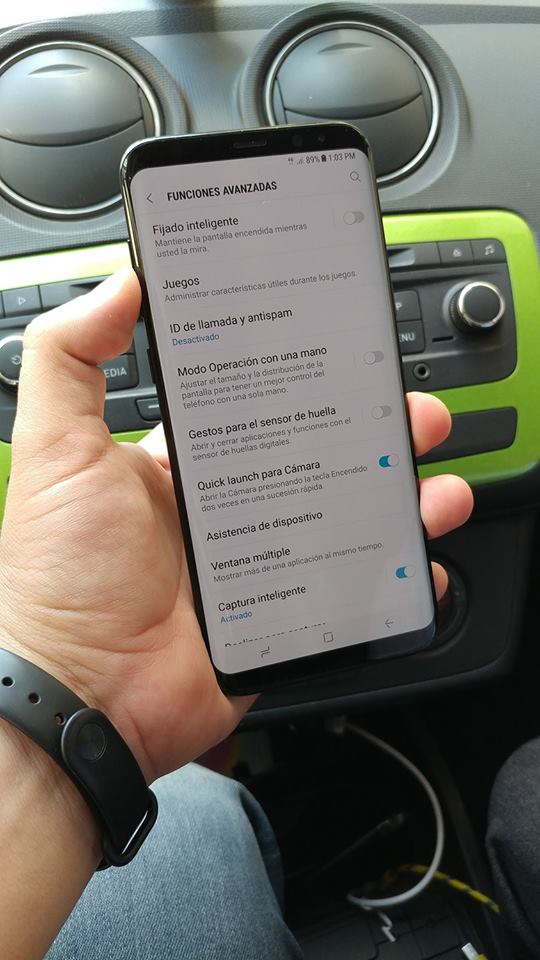
The official launch of Galaxy S8 is just a few days ahead and the rumor mills are working over time. Yesterday we got to see the accessories that will be offered alongside the device, along with some high resolution images of a working Galaxy S8+. A new speculation suggests that users will be able to launch the camera app just by double tapping the power button twice in Galaxy S8 and Galaxy S8+.

One of the leaked images of Galaxy S8+ shows the additional features of the device. Even though it is in Spanish, that has not stopped fans from deciphering and speculating about what it means. The the ‘Advanced Functions‘ menu there is an option ‘Open the Camera by pressing the Power key twice in quick succession‘. This means that if users activate the feature they will be able to opt for powering the camera app by just double tapping the Power button.

Users earlier have been able to power up the camera app without unlocking the device and double tapping the home button. Galaxy S8 and Galaxy S8+  do not have the physical home button, so users can’t opt for that feature now. It seems like Samsung in the absence of the home button has gotten around to making the power button the likely candidate for this feature now.

Source

Samsung revamps signature ‘Over the Horizon’ in collaboration with Jacob Collier for Galaxy S8

0
Samsung revamps signature ‘Over the Horizon’ in collaboration with Jacob Collier for Galaxy S8

Well design isn’t the only new thing that Galaxy S8 will be getting! Samsung for Galaxy S8 and Galaxy S8+ has recomposed its signature ringtone ‘Over the Horizon‘ in collaboration with Grammy Award-winning artist, Jacob Collier giving it a fresh new look.

Samsung does revamp things and comes with a new version of Over the Horizon with every generation Galaxy devices. This time around with a new Galaxy flagship in which they have introduced the ‘best features’ and a ‘breakthrough design’ the ringtone is also dubbed as ‘unique‘ and ‘inventive‘ as the devices.

Samsung will be officially unveiling Galaxy S8 and Galaxy S8+ in 3 days in unpacked events held in London and New York. With the hype around the devices, the event is bound to be spectacular. In the manwhile enjoy the revamped and uniqe take on ‘Over the Horizon’.

Source