Home Blog Page 409

How To Jailbreak iOS 8.1 Untethered Using Pangu8 [ Tutorial ]

0
How To Jailbreak iOS 8.1 Untethered Using Pangu8 [ Tutorial ]

No doubt iOS 8.1 Jailbreak comes out so fast and first time Cydia was installed manually. After the Pangu8 tool was out we have seen a rapid version released, but today they gave us another surprise iOS 8.1 Untethered Using Pangu8. I wasn’t expecting this because in this update they have added Cydia so now you don’t have to manually install it now. In the following guide I will explain you how to Jailbreak iOS 8.1 Untethered Using Pangu8.

pangu2_ui

  • Supported devices:
    • iPhone 6
    • iPhone 6 Plus
    • iPhone 5s
    • iPhone 5c
    • iPhone 5
    • iPhone 4s
    • iPad (2, 3, 4, Air, Air 2, mini 1, mini 2, mini 3)
    • iPod touch 5
  • Supported firmwares:
    • 8.0
    • 8.0.1
    • 8.0.2
    • 8.1

Also See: Download iOS 8.1 IPSW 

How To Jailbreak iOS 8 / 8.1 Untethered Using Pangu:

Step 1: Download and Install Pangu 8 for Mac/Windows from here.

Step 2: Now right click on Pangu8  icon and run as administrator.

Step 3: Connect your device while Pangu 8 running.

Step 4: Now click on checkbox and uncheck the PP.

Step 5: Click on the big blue button in the center to start the Jailbreak process. During the Jailbreak process your device will reboot couple of times.

Step 6: Once the Jailbreak process is done you’ll see Pangu icon on your home screen.

Step 7: To install Cydia open Pangu on your device.

Step 8: Just tap on Cydia icon to install it.

All Done.

How To Install TWRP Recovery and Root Verizon Galaxy Note 4 SM-N910V

6
How To Install TWRP Recovery and Root Verizon Galaxy Note 4 SM-N910V

Now that we are done from T-Mobile Galaxy Note 4 and Sprint Galaxy Note 4, now it is time for Verizon Galaxy Note 4 to get root access and a Custom Recovery, and as usual TWRP recovery takes the lead, CWM recovery will take some time to reach this device, till then only Developer Edition of Verizon Galaxy Note 4 can get this recovery and rooting method. For the retailer version, users have to wait a little bit more. Though I don’t like the TWRP recovery, I prefer CWM over TWRP and even better I will go after PhilZ Touch, no matter how much I have to wait. For all the retailers, If you try to Follow this process, it will Brick your phone. This process includes both the Rooting and TWRP recovery installation tutorial.

The Whole Process is simple and only needs few click, as we are going to use Odin in such matter, if you are not familiar with Odin and its working, pay a little close attention towards the tutorial. If you don’t want to use Odin, you can look for an alternate method, which requires commanding and active ADB drivers, Yeah! I know it is difficult, I also use Odin a lot more than ADB Shell. First we will Flash the Recovery and thus Flash the Super SU using the recovery and root the device So, Without further ado, Let us begin.

1411417916_539372

Early Preparations:

1. This guide is only for Verizon Galaxy Note 4 (Developer Edition)!

Make sure that your device is exactly as mentioned above. To check out what device you have, go to Settings > More/General > About Device or Settings > About Device and match the model number. Be careful about the device model number, flashing a file on a device not listed here might result in bricking it up. In that case, we may not be held responsible.

2. Battery should be charged at least 60%!

Your device’s battery shouldn’t be weak. In case your device goes dead during the flashing process, your device may get soft bricked and you might be in need of flashing stock firmware and that will ultimately result in wiping up your data as well. So, make sure that you charge your device before you start the flashing process.

3. Use the OEM data-cable to establish connection!

Always use the original data cable to establish connection between your Android device and your computer / laptop. Using ordinary data cables might interrupt the flashing process, so to avoid any mishap, you need to meet this requirement as well.

4. Backup everything!

Just to be on the safe side, you may consider backing up each and everything from your Android device. This is highly recommended so that in case anything goes wrong, you still have the access to all of your data and you can restore it immediately. Also, clean install is always recommended, that means you will probably have to wipe your device to install the new firmware. So, you may backup everything as listed below.

5. Discalimer

The methods involved in flashing custom recoveries, roms and rooting your phone are highly custom and may result in bricking your device, and has nothing to do with Google or the device manufacturer that is Samsung in our case. Also rooting your device will void its warranty and you will be no longer eligible for any kind of free device services by the manufacturers/warranty providers. Incase of any mishap we may not be held responsible. Follow these instructions to the letter to avoid any mishap or bricking. Make sure that whatever you do, you are doing it at

How To Install TWRP Recovery On Verizon Note 4

  1. Download and extract Odin3 v3.09.
  2. Download and Install Samsung USB drivers .
  3. Download and extract TWRP Recovery: Link 
  4. Super SU: Link

Method:

  1. Open Odin3.exe.
  2. Put your Galaxy Note 4 in download mode. To do so, turn it off and wait for 10 seconds. Turn it on by pressing and holding Volume Down + Home Button + Power Key simultaneously, You should see  a warning, press Volume Up to continue. In case this method doesn’t work for you, try one from this guide.
  3. Connect your device to your PC.
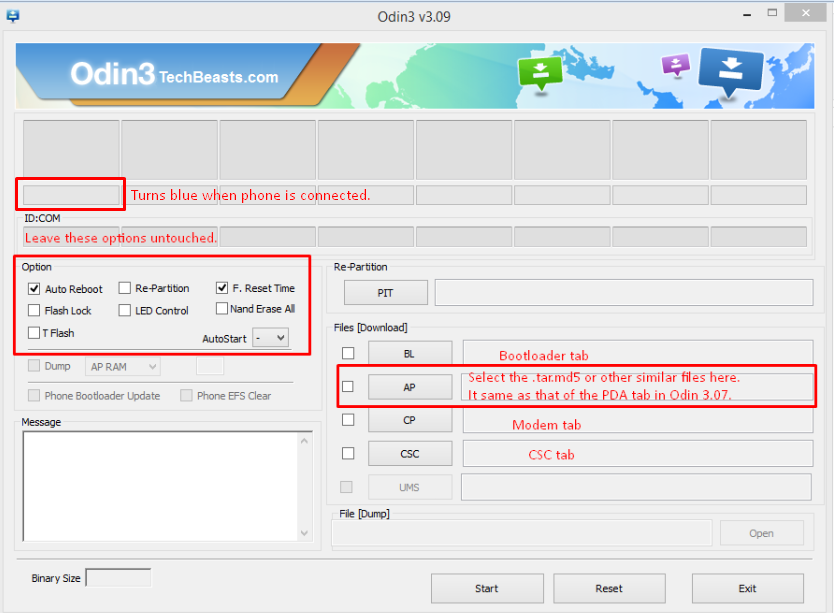
  4. As soon as Odin detects your phone, the ID:COM box should turn blue.  Make sure that you’ve installed Samsung USB drivers before connecting.
  5. For Odin 3.09 hit the AP tab. Select the .tar.md5  file or .tar file, that you downloaded and extracted above.
  6. If you’re using Odin 3.07, you will select “PDA” tab instead of the AP tab, rest of the options remain untouched.
  7. Make sure that the options selected in your Odin are exactly as shown in the pic (Do not Tick the F.reset Option)Odin-3.09-explained.-2
  8. Hit start and wait till the flashing is complete, as soon as your device restarts, remove it from PC.
  9. Wait for your device to reboot.
  10. That’s all!
  11. Now Visit Recovery Mode to Confirm

How To Root Your Device:

  • Connect your device with PC.
  • Copy and Paste the Above zip files to the root of your sdcard.
  • Disconnect the cable.
  • Turn Off your Device
  • Open Recovery mode. How? Press and hold the Volume Up + Home + Power buttons until you see some text on screen.

TWRP Users.

  1. Tap On Back-Up and Select System and Data
  2. Swipe the Confirmation Slider
  3. Tap on Wipe Button and Select Cache.
  4. Swipe the Confirmation Slider.
  5. Go back to Main Menu and Tap Install Button.
  6. Locate the UPDATE-SuperSU-v1.94.zip and Swipe the Slider To install it.
  7. Once the Installation is Over, you will be promoted to Reboot System Now
  8. Select Reboot Now to Reboot the System.
  9. Now use any Root Checker app or Super SU app in App Drawer to Confirm

Download Angry Birds Transformers v1.1.25 apk

0
Download Angry Birds Transformers v1.1.25 apk

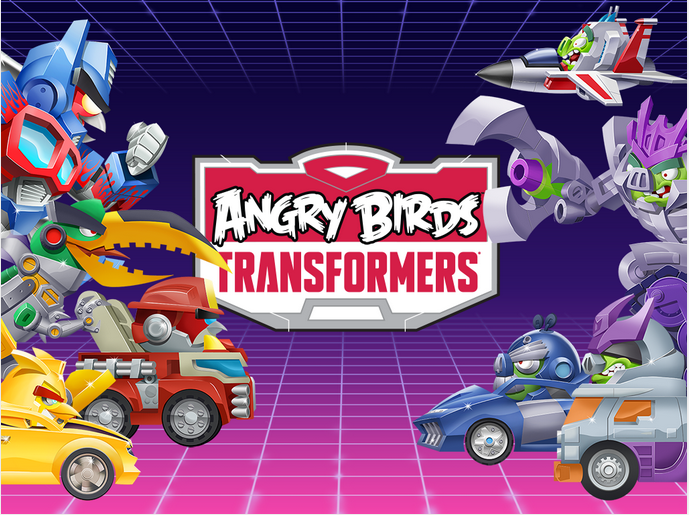
After such a long wait Angry Birds Transformers has finally arrived for Android you can download Angry Birds Transformers v1.1.25 direct from Google Play Store or you can download the Angry Birds Transformers v1.1.25 apk from the following links. Angry Birds Transformers are based on famous movie transformers, both Birds and Piggies are suited in robots costumes.

Screen Shot 2014-10-31 at 19.47.14

Main Features of Angry Birds Transformers:

– COLLECT! Unlock a roster of heroes (and villains) with unique attacks and abilities!

– DESTROY! Leave the slingshot at home – this time you have some SERIOUS firepower!

– VEHICLES! Oh, yes! Car, truck, tank or plane – transform to dodge falling hazards!

– UPGRADES! Get stronger weapons and new abilities for every Transformer!

– TAG TEAM! Borrow a friend’s character to unleash a devastating two-bot assault!

– TELEPODS™! Scan ‘em to unlock, revive or boost your bots!

For More Visit Google Play Store.

What’s New

  • Angry Birds Transformers is now rolling out across the planet!
  • ::::Begin Update Text Transmission::::
  • NEW WEAPONS – Sentinel Prime, Bludgeon and SoundBlaster are packing new firepower!
  • EARN GEMS – Now you can get gems by completing achievements!
  • BUDDY SYSTEM – See who has used your bots and when!
  • UPDATED MAP – Navigating just got easier!
  • ::::End Update Text Transmission::::

Download and Install Angry Birds Transformers v1.1.25 apk:

Step 1: Download Angry Birds Transformers v1.1.25 apk.

Step 2: Open downloads folder on your device.

Step 3: Tap on the Angry Birds Transformers v1.1.25 apk file.

Step 4: Follow the given instruction on the screen and in few minutes Angry Birds Transformers v1.1.25 apk will be installed on your Android device.

All Done !.

Some Hidden Features of Mac Latest OS X Yosemite

0
Some Hidden Features of Mac Latest OS X Yosemite

Recently Apple release the Stable and Final version of OS X Yosemite, which was quite stable and faster than the beta version, despite it took alot of time to download and the biggest problem was that if you Close the Lid, the Internet will disconnect and you might need to start the download from the very beginning. That very thing was the reason why it took me a lot of days to download this. The Size of this update was already 5GB and the downloading speed was max at 200kbps, you can understand my patience, however, it was successfully downloaded and installed, I start exploring the Secret features in it and with a little help from Google, I was able to found some of them very useful, that I though to share with you people.

Last Time we shared some amazing Key Short-cuts in Mac, praised alot by users. Every Mac OS X has some new features in it, some are so hidden that most users don’t even know that they exist, until they are shown to users, how you can utilize or even find them. Today we are going to show you 3 of the Hidden Features on Mac OS X Yosemite. Without further ado, Let us continue.

yosemite-2

Quick Type Suggestions:

Like what we see in Chrome or FireFox, while typing if you make a mistake, it starts giving you suggestions and we have seen this Quick Type Suggestions in iOS 8 and this time the same feature is now in Mac OS X Yosemite. However, that feature is limited to only TextEdit app and may be some others. To activate it, press the ESC key while typing anything in TextEdit app.

From Your Mac, Close Safari Tabs:

Well this is a neat feature, however, not mentioned by Apple at all, that you can close all your opened Tabs of Safari opened in your device by Your Mac.

To Enable this:

  1. Open Safari.
  2. Click the Empty space of Toolbar > Customize Toolbar
  3. Then From the Options available, Click iCloud Tabs Button and Drag it to Safari Toolbar
  4. Now Just Click on that button and all the Open Tabs in Safari will be displayed there.
  5. Hover the Cursor over them and Close button will appear, Click it and the Tab will close.

Share Screen Via Messages:

Now in OS X Yosemite, you can share screen of your device with any other, using the messages app. To do this:

  1. Click on the Details of Person Message Window.
  2. If the party accepts your Invitation, you’ll be able to Share screen with them..
  3. However, once the Screen is shared, you’ll be able to talk with that person in Audio only.
  4. You can even block people, from you don’t want invitations

How To Make Your Android Device Look Like Stock Android 5.0 Lollipop

0
How To Make Your Android Device Look Like Stock Android 5.0 Lollipop

Android LollipopThe long awaited Android 5.0 came out running on Google’s Nexus 6 a few days back. Google’s very own Nexus devices will be the first ones to receive the update to Android 5.0 Lollipop, while other smartphone giants have announced their devices that will be tasting Android 5.0 Lollipop. While Android 5.0 happens to be the latest and greatest version of Android, and packs up some serious improvements and features, it does make a great sense that smartphone giants will be only updating their mainstream / flagship devices to this firmware, while many of the old devices will be standing in the unlucky list, and those past flagships, which happen to be the lucky ones, those too will be getting this update after quite a long time.

For an Android freak like me, it’s pretty hard to wait for the Android 5.0 Lollipop to wait to hit the device while knowing that their are goodies like Material Design, Notifications on the Lockscreen, improved Notification bar, Bluetooth connectivity improvements, battery enhancements, performance improvements and a lot of bugs found in the previous Android version have been fixed too. The notable changes are in the UI only, so for now the only concern for Android freaks to test out this update might be to have a look on the great new UI. One of the biggest advantages of Android is, the components of the OS are easily available in the form of installable APKs, sometimes rolled out by Google itself and sometimes designed by the great developers, and sometimes the developers are able to make the flashable zips by porting the features from Android.

Last year we were able to cater some applications that helped the users to make their Android device look like a stock Android 4.4.4 KitKat device while they weren’t actually able to update their device to the firmware and something similar is there to check out once again. APKs from the Android 5.0 Lollipop have already surfaced, and some developers have come up with Applications that let you enjoy some features from the Lollipop Android. We’ve compiled up all the applications in the proceeding post with the installation method, the guide will help you to make your Android device look like stock Android 5.0 Lollipop. Let’s get ahead now.

Download & Install Google Now Launcher from Android 5.0 Lollipop

The very first step is to change your device’s launcher, you might like using Android 5.0’s Google Now launcher instead of your TouchWiz, Sense  or some other launcher. You will need a custom recovery running on your device in order to flash the zip file that contains the Google Now Launcher. You will need Android 4.4 running on your device first.

  1. Download Google  Now Launcher zip and copy it to your phone.
  2. Boot into CWM / TWRP recovery on your phone.
  3. Select Install > Choose Zip from SD Card / Choose Zip > Locate the Google Now Launcher Zip file.
  4. Once done, access the Google Now Launcher application from the app drawer.
  5. Follow the onscreen instructions to select and launch the Google Now Launcher.
  6. You can turn it off by clearing Google Now Launcher defaults from settings > application manager.
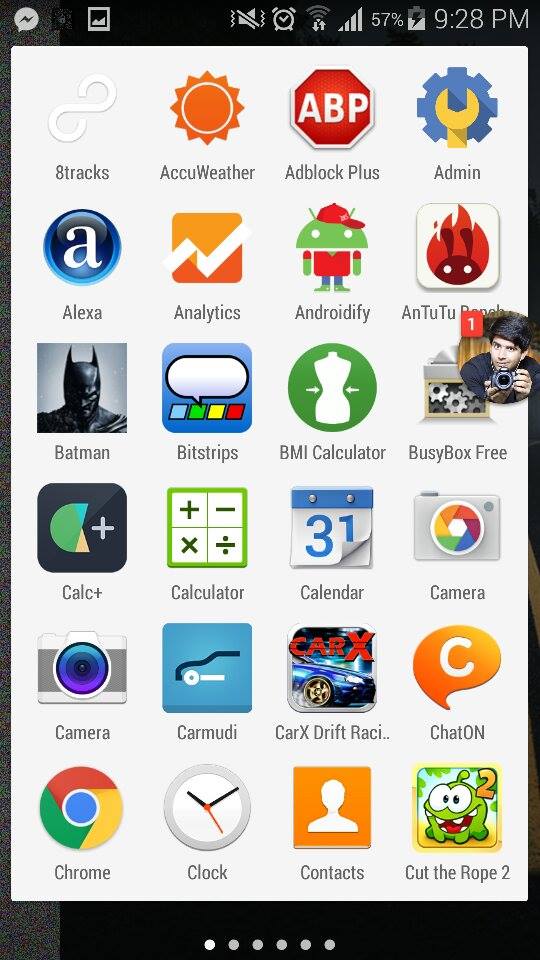
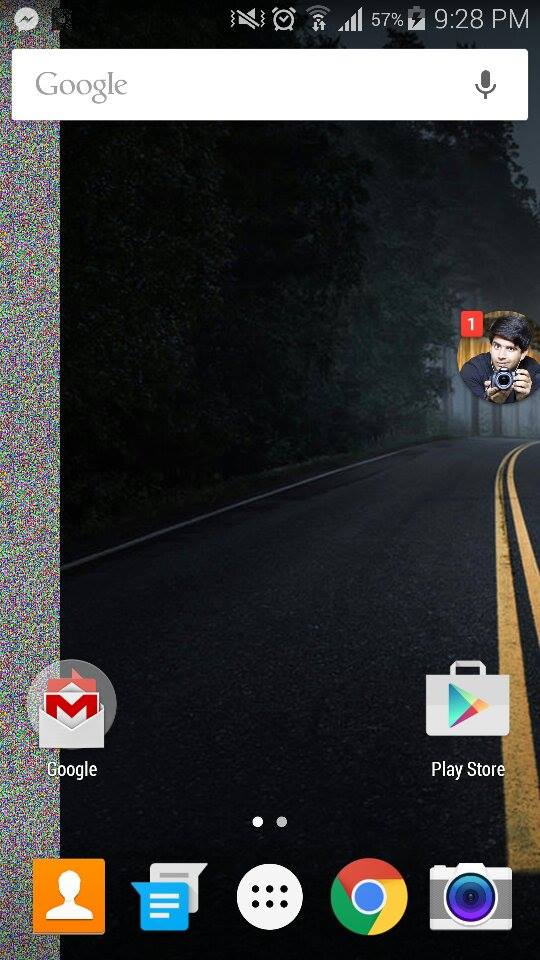
10748963_710451012382723_1747000245_n10748879_710451029049388_2003195590_n10736158_710450919049399_1004000453_n   
10749424_710450959049395_1597780922_n 10749466_710450989049392_823524169_n
Download & Install Android 5.0 Lollipop Lockscreen [Android 4.0+]

Notifications on the Android L have a new look. Just like iOS 8, the notifications now appear on the lock screen and look way good. The feature hasn’t been extracted from the Android L originally, but the guys over Luck Coin have successfully compiled up an application that allows the users to receive notifications on their Android devices as they would do in Android L.

10603577_1031515240208156_948166863698854089_n

Download and install Lollipop Lockscreen Android L on your Android device. Requires Android 4.0+

Download & Install Android 5.0 Lollipop Messenger [Android 4.0+]

    1. Download Android 5.0 Lollipop Messenger APK and copy it to your phone.
    2. On your phone, go to settings > security > allow unknown sources.
    3. Locate the APK file on your phone, tap it and install it.
    4. Once installed, access the messenger app using app drawer and start using it.


  • 10744678_710451359049355_2069240290_n10609023_710451339049357_190006_n


Download & Install Android 5.0 Lollipop Keyboard [All Android Versions]

  1. Download Android 5.0 Lollipop Keyboard APK and copy it to your phone.
  2. On your phone, go to settings > security > allow unknown sources.
  3. Locate the APK file on your phone, tap it and install it.
  4. Once installed, select the Google Keyboard in keyboard settings and start using it.
  5. 2014-10-30-15.43.43

Grab Some Nice Android 5.0 Lollipop Wallpapers

Get some nice Android 5.0 Lollipop Wallpapers and set on your device’s screen to give it a touch of the Lollipop. The wallpapers add some extra charm to the flat Material Design UI.

Download & Install Latest Google Play Services [All Android Versions]

  1. On your Android device, go to settings > application manager > running / all > Google Play Services > see the version number ending with 034 or 038.
  2. Download Google Play Services 6.1.71 034 APK or Play Services 6.1.71 038 APK (according to your version number) and copy it to your phone.
  3. On your phone, go to settings > security > allow unknown sources.
  4. Locate the APK file on your phone, tap it and install it.
  5. Once installed, you will see several changes in the Google Apps running on your phone.
  6. That’s all.

Download & Install Android 5.0 Camera Application [Android 4.0+]

You will need root access and a root explorer to make the Camera application work properly, also this app works with devices having Android 4.4. Here’s how to get it.

  1. Download Android 5.0 Lollipop Camera APK and copy it to your phone.
  2. On your phone, go to settings > security > allow unknown sources.
  3. Locate the APK file on your phone, tap it and install it.
  4. Now download the Camera files.zip file and extract it to get the .so files.
  5. Copy these .so files to the folder /data/app-lib/com.google.android.GoogleCamera-2 using the root explorer, and set the permissions of these files to r-w-r-r by going into properties > permissions / privileges.

That’s all. Just in case you’re stuck with anything, drop you query in the comment box below. We will get back to you immediately. Thank you all.

Lollipop Keyboard Apk Download for ALL PHONES – No root needed!!

2
Lollipop Keyboard Apk Download for ALL PHONES – No root needed!!

Android 5.0 Lollipop is coming next month for many devices, but stocks app apk are available for download. Android 5.0 Keyboard got a new design, Material look and new themes. When I was trying to install it on my Galaxy Note 3, I was facing an issue after installing the apk file I cannot edit lib.so file. So I started searching a simple apk, good news is that I found one and you don’t need Root. You can download Lollipop Keyboard Apk Download for ALL PHONES.

Android 5.0 Lollipop Keyboard

Important Things Before Installation:

1). Device running 4.0 ICS and up.

2). No Root Required.

3). No need to uninstall other Google Keyboards.

Download and Install  Lollipop Keyboard Apk:

Step 1: Download Lollipop Keyboard Apk

Step 2: Connect your phone to your laptop or PC now.

Step 3:Copy the APK file to your phone’s SD card.

Step 4: Disconnect your phone.

Step 5: Locate the Lollipop Keyboard file on your phone now and tap to install it.

Step 6: If prompted to select installer, then select “Package Installer”.

Step 7: Allow “Unknown Sources” from Settings > Security if prompted.

Step 8: Proceed with the installation and complete it.

That’s all!

Following are the other Android 5.0 Apps with Material Design download links.

Resident Evil 4 HD Wallpapers Download For Desktop – Free

0
Resident Evil 4 HD Wallpapers Download For Desktop – Free

We all know very well Resident Evil movies sequel, every part was full of action with awesome graphics. As we all know that Resident Evil 4 is available for PC games and good news is that Capcom is working Resident Evil 4 “Ultimate HD “ version, you can check all the details here.

Today I’ve collected some of  the best Resident Evil 4 HD Wallpapers For Desktop. You can try these Wallpapers on your mobile devices or you can wait for Resident Evil 4 HD Wallpapers for mobiles.

You can check my complete collection of HD Wallpapers for Desktop and Mobiles. Please visit my Gallery and suggest me more Wallpapers so i can collect the HD version of them.

28ldrnc

Resident Evil 4 HD Wallpapers Download For Desktop

Frozen Movie HD Wallpapers for Your Desktop – Free Download

0
Frozen Movie HD Wallpapers for Your Desktop – Free Download

Frozen won OSCAR for best animated movie of 2013 and no doubt about it Frozen was super hit movie. I love all the characters of this movie specially OLaF, so I though why not collect the best Frozen Movie HD Wallpapers for Your Desktop. Good thing is that I am also adding Frozen Movie HD Wallpapers for smartphones. 

You can check my complete collection of HD Wallpapers for Desktop and Mobiles. Please visit my Gallery and suggest me more Wallpapers so i can collect the HD version of them.

2013_frozen_movie-2560x1440


Frozen Movie HD Wallpapers for Your Desktop:

How to Get Unlimited Free Trial Subscriptions to Netflix and Spotify

1
How to Get Unlimited Free Trial Subscriptions to Netflix and Spotify

Netflix and Spotify both are best in different ways, but one thing is same for both services that they don’t give Unlimited free subscriptions. A few days back i tried a trick to get Unlimited Free Trial Subscriptions and guess what it worked. In the following post I’ll tell you How to Get Unlimited Free Trial Subscriptions to Netflix and Spotify.

get-unlimited-free-trial-subscriptions-netflix-spotify-and-more-using-gmail.w654

Before proceeding following steps are the important part of this Guide. To successfully get the free trial subscription you have to understand these steps.

  • Use a Gmail account.
  • Now insert characters and symbols, like a plus sign or a period, into your email address.
  • Use the following as example.

I would also be able to use…

Or even something like this…

By adding these symbols to your email address, the third parties services will take it as a new email address, but Gamil treats it like the original one. (they ignore periods and some special characters).

How to Get Unlimited Free Trials on Spotify:

Step 1: Make premium account on Spotify.

Step 2: Now wait until the 30 days free trial is over.

Step 3: Sign up again and you’ll get “only valid for new members.”

Step 4: Now use your email again and just add few periods in your original Gmail id.

Step 5: All done they will send a confirmation email on your same id ” 30 days free trial “.

How to Get Unlimited Free Trials of Netflix:

Step 1: Make premium account on Netflix.

Step 2: Now wait until the 30 days free trial is over.

Step 3: Sign up again and you’ll get “only valid for new members.”

Step 4: Now use your email again and just add few periods in your original Gmail id.

Step 5: All done they will send a confirmation email on your same id ” 30 days free trial “.

get-unlimited-free-trial-subscriptions-netflix-spotify-and-more-using-gmail.w654 (1)

How To Root Sprint Galaxy Note 4 On Android 4.4.4 Kit-Kat Official Firmware

0
How To Root Sprint Galaxy Note 4 On Android 4.4.4 Kit-Kat Official Firmware

Previously, we posted an article related with the Installation tutorial of TWRP on Sprint Galaxy Note 4 and now all there is left to do is to Root that device. However, there is no rooting solution available, if you try to explore the XDA Forums as everyone expect them to release the rooting method before anyone else, but if you look at the T-Mobile Galaxy Note 4, then you’ll realize that there is no thread related with the rooting details of it too. But still the rooting method is available and working. In many cases developers didn’t post the tutorial in the Official thread of devices, they like to separate themselves, thus they create a whole different thing and post it there, like Chainfire. The inventor of both Super SU and CF-Auto root, who is the main reason, why users are gaining full control of their Android devices, because of him we are now able to enjoy these customizations and Mods and Tweaks.

This process is a little more complicated than CF-Auto Root, although always a working one, I have tried it on most of the device and it always worked like a charm. Although there are times when you might fail while rooting your device through this method, even if you fail, your device will work like usual. This method doesn’t require any ADB Shell or coding, instead it is a quite easy and great one, Without further ado, let us continue.

supersu

Early Preparations:

1. This is only for Sprint Galaxy Note 4!

This custom ROM is only for the device mentioned above. Make sure that your model number matches the one listed above. To do so, go to Settings > About Device on your device and see your model number. Flashing this ROM on any other device will result in bricking it so make sure that you meet this requirement first of all.

2. Battery should be charged at least over 60%

Make sure that your battery is charged enough to complete the flashing process. In case your battery is low and your device goes dead during the flashing process, you may end up soft bricking your device as it won’t complete the flashing process.

3. Flash a Custom Recovery

A custom recovery, whether a TWRP or  CWM is required to flash this ROM.

4. Backup everything!

Just to be on the safe side, you may consider backing up each and everything from your Android device. This is highly recommended so that in case anything goes wrong, you still have the access to all of your data and you can restore it immediately. You may backup everything as listed below.

5. Disclaimer

The methods involved in flashing custom recoveries, roms and rooting your phone are highly custom and may result in bricking your device, and has nothing to do with Google or the device manufacturer that is SAMSUNG in our case. Also rooting your device will void its warranty and you will be no longer eligible for any kind of free device services by the manufacturers/warranty providers. In case of any mishap we may not be held responsible. Follow these instructions to the letter to avoid any mishap or bricking. Make sure that whatever you do, you are doing it at your own responsibility.

Downloads Required:

Super SU: Link

Installation Process:

  • Connect your device with PC.
  • Copy and Paste the Above zip files to the root of your sdcard.
  • Disconnect the cable.
  • Turn Off your Device
  • Open Recovery mode. How? Press and hold the Volume Up + Home + Power buttons until you see some text on screen.

TWRP Users.

  1. Tap On Back-Up and Select System and Data
  2. Swipe the Confirmation Slider
  3. Tap on Wipe Button and Select Cache.
  4. Swipe the Confirmation Slider.
  5. Go back to Main Menu and Tap Install Button.
  6. Locate the UPDATE-SuperSU-v1.94.zip and Swipe the Slider To install it.
  7. Once the Installation is Over, you will be promoted to Reboot System Now
  8. Select Reboot Now to Reboot the System.
  9. Now use any Root Checker app or Super SU app in App Drawer to Confirm

Download Songs Directly From SoundCloud to iPhone

0
Download Songs Directly From SoundCloud to iPhone

SoundCloud is one of the biggest Songs database on earth, if we talk about the .Mp3 format. Due to its popularity, almost every huge platform like Android and iOS have their Official apps, however, there was a problem with this SoundCloud app, you can’t download the Songs directly from the App. You can search and listen to any Song on the app, but you can’t download it, I don’t know the reason, lets just assume that they have their stupid policies, not to allow users to download their content, just like Youtube. However, even if it is iOS or iPhone, developers have created some apps that allows them to download Songs directly from Soundcloud app.

There are a lot of different options available, when it comes to download songs from SoundCloud and all of them are 3rd Party apps. They all work quite the same, although made by different developers, the only noticeable difference might be names, otherwise while using them you won’t be able to find any difference at all. While using these apps, you don’t actually need the SoundCloud app. These are more like the alternates of SoundCloud, they may not have a huge database as SoundCloud, but still they are more then enough. We are only going to use the “Free Music Download” as almost all of them are loaded with ads, lots and lots of ads.

soundcloud

Free Music Download:

Free Music Download splits the Songs by Genre, I don’t like this thing at all, they should be separated by names, but who knows, may be developer must have been facing problems. You can get the Top 100 iTunes Songs in the very first list, hence making it easy to download the most popular songs easily.

mzl.qzfbxbyd

  1. Download and Install the Free Music Download.
  2. Open the App,
  3. You’ll see the list of songs sorted by Genre.
  4. Tap the Song to Play it.
  5. To download a Song, Search for one.
  6. Once the Search is over, you’ll see a Download section.
  7. Tap the Download button to start the downloading.
  8. If you accidentally played the Song, Just Tap Share and tap Download.
  9. Visit Files Section to see the songs you have downloaded.
  10. Enjoy!

RETRY for PC Download ( Windows 8,8.1,10,7 – Mac )

0
RETRY for PC Download ( Windows 8,8.1,10,7 – Mac )

RETRY a game like Flappy bird is introduced by creators of Angry Birds is available for PC, you can download and install RETRY on Mac/Pc running Windows 8,8.1,10,7. There is no exe or dmg format for this game, but you can install Retry for Pc using third party emulator. In the following post I’ll tell you how to download Retry for Pc Windows/Mac.

RETRY

RETRY Main Features:

FLY. CRASH. REPEAT. No one said this would be easy.
SPIN FOR THE WIN! Loop, stall, dive – master the moves, or eternally retry.
COLLECT COINS! It’s the 80s – what did you expect? Don’t say Bitcoins…
DAILY CHALLENGES! Unlock these intense levels and humiliate your Facebook friends.
RETRO 8-BIT GRAPHICS! Next gen? How ‘bout first gen.
SLICK SYNTHESIZER SOUNDTRACK! Crank it up and hit the skies.

About Retry:

Retry is old fashioned game with 8 bit graphics, but so hard, so addictive, so old skool that you’ll think you’ve stepped into an 8-bit time machine and gone back to 1986. Totally rad. You have to work really hard to unlock the new world, you have to fly through treacherous obstacles, On the way you have to collect stars that will help you to unlock the other worlds.

How to Download and install Retry for PC:

  1. To download Retry for PC, you will need an Android emulator like Bluestacks. If you do not have it already, you can download it from the website Bluestacks.com.
  2. Open Bluestacks and search for Retry using search tool on the top of the homepage.
  3. Click on install button. The game will automatically download and install.
  4. Once the app has been installed, go to My Apps in Bluestacks homepage.
  5. The icon for the game will appear in My Apps.
  6.  Click on this icon to open Retry.

Now, you can start playing the game any time on your Pc simply by opening it from My Apps. Get mesmerized by the amazing 8 bit graphics of the game.

Hopefully, you will be able to install the game easily on your PC through this guide. If you still have any issues, please let us know and we will help you solve them. Enjoy !