Home Blog Page 443

Top Google PlayStore alternative ‘App Stores’
0
Top Google PlayStore alternative ‘App Stores’

PlayStore has remained the main platform for browsing Android apps, downloading and keeping them updated. But, there are some substitutes to PlayStore as well, that came up with some extra features and facilities for the users in one way or the other, which Android’s PlayStore does not provide.

App Brain:

Top Google Play Store alternative app stores

Just like PlayStore, App Brain enables you to search for different apps, install them and update them later on or uninstall apps as required. It acts like your App manager. The apps will be shown to you in the categories where you can browse new or recent apps, hot apps, etc. App Brain makes it very easy to manage your apps and is compatible for Android devices with O.S 2.2 or above.

Aptoide:

Top Google Play Store alternative app stores 1

Aptoide is known as the largest independent app store for android. It is available in 17 different languages and is a great alternate to Playstore, as it allows users to download, install and browse android apps. The users can manage their own stores, go through their well updated database, see ratings and comments for apps as well. To get Aptoide you will have to first install KPK file that will allow a third party applications to get installed.

Market Enabler:

Market-Enabler-pic1

Market enabler helps you hide your phone’s location and access the Appstore from a different region in the world. This is helpful to download the apps which are introduced only for specific countries and are not available in others. You can now easily download those apps . Once you have done the job, you can restore your original settings and even set your local region. Simple!

F-Droid:

device-2011-11-16-120452

F-Droid works similar to Google Playstore. It makes installation of apps easy and updating app easier by introducing FOSS, free and Open Source Software. You can choose which apps you want to update from within the app enabling you to keep a track of the updates on your device.

Amazon App Store:

app_tcg._V377200320_

It is the easiest way to buy apps online. The app is compatible for all devices with Android 2.2 or later. Amazon enables you to search and browse for apps in categories and buy them online through a simple and reliable process.

Top 5 Whatsapp Alternatives for your Smartphones

1
Top 5 Whatsapp Alternatives for your Smartphones

WhatsApp is the fastest growing communication app, indeed very popular around the globe for its features. But here are some other alternatives to WhatsApp, that pretty much do the same job and are equally popular.

Skype-Viber-Whatsapp-Sindh-Ban_10-3-2013_120941_l

Viber

viber

Viber has made communication very convenient and more fun at the same moment. Through Viber you can always be in touch with your family and friends. It allows you to call all around the globe offering fast connection and clear voice, which is an additional feature that WhatsApp does not support.

In addition to that, you can also send messages; have colorful conversations with different stickers, share files and photos as well as it features voice messages.

Skype

skype-logo-open-graph

Skype is a very good alternative to WhatsApp, as it has some additional features like voice calls and video calls. Skype can be used to communicate with friends and family across the borders or within. It can also be used for business purposes for example, to conduct meeting with client through video call or making a conference call. It also support chat conversations with amazing emoticons.

Hangouts

hangout

Hangouts is an all in one app, which not only supports voice calls, video calls, instant messages but group messages as well. You can also add location to your hangout conversations to let people know where are you at that very moment. You can turn any conversation into a video call with up to ten friends. In addition, you can send photos or emoticons to your friends in the chat as well. All you need is an android device and your Google account, to run this app.

Nimbuzz

1317285026-screenshot

Nimbuzz is a very convenient way to stay connected with your friends, this app is widely used all around with 150+ million users. It supports international calls and messages, sharing photos, videos, files and multimedia. It has a very useful feature which lets you connect to other instant messaging platforms like Yahoo, Facebook, GTalk, etc.

Line

Line-app-logo

With over 450 million users around the world, this app is extending its circle with time, and has gained much popularity among its users. Line enables you to connect with friends and family via chat, messages and voice and video calls. You can also call Mobiles or land lines with cheaper call rates and with best voice quality.

Top 5 Puzzle Games For Android and iOS

0
Top 5 Puzzle Games For Android and iOS

Puzzle games are the best way to pass your time, these addictive and challenging games are loved by people of all the ages. Such games have always been trending throughout ages, and as we all know, this is the era of modern smartphones, so there are bunch of very good games both on Android and iOS Playstore’s. You can check the Top 5 Puzzle Games For Android and iOS.

World of Goo

World of Goo

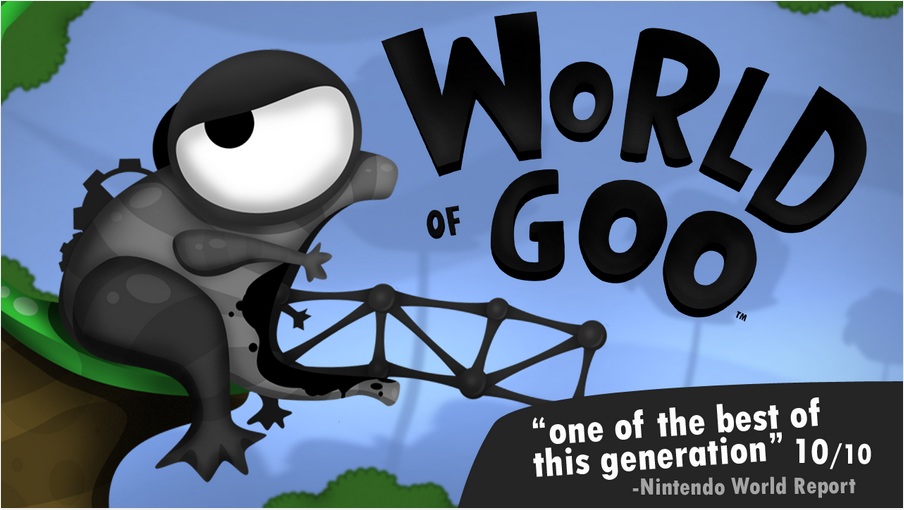
It is a very interesting puzzle game which is quite different from the traditional puzzle games we have been seeing so far. In this you will have to make a path to reach the given destination in each level by sticking Goo ball creatures. Also you will have to make different structures and gadgets to make your way. The game is simple and easy in the beginning, but the difficulty level increases as you gradually proceed further.

Slydris

Slydris

Slydris can be said as the cousin of our very own traditional Tetris, but with some modifications and changes.

The blocks have been given bright colors to make it look more appealing. Moreover, the blocks in Tetris were only movable vertically but in Slydris you can actually move the blocks sideways, drop them down the spaces, etc to match the colors. You can play three modes of the game; Infinite, Zen and Survival.

Flow Free

Flow Free

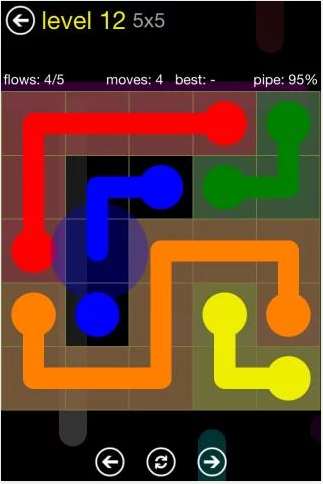
Flow Free is another puzzle game famous among the users. The game consists of different colorful pipelines that you have to connect according to the colors. You have to keep in mind that no two lines can intersect with each other. So, all you have to do is to calculate and plan your each move from the very beginning. The game is highly addictive and doesn’t let you get bored.

Candy Crush Saga

Candy-Crush-Saga-Screenshot-01

The game is very popular among users of all ages, from all over the world. The main concept is to match 3 candies of same type. The app is built with innovative graphics, players have certain number of moves that are allowed to finish each level, with a definite number of lives. The players can get their friends to play and even can ask for lives, to help you out as you move forward.

Dots

dots_266

Dots is very simple yet highly addictive puzzle game. You have to connect dots with each other through lines, making longer lines results in earning more points. The game has different challenging modes, including the timer mode where you have to complete the challenge within a given time. You are able to earn different power ups and credits that can be used in later stages of the game.

Jailbreak iOS 7.1 and 7.1.1 Untethered using Pangu [How To – Guide]

2
Jailbreak iOS 7.1 and 7.1.1 Untethered using Pangu [How To – Guide]

Developers have been trying hard to jailbreak the iOS 7.1.1, since it was quite difficult there hasn’t been any solution in a while. Just a few hours ago, Chinese developers have come up with a tool named as “Pangu” that Jailbreaks the iOS 7.1.1 on almost all the devices having this update. The guys behind this tool apparently took training from Stefan Esser, the guy who Jail broken iPhone 5C. A number of tweets has suggested that this tool is quite safe to use, it install Cydia and the Chinese app store with the illegal apps a well without any malwares or hiccups here and there.Jailbreak-iOS-7.1.1-iPhone5

Jailbreaking an Apple device definitely gives it a new life as there is a number of things you can do by going beyond the boundaries. Those of the iOS enthusiasts who updated their devices to the latest iOS 7.1.1 firmware, and were stuck on the stock system, now have a chance to get their devices running great once again. As you move forward, in the following post we’ll be explaining how you can use this tool [Pangu] and Jailbreak iOS 7.1.1 and iOS 7.1 Untethered. Before you move ahead, it must be kept in mind that this tool works only with Windows, and you must follow the instructions carefully.

Here are the devices, compatible with Pangu:

  • iPhone 5S
  • iPhone 5C
  • iPhone 5
  • iPhone 4S
  • iPhone 4
  • iPad Air
  • iPad Mini Retina
  • iPad Mini
  • iPad 4
  • iPad 3
  • iPad 2
  • iPod Touch 5

Firmware Compatibility:

iOS 7.1.1 and iOS 7.1

How to Jailbreak iOS 7.1.1 and iOS 7.1 Untethered with Pangu:

  1. Download Pangu for Windows.
  2. Connect your iOS device to your PC. [Use original data cable].
  3. Unzip the Pangu folder and click onthe Pangu.exe file to launch the tool.
  4. One launched, untick the box as shown in the picture below in order to avoid the installation of Chinese App store with pirated/illegal apps.Pangu1
  5. Now click on the questions marks with black background “??????”.Pangu2
  6. As soon as you click this button, the Jailbreak process will begin and you will be prompted to change the date and time on your iOS device.
  7. Once it prompts, on your iOS device go to Settings > General > Date & Time and change the date to June 2, 2014.
  8. Once the whole procedure is done, your iOS device will reboot and you will be able to see Cydia installed on your device.
  9. Congrats! You’re now jail broken and free to go beyond the boundaries. Enjoy tweaking your Apple device.

Just in case your device is stuck with something, reach us through the comment box below and we will be up to help you as soon as possible. Thanks all.


Download Oppo Find 7 Stock Wallpapers

Download Oppo Find 7 Stock Wallpapers

Oppo’s Find 7 sports a very beautiful QHD display sized at 5.5 inches, with 534 PPI. The device’s color OS gives Android a great touch and adds to the good user experience. Oppo has loaded the Find 7 with some really cool wallpapers to add charm to this QHD display, these wallpapers are eye-catching. We’ve found all the stock wallpapers from the Oppo Find 7, those of you looking out for these can download by picking up the favorite one or from the all in one download link that is embedded at the bottom of this post. Some of these wallpapers are full HD and some are QHD.

Download Oppo Find 7 Stock Wallpapers

Oppo Find 7 Homescreen Wallpapers:

Download Oppo Find 7 Stock Wallpapers Download Oppo Find 7 Stock Wallpapers Oppo Find 7 Stock Wallpapers Oppo Find 7 Stock Wallpapers Oppo Find7_StockWallpapers_Techbeats (10) Oppo Find7_StockWallpapers_Techbeats (11) Oppo Find7_StockWallpapers_Techbeats (12) Oppo Find7_StockWallpapers_Techbeats (13) Oppo Find7_StockWallpapers_Techbeats (14) Oppo Find7_StockWallpapers_Techbeats (15) Oppo Find7_StockWallpapers_Techbeats (16) Oppo Find7_StockWallpapers_Techbeats (17)

Oppo Find 7 Lockscreen Wallpapers:

Oppo_Find7_Lockscreen_Techbeasts (1) Oppo_Find7_Lockscreen_Techbeasts (2) Oppo_Find7_Lockscreen_Techbeasts (3) Oppo_Find7_Lockscreen_Techbeasts (4) Oppo_Find7_Lockscreen_Techbeasts (5) Oppo_Find7_Lockscreen_Techbeasts (6) 

Download All Stock/Official Oppo Find 7 Wallpapers

Download Huawei Ascend P7 Stock Wallpapers

Download Huawei Ascend P7 Stock Wallpapers

Huawei did quite a nice a job with its latest flagship, the Ascend P7. This device sports a beautiful full HD 5.0 inches display with 441 ppi. There’s a very nice 13 MP shooter at the back and an 8 MP on the front. The device runs on Android 4.4.2 KitKat out of the box. Huawei as loaded some nice wallpapers in this device, that you may come across and want to grab for your Android device. Before you start searching for the stock/default/official wallpapers of the Ascend P7, we’ve done the job for you.

As you move forward, you will find all the stock/official lockscreen and homescreen wallpapers pulled out from the Huawei Ascend P7. Just pick up your favorite and set it on your Android device or else, download all the wallpapers from the all in one download link at the bottom. All these wallpapers are full HD.

Huawei Ascend P7 Homescreen Wallpapers:

Huawei-Ascend-P7-Homescreen-Techbeasts (1) Huawei-Ascend-P7-Homescreen-Techbeasts (2) Huawei-Ascend-P7-Homescreen-Techbeasts (3) Huawei-Ascend-P7-Homescreen-Techbeasts (4) Huawei-Ascend-P7-Homescreen-Techbeasts (5) Huawei-Ascend-P7-Homescreen-Techbeasts (6) Huawei-Ascend-P7-Homescreen-Techbeasts (7) Huawei-Ascend-P7-Homescreen-Techbeasts (8) Huawei-Ascend-P7-Homescreen-Techbeasts (9) Huawei-Ascend-P7-Homescreen-Techbeasts (10) Huawei-Ascend-P7-Homescreen-Techbeasts (11) Huawei-Ascend-P7-Homescreen-Techbeasts (12) Huawei-Ascend-P7-Homescreen-Techbeasts (13) Huawei-Ascend-P7-Homescreen-Techbeasts (14) Huawei-Ascend-P7-Homescreen-Techbeasts (15) Huawei-Ascend-P7-Homescreen-Techbeasts (16)

Huawei Ascend P7 Lockscreen Wallpapers:

HuaweiAscend-P7-Lockscreen-Techbeasts (1) HuaweiAscend-P7-Lockscreen-Techbeasts (2) HuaweiAscend-P7-Lockscreen-Techbeasts (3) HuaweiAscend-P7-Lockscreen-Techbeasts (4) HuaweiAscend-P7-Lockscreen-Techbeasts (5) HuaweiAscend-P7-Lockscreen-Techbeasts (6) HuaweiAscend-P7-Lockscreen-Techbeasts (7) HuaweiAscend-P7-Lockscreen-Techbeasts (8) HuaweiAscend-P7-Lockscreen-Techbeasts (9) HuaweiAscend-P7-Lockscreen-Techbeasts (10) HuaweiAscend-P7-Lockscreen-Techbeasts (11) HuaweiAscend-P7-Lockscreen-Techbeasts (12) HuaweiAscend-P7-Lockscreen-Techbeasts (13)

Download All Stock/Official Huawei Ascend P7 Wallpapers


Download Nokia Lumia 1520 Stock/Official Wallpapers

Download Nokia Lumia 1520 Stock/Official Wallpapers

Nokia might not be doing so good with its Lumia series, but it has always tried its best to put something unique in its devices to attract the users. The only reason for Nokia to lag might be the OS, while the hardware features of the devices definitely are top-notch. Nokia’s Lumia 1520 sports a beautiful 6 inches Full HD display, that offers a great visibility and readability. Nokia has been doing quite hard in the display/graphic department in tis lumia series.

Lumia 1520’s display is good enough to grab some attention, while you come across the device and you find out the cool wallpapers put by default in the device, you may want to pull them out and download for your Android or iOS device. Before you start looking out for these wallpapers, we’ve already collected all of the stock/official/default wallpapers from Nokia Lumia 1520, and are displayed below. You may pick up your favorite and download, or download all the wallpapers from all in one link at the bottom. All these wallpapers are full HD.

Lumia-1520-Stock-Wallpapers-TechBeasts (1) Lumia-1520-Stock-Wallpapers-TechBeasts (2) Lumia-1520-Stock-Wallpapers-TechBeasts (3) Lumia-1520-Stock-Wallpapers-TechBeasts (4) Lumia-1520-Stock-Wallpapers-TechBeasts (5) Lumia-1520-Stock-Wallpapers-TechBeasts (6) Lumia-1520-Stock-Wallpapers-TechBeasts (7) Lumia-1520-Stock-Wallpapers-TechBeasts (8) Lumia-1520-Stock-Wallpapers-TechBeasts (9) Lumia-1520-Stock-Wallpapers-TechBeasts (10) Lumia-1520-Stock-Wallpapers-TechBeasts (11) Lumia-1520-Stock-Wallpapers-TechBeasts (12) Lumia-1520-Stock-Wallpapers-TechBeasts (13) Lumia-1520-Stock-Wallpapers-TechBeasts (14) Lumia-1520-Stock-Wallpapers-TechBeasts (15) Lumia-1520-Stock-Wallpapers-TechBeasts (16) Lumia-1520-Stock-Wallpapers-TechBeasts (18) Lumia-1520-Stock-Wallpapers-TechBeasts (19) Lumia-1520-Stock-Wallpapers-TechBeasts (20) Lumia-1520-Stock-Wallpapers-TechBeasts (21) Lumia-1520-Stock-Wallpapers-TechBeasts (22) Lumia-1520-Stock-Wallpapers-TechBeasts (23) Lumia-1520-Stock-Wallpapers-TechBeasts (24) Lumia-1520-Stock-Wallpapers-TechBeasts (25)

Download all Nokia Lumia 1520 Stock/Official wallpapers

Download LG G3 Stock Wallpapers (Official)

Download LG G3 Stock Wallpapers (Official)

LG pulled the curtains off from its latest flagship device, the LG G3 in May, 2014. The device sports the top-notch specifications. G3 is LG’s first device with QHD display, with a resolution of  1440 x 2560 pixels, the screen is sized as 5.5 inches while the ppi is 534. To power up the device, LG has used Qualcomm’s Snapdragon 801 Quad Core CPU clocked at 2.5 GHz accompanied by Adreno 330 GPU and a RAM of 3 GB. LG has used a 13 MP shooter at the back, while on the front is a 2.1 MP shooter. As the G3 came out, it gave us a great impression of LG as it’s taking the rivals more seriously this time and the G3 has already outdated the other in-competition smartphones. What makes the device even more unique is its laser auto focus that helps to capture the pictures at an extremely fast speed.

Well, that’s enough talking about the device, let’s get back to our target now. As you know now, that G3 flaunts a beautiful display, it is obvious that LG must have put some cool wallpapers to add charm to this QHD display. Just in case you come across some of the wallpapers from the LG G3, that LG loaded by default, you may want to grab some of those for your Android device. We’ve found all the stock wallpapers pulled out from LG G3, and the download link is embed right here. All these wallpapers are in full HD, 2160 x 1920. Pick up your favorite or download all in one package from the bottom.

LG G3_Wallpapers_TB (8)LG G3_Wallpapers_TB (1)LG G3_Wallpapers_TB (1)LG G3_Wallpapers_TB (2)

LG G3_Wallpapers_TB (7)LG G3_Wallpapers_TB (3)LG G3_Wallpapers_TB (4)LG G3_Wallpapers_TB (9)

LG G3_Wallpapers_TB (6)LG G3_Wallpapers_TB (5)

Download all LG G3 Stock/Official Wallpapers


SwiftKey Keyboard 5.0.1.77 – APK

0
SwiftKey Keyboard 5.0.1.77 – APK

Stock keyboard on Android devices is not good enough to stick with for a long time, and some users just don’t like it because of the same old style. Manufacturers hardly change the keyboard once in a while. In this case, a keyboard with fully user controlled customization is what we need. This is where SwiftKey steps in, used by millions of Android enthusiasts all over the world, the keyboard is far better then the stock keyboard on the Android devices by all the smartphone manufacturers.

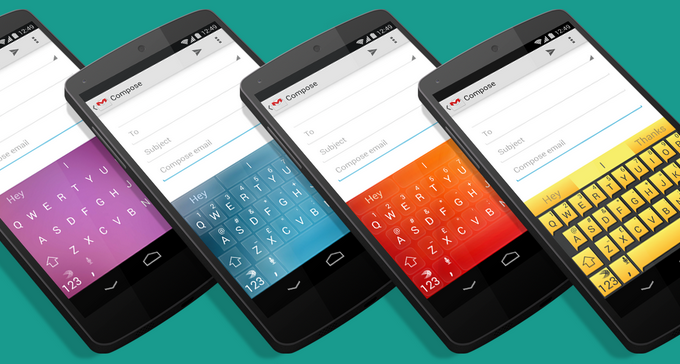
SwiftKey intelligently improves and enhances the typing material on the Android devices. It’s way smooth, the auto correct is far better then the other keyboards. In fact, SwiftKey also allows the users to select customized predictions, you can easily sync the SwiftKey with other applications in order to capture your typing style and fill the words inventory according to your chat style. Besides this, SwiftKey offers a number of a languages. The Keyboard is re-sizable, users can split or undock it as well. There is a plenty of themes to choose from, that add charm to the typing experience on an Android device.SwiftKey Keyboard

Current version of SwiftKey Keyboard is 5.0.1.77. SwiftKey was paid, but recently the developers have made it free and everyone can install it now and enjoy typing using this awesome application. Although you can install this application simply from the Google Play Store, but just in case you’re unable to find it, you may not worry about it as we’ve pulled out the APK and the download link is embed right here for you. Just go ahead, download the APK file and install SwiftKey Keyboard 5.0.1.77 using the installation instructions below.

Download & Installation Instructions:

  1. Download SwiftKey Keyboard 5.0.1.77 APK
  2. Copy the downloaded APK file to your phone or download it directly to your phone.
  3. Locate the APK file on your phone now, tap to start installation.
  4. Select “Package Installer” if prompted.
  5. Allow Unknown Sources from Settings > Security if required.
  6. Proceed with the installation and complete it.
  7. As soon as the installation is completed, SwiftKey should ask you to select it as keyboard.
  8. Setup SwiftKey by following the initial instructions.
  9. Use the new keyboard on your Android device.
  10. That’s All!


How to Root Sony Xperia Z1 Compact 14.3.A.0.757 Firmware [Locked Bootloader]

5
How to Root Sony Xperia Z1 Compact 14.3.A.0.757 Firmware [Locked Bootloader]

Sony unveiled Xperia Z1 compact in January, 2014, a mid-range sibling of the original Xperia Z1. The device sports a very nice 4.3 inches IPS display with 342 ppi. Sony has powered it up with Qualcomm Snapdragon 800 Quad Core CPU clocked at 2.2 GHz accompanied by Adreno 330 GPU and a RAM of 2 GBs is placed on board. At the back, a 20.7 MP shooter is fixed while a 2 MP is fixed on the front. Xperia Z1 compact runs on Android 4.3 Jelly Bean out of the box, but Sony is doing true justice with the software updates and isn’t taking long to provide the latest and greatest version of Android for its mainstream devices. Xperia Z1 compact is currently running on Android 4.4.2 KitKat firmware based on the build number 14.3.A.0.757. All these nice specifications make this device a good to go with choice.

Let’s get back to the topic now. If you happen to chose this device or you already own one, and now you’re looking to checkout the capabilities of your Xperia Z1 compact by going beyond the boundaries set by the manufacturer, you probably will look out for the root access using the easiest method without falling for any hard and fast rules, like unlocking the bootloader of your Xperia Z1 compact, which definitely is not a good choice to go with at times, specially when you’re new to the rooting stuff. Before you start looking here and there, we’ve made this easy for you. Thanks to XDA-developer GeoHot who created TowelRoot application, that has made rooting a number of Android devices a lot easier. TowelRoot works like a charm with Xperia Z1 compact as reported by a number of users. So, in the following post we are going to see how we can gain the root access on Sony Xperia Z1 Compact D5503 running on latest Android 4.4.2 KitKat firmware with the build number 14.3.A.0.757 having a locked or unlocked bootloader. All you need is, you need to follow this guide being careful.Xperia Z1 Compact-Root-LB

Here are the early preparations:

  1. This guide is only for Sony Xperia Z1 Compact. The device must be running on the latest Android 4.4.2 KitKat firmware based on the build number 14.3.A.0.757.
  2. Make sure that your phone’s battery is charged at least over 60%. This is highly recommended in order to prevent any power issues during the rooting process.
  3. USB debugging mode must be enabled on your device. To do so, go to Settings > Developer Options > USB debugging mode > Enable. In case you can’t find the developer options, then go to Settings > About Device > Tap Build Number for 7 Times to enable the developer options.
  4. Use only on OEM data cable to establish connection between your PC and your Phone.
  5. Allow “Unknown Sources” on your phone. To do so,  go to Settings > Security > Unknown Sources > Tick.

How To Root Sony Xperia Z1 Compact Locked Bootloader:

  1. Download Towelroot apk.
  2. Connect your Xperia Z/ZL to your PC now.
  3. Copy the downloaded APK file to your device.
  4. Disconnect your device and locate the APK file on it.
  5. Tap the APK file to begin installation.
  6. Select “Package Installer” if prompted.
  7. Allow Unknown Sources from Settings > Security if required.
  8. Proceed with the installation and complete it.
  9. Now open the Towelroot application from the app drawer.
  10. Tap the button “make it ra1n” in the towelroot app.
  11. Now download SuperSu.zip file.
  12. Unzip the file, and grap Superuser.apk from the common folder in the unzipped folder.
  13. Now copy this apk to your Xperia Z1 Compact, and install it using steps 2 – 8.
  14. Once installed, update Superuser or SuperSu using Google Play Store.
  15. Phewwww! That’s all, you can now enjoy your rooted Xperia Z1 Compact.

TowelRoot-Verizon-At&t-SGS5

How to install busybox now?

  1. Go to Google Play Store on your phone.
  2. Search for “Busybox Installter”.
  3. Once you find it, install it.
  4. Run the Busybox installer and proceed with the installation.
  5. That’s all!

How to check if the device is properly rooted or not?

  1. To do so, go to Google Play Store on your Xperia Z1 Compact.
  2. Find “Root Checker” and install it.
  3. Open Root Checker.
  4. Tap “Verify Root”.
  5. It will ask you for SuperSu rights, tap “Grant”.
  6. It should show you Root Access Verified Now!
  7. That’s All!

1560688_10202529514651766_2061540064_n


What to do once you’re rooted?

Rooting your phone gives you complete access over all the data which is apparently locked by the manufacturers. This includes removal of the factory restrictions and making changes to the internal system and the operating system. Gaining the root access gives you the privileges to install various applications to enhance the performance of your device, allows you to remove the built-in applications/programs, helps you to upgrade the battery life of your device & install the apps which require the root access for the proper functionality and modify your device in so many other ways e.g using mods and flashing custom recoveries and custom ROMs. Here’s our collection of 10 Best Root Apps.

That’s all. Please consider a donation to the developer for his hardwork on this application. Just in case you got any queries or you face any difficulties regarding this post, feel free to reach us through the comment box below. We will try our best to help you out.

One-Tap Root for Samsung Galaxy S4 Active [How To]

One-Tap Root for Samsung Galaxy S4 Active [How To]

Galaxy S4’s waterproof and dust resistant variants soon came out after its official release named as the Samsung Galaxy S4 Active. The device sported some similar specs to its siblings, the original Galaxy S4, and lagged in a few departments, like an 8 MP shooter instead of 13 MP at the back and others. Just in case you own this device and you want to play with this device, you probably will need root access. There are several methods available over the web, but those require you to go through some hard and fast rules.

So, are you looking for an easy method to root your Samsung Galaxy S4 Active without any hard and fast rules? Well, if you’re doing so, you’ve spotted the right place. While going through the XDA-developers forum, I came across famous developer GeoHot’s latest application named Towelroot that roots many Android devices in just one tap. The applications work well with the Samsung Galaxy S4 I9295 and At&t Galaxy S4 Active I537.S4 Active

Here are the early preparations:

  1. This guide is only for Samsung Galaxy S4 Active I9295 and At&t Galaxy S4 Active I537.
  2. Make sure that your phone’s battery is charged at least over 60%. This is highly recommended to prevent any power issues during the rooting process.
  3. USB debugging mode must be enabled on your device. To do so, go to Settings > Developer Options > USB debugging mode > Enable. In case you can’t find the developer options, then go to Settings > About Device > Tap Build Number for 7 times to enable the developer options.
  4. Use only on OEM data cable to establish a connection between your PC and your Phone.
  5. Allow “Unknown Sources” on your phone. To do so,  go to Settings > Security > Unknown Sources > Tick.

How To Root Galaxy S4 Active in One-Tap:

  1. Download Towelroot apk.
  2. Connect your Galaxy S4 Active to your PC now.
  3. Copy the downloaded APK file to your device.
  4. Disconnect your device and locate the APK file on it.
  5. Tap the APK file to begin the installation.
  6. Select “Package Installer” if prompted.
  7. Allow Unknown Sources from Settings > Security if required.
  8. Proceed with the installation and complete it.
  9. Now open the Towelroot application from the app drawer.
  10. Tap the button “make it ra1n” in the towel root app.
  11. Now download the SuperSu.zip file.
  12. Unzip the file and grab Superuser.apk from the common folder in the unzipped folder.
  13. Now copy this apk to your Galaxy S4 Active, and install it using steps 2 – 8.
  14. Once installed, update Superuser or SuperSu using Google Play Store.
  15. Phewwww! That’s all, you can now enjoy your rooted Galaxy S4 Active.

TowelRoot-Verizon-At&t-SGS5

How to install a busy box now?

  1. Go to Google Play Store on your phone.
  2. Search for “Busybox Installter”.
  3. Once you find it, install it.
  4. Run the Busybox installer and proceed with the installation.
  5. That’s all!

How to check if the device is properly rooted or not?

  1. To do so, go to Google Play Store on your Galaxy S4 Active.
  2. Find “Root Checker” and install it.
  3. Open Root Checker.
  4. Tap “Verify Root”.
  5. It will ask you for SuperSu rights, tap “Grant”.
  6. It should show you Root Access Verified Now!
  7. That’s All!

1560688_10202529514651766_2061540064_n


What to do once you’re rooted?

Rooting your phone gives you complete access to all the data which is apparently locked by the manufacturers. This includes the removal of the factory restrictions and making changes to the internal system and the operating system. Gaining the root access gives you the privileges to install various applications to enhance the performance of your device, allows you to remove the built-in applications/programs, helps you to upgrade the battery life of your device & install the apps which require the root access for the proper functionality and modify your device in so many other ways e.g using mods and flashing custom recoveries and custom ROMs. Here’s our collection of 10 Best Root Apps.

That’s all. Please consider a donation to the developer for his hard work on this application. Just in case you got any queries or you face any difficulties regarding this post, feel free to reach us through the comment box below. We will try our best to help you out.

One-Tap Root For At&t and Verizon Galaxy Note 3 Without Tripping Knox [How To]

One-Tap Root For At&t and Verizon Galaxy Note 3 Without Tripping Knox [How To]

At&t and Verizon have always remained the hardest to root, when it comes to the Samsung devices by these two variants. You always need to unlock the bootloader of your Samsung Galaxy device if it’s from one of these variants and many of the users just can’t go beyond the bars on their powerful Samsung Galaxy Android smartphones just because of this restriction put by At&t and Verizon. In the past, a number of devices got rooted, the blootloaders were unlocked, some within hours and some within days, but with the latest devices like Galaxy Note 3 and Galaxy S5, these restrictions have become harder to break.

If you own an At&t or Verizon Galaxy Note 3 and you’re looking for the easiest method to get the root access, you’re on the right spot at the moment. Famous developer Geohot recently released his application named as TowelRoot that can root a number of Android devices without any requirements, and that too in just one tap. As you move forward, in the following post we will be showing you how you can root your At&t and Verizon Galaxy Note 3 [SM-N900A and SM-N900V] and that too without voiding the knox warranty on your phone. All you need is, you need to follow this guide being careful.Verizon-At&t-Note 3-Root

Here are the early preparations:

  1. This guide is only for At&t and Verizon Galaxy Note 3.
  2. Make sure that your phone’s battery is charged at least over 60%. This is highly recommended in order to prevent any power issues during the rooting process.
  3. USB debugging mode must be enabled on your device. To do so, go to Settings > Developer Options > USB debugging mode > Enable. In case you can’t find the developer options, then go to Settings > About Device > Tap Build Number for 7 Times to enable the developer options.
  4. Use only on OEM data cable to establish connection between your PC and your Phone.
  5. Allow “Unknown Sources” on your phone. To do so,  go to Settings > Security > Unknown Sources > Tick.

How To Root At&t and Verizon Galaxy Note 3 Without Voiding Knox:

  1. Download Towelroot apk.
  2. Connect your At&t and Verizon Galaxy Note 3 to your PC now.
  3. Copy the downloaded APK file to your device.
  4. Disconnect your device and locate the APK file on it.
  5. Tap the APK file to begin installation.
  6. Select “Package Installer” if prompted.
  7. Allow Unknown Sources from Settings > Security if required.
  8. Proceed with the installation and complete it.
  9. Now open the Towelroot application from the app drawer.
  10. Tap the button “make it ra1n” in the towelroot app.
  11. Now download SuperSu.zip file.
  12. Unzip the file, and grap Superuser.apk from the common folder in the unzipped folder.
  13. Now copy this apk to your At&t and Verizon Galaxy Note 3, and install it using steps 2 – 8.
  14. Once installed, update Superuser or SuperSu using Google Play Store.
  15. Phewwww! That’s all, you can now enjoy your rooted At&t and Verizon Galaxy Note 3.

TowelRoot-Verizon-At&t-SGS5

How to install busybox now?

  1. Go to Google Play Store on your phone.
  2. Search for “Busybox Installter”.
  3. Once you find it, install it.
  4. Run the Busybox installer and proceed with the installation.
  5. That’s all!

How to check if the device is properly rooted or not?

  1. To do so, go to Google Play Store on your At&t and Verizon Galaxy Note 3.
  2. Find Root Checker” and install it.
  3. Open Root Checker.
  4. Tap “Verify Root”.
  5. It will ask you for SuperSu rights, tap “Grant”.
  6. It should show you Root Access Verified Now!
  7. That’s All!

1560688_10202529514651766_2061540064_n


What to do once you’re rooted?

Rooting your phone gives you complete access over all the data which is apparently locked by the manufacturers. This includes removal of the factory restrictions and making changes to the internal system and the operating system. Gaining the root access gives you the privileges to install various applications to enhance the performance of your device, allows you to remove the built-in applications/programs, helps you to upgrade the battery life of your device & install the apps which require the root access for the proper functionality and modify your device in so many other ways e.g using mods and flashing custom recoveries and custom ROMs. Here’s our collection of 10 Best Root Apps.

That’s all. Please consider a donation to the developer for his hardwork on this application. Just in case you got any queries or you face any difficulties regarding this post, feel free to reach us through the comment box below. We will try our best to help you out.