Home Blog Page 428

How To Fix Samsung Galaxy S4 Black Screen Problem [ Video ]

8
How To Fix Samsung Galaxy S4 Black Screen Problem [ Video ]

Samsung Galaxy S4 is perfect device as compared to many other smartphones in size and performance, but nothing perfect Samsung Galaxy S4 is facing a hell of issues and I have provided many solutions regarding to Galaxy S4 main issues for e.g Fix Samsung Galaxy S4 wifi is stuck on when turning on, Fix Samsung Galaxy S4 Null IMEI and Fix Samsung Galaxy S4 network not registered. Today I’ll help you to fix Samsung Galaxy S4 black screen problem. 

How To Fix Samsung Galaxy S4 Black Screen Problem

Note: Please perform these steps on your own risk. We’ll be not responsible of any damage or anything else.

How To Fix Samsung Galaxy S4 Black Screen Problem [ Video ]:

  1. First Turn on your device and check that for sure that you are facing a black screen problem on your Samsung Galaxy S4.
  2. Remove your back cover and take out the battery, now press home + Volume button for 10 secs.
  3. Insert the battery back and turn on your device, hope it works.
  4. If your device is in the same condition try to connect your device with PC, to make sure that your computer is detecting your device.
  5. If yes disconnect your device and turn off, now turn your device while holding Home+Power+Volume up button. Put your device into download mode.
  6. Now open Odin on your computer and flash the official firmware. Maybe the last ROM got crashed and now it won’t let your device to boot up, flashing a new ROM might help to fix the issue.

Method 2:

  1. Turn off your device, take the sim out, remove your battery and SD card.
  2. Now get a screwdriver according to size of your device screws. Open all the screws one by one carefully and put them into a safe place.
  3. When all the screw is done lift the back case up as shown in the following video.
  4. Now carefully remove the strips that are attached with the board as shown in the video.
  5. After removing all the strips, now take the board and place it on the clean surface.
  6. Get a blower a give a heat cleanup to your board as shown in the video.
  7. Now place the board back and attach all the strips that you have remove before and place the back case back as it was before.
  8. Power on your device and i am sure black screen issue will be fixed.

How to Get Free Wifi Tether on Rooted AT&T, T-Mobile, Sprint, Verizon Android [Video]

1
How to Get Free Wifi Tether on Rooted AT&T, T-Mobile, Sprint, Verizon Android [Video]

Wifi tethering helps in many ways while we are at work on hanging out with friends, but if you are using a carrier mobile AT&T, T-Mobile, Sprint and Verizon, then you cannot use Wifi Tether for free you have to pay the fees for tether service. but no need to worry you can get free Wifi Tether on Rooted AT&T, T-Mobile, Sprint, Verizon Android smartphones how ? follow my step by step guide below in order to get free Wifi Tether on Android phones.

20373-00-WiFiTether

Before Starting:

How to Get Free Wifi Tether on Rooted AT&T, T-Mobile, Sprint, Verizon Android:

  1. First of all make sure your device is rooted and if your device is not rooted then follow our guides [ How To Root Android ].
  2. Now download the files that are mentioned above Xposed Installer apk/Xposed Xtether apk.
  3. After downloading is complete install both apk files.
  4. It will take few minutes to install and after the installation is completed. Open Xposed Installer and select Framework-> Install Updates.
  5. When you tap on Install Updates you’ll get a pop-up from Superusers tap on allow to grant the permission.
  6. Once installation is complete tap on cancel, Don’t restart the device.
  7. Now goto Xposed Installer menu and select modules.
  8. Once you are in modules make sure the Moto Tether is checked ON.
  9. Now reboot your device and Volla! now you can use free Wifi Tether on Android phone.

How to Get Free Wifi Tether on Rooted AT&T, T-Mobile, Sprint, Verizon Android [Video]

How to Add Multi-Window on Any Android Smartphone/Tablet [ Root Required ]

0
How to Add Multi-Window on Any Android Smartphone/Tablet [ Root Required ]

If you want to use the Multi-Windows Features on any Android smartphone or tablet, follow my step by step guide on how to add Multi-Window on Any Android Smartphone/Tablet. But first you have to root your Android device before performing the following the process. Multi-Window feature first came in Samsung Galaxy devices by default, but not on other devices. Multi-Window help us to use several applications at same just like on Windows.

Multi windows on android devices Multi windows on android phones

Before Starting:

How to Add Multi-Window on Any Android Smartphone/Tablet:

  • First of root your device in order to install Multi-Windows on your cellphone. [ Root Android ].
  • Now Download both files mentioned above.
  • After downloading both files goto Play Store, download and install ES File Explorer app.
  • Now open ES File Explorer and goto downloads folder.
  • Here you’ll find Xposed Installer and Multi Window sider bar files. Install both files ( one at a time ).

Kindly allow Unknown Source installation by going in to settings->Security->Unknown sources.

  • Once the installation is completed of both apps now open Xposed Installer.
  • Now you’ll be in Xposed Installer menu choose Framework->Install Updates.
  • After tapping on install updates Xposed installer will take time to install the latest updates. When the process is completed you’ll see a pop-up saying restart your device. Do not tap on allow press cancel.
  • Tap on Xposed menu and choose downloads.
  • Now tap on search and find  “Xmultiwindow” , now select it.
  • You’ll be in “Xmultiwindow” menu swipe to left and goto version->Download->Install.
  • Again goto Xposed installer menu and choose modules and see “Xmultiwindow” is checked.
  • Reboot your device and done !!

You can check the Complete video tutorial on How to Add Multi-Window on Any Android Smartphone:

Source: XDA Video Credit: zedomax

Download Brave Frontier for PC ( Windows 8,8.1,7,XP-Mac)

0
Download Brave Frontier for PC ( Windows 8,8.1,7,XP-Mac)

For all Brave Frontier geeks now you don’t need a smartphone to play Brave Frontier because today i’ll tell you how to download and play Brave Frontier on PC. It’s a style role type game i’ve played it few times but it fun 🙂 .. You have to beat all the fire beasts in land of Grand Gaia. So are you people ready to play this mind blowing action PRG game on PC. Follow my easy step by step guide on how to install Brave Frontier for PC ( Windows 8,8.1,7,XP-Mac).

Brave Frontier for PC

Main Features of Brave Frontier:

* Summon over 200 legendary heroes and ancient beasts, and assemble them into powerful squads, mastering the elemental strengths of Fire, Water, Earth, Thunder, Light, and Dark!

#1 Classic Style RPG game in Japan and Korea!

* Team up with friends and develop your tactics to take on more than 100 missions throughout the land of Grand Gaia!

* Collect loads of beautifully pixel-crafted heroes, each with their own battle style and unique Brave Burst attack!

* Compete in the PVP Arena! Climb its ranks and cut down your opponents to receive rare equipment and other rewards!

* Upgrade resource fields in your town and harvest materials from them to synthesize potions or craft powerful equipment!

For More Please Visit Google Play Store:

How to Download Brave Frontier for PC ( Windows 8,8.1,7,XP-Mac):

  1. You need an Android emulator to run this game on your Windows PC or MAC. We recommend using BluestacksUse our guide to install it on your PC.
  2. After downloading and installing BluestacksDownload Brave Frontier apk.
  3. Open the downloaded APK file now, and let Bluestacks install it.
  4. Open BlueStacks now > All Apps > Brave Frontier
  5. Now click on Install Button to start the downloading.
  6. Follow the initial screen instruction after installation is done.
  7. Goto My Apps after all installation is completed.
  8. There you’ll see Brave Frontier. Double click on it to open.
  9. That’s All!

10 Mobile SMS Text Messaging Services for Marketing [ Mobile/Cellphones ]

0
10 Mobile SMS Text Messaging Services for Marketing [ Mobile/Cellphones ]

Mobile Marketing has been trending since 2000 and plays a vital role in promoting goods, services, ideas and brands to the customers. In today’s age, every person carries a cell phone with him and SMS are noted to be received and read in real time. This strategy is used by the latest marketing companies to provide information and brand awareness among people and has been very successful.

texting

With the increasing popularity and usage of smart phones, app developers have set a ground for marketing by introducing apps that use the mobile marketing strategy. The apps are used as marketing resource to promote a brand, engaging target customers and also include payments along with advertising a service.

Let’s have a look at what makes Mobile marketing or marketing through SMS so successful.

  • It guarantees instant deliverability. Messages are sent and received within seconds.
  • SMS marketing is customizable as it can be molded in every possible way according to the requirement and can be sent to a list and thousands of people quite easily.
  • Almost every SMS is opened and read instantly within a span of 4 minutes on average.
  • It makes a direct connection with the customer unlike emails where there is a chance that your email is marked as spam.
  • Short codes are used with 160 characters; information is given to the point without beating about the bush and nagging the customers.

To summarise the whole point, mobile marketing is cheap, easy and reliable and has a high open rate. Here are some of the apps that can used for using mobile marketing to promote your brand, idea or service. We have gathered the most easily usable and affordable apps for that matter.

Top 10 Mobile SMS Text Messaging Services for Marketing:

Signal:

Signal contributes a lot in managing all your business contacts in one database and ensures sending personal message notifications in real time. You can start up your text messaging campaigns, easily create and schedule them. Plus, you can have a free trial before opting for paid plans.

Fanminder:

Fanminder is one of the fastest growing merchant services in US and Canada working since 1996. They help you start sms marketing campaigns, grow your customers and create coupons and sales. It is affordable with having able to text to 100 numbers for free and $15/month above that.

TellMyCell:

TellMyCell can be used for sms campaigns that require the customers to send in texts with keywords to avail a service. The pricing starts from as low as 5cents/message and free incoming messages. They also offer bulk discounts. You can maintain unlimited contacts and unlimited groups.

Trumpia:

Trumpia let’s you make your personalized text messages that are relevant and are less likely to be thrown in trash. You can generate text alerts, coupons and loyalty programs and also maintain your existing customer database and grow it by adding new ones. It is affordable starting from $25/month coming with a 30-day free trial.

Simple Texting:

Simple Texting is used to generate your short codes and keywords. You can schedule texts, voting campaigns and auto responders lessening your time effort and time.You can also include tiny links and images to the messages. The plan starts from $15/month and comes with a 30-day free trial.

CallFire

Call fire lets you create IVR (interactive voice response) along with messages. Their plans are flexibile and affordable with no monthly or setup fee and as low as 5 cents per message.

Snapgiant:

Snapgiant helps you create personalized marketing messages, short codes, bulk sms and more. Their plan starts from $19 per month; all incoming messages are free, you only pay for the outgoing messages and unused messages are transferred to the next month.

Mozeo:

Mozeo comes with no monthly fee. You are charged for the outgoing messages, all incoming messages are free. You can get short codes or auto responders for effective marketing and your customer database is kept safe. Mozeo charges 3cents per message.

The above mentioned services require you pay some amount to them or purchase their monthly plans and offer good marketing of your brand, service or idea in return.

However, if you want to opt for some less expensive methods for mobile marketing you can go for any of the services mentioned below.

GroupMe:

GroupMe is a free of cost service where you can create groups of people i.e customers and send group messages to them. GroupMe is currently available in US only.

GO SMS:

Go SMS is another free app developed by GO dev Team that you can use to generate free SMS, scheduled SMS, auto reply, etc. The app can be used for dual-SIM as well.

KIK Messenger:

KIK messenger is one of the fastest growing messaging app. It is absolutely free and can send instant messages to a number of people in real time.

Jaxtr SMS:

Jaxtr is a convenient messaging app where if you text to a Jaxtr user it will be free of cost whereas low and affordable sms rates apply to other numbers. The app makes international messaging pretty easy. The messages go directly to the SMS inbox.

If you are looking for a way to include mobile marketing as a part of your customer communications then you may want to try any of the above mentioned platforms. They are affordable, flexible and guarantee customer engagement by sending real time messages, using tools like short codes and auto-reply. You will be able to track your customers, maintain their data base and much more with as low cost as you can wish.

Download ABC for Kids All Alphabet Free for PC – Windows 8,8.1,XP,7 – Mac

0
Download ABC for Kids All Alphabet Free for PC – Windows 8,8.1,XP,7 – Mac

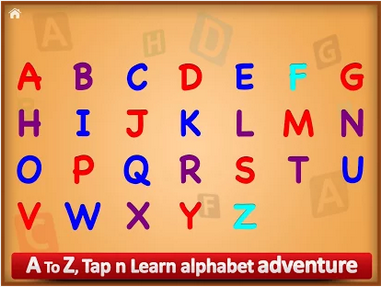
Smartphones are not only for adults and also not for Games, Songs, Photos and Videos. You can help your children’s to learn many thing using different kinds of apps, like ABC for Kids All Alphabet Free it’s a fun learning app for our kids and it really help kids to learn fast, it will help kids to learn to associate words with alphabets, it can help to teach children’s letters and words with sound and much more. You can install ABC for Kids All Alphabet Free on your cellphone, tablets and PC. Yes today i’ll guide you how to download and install ABC for Kids All Alphabet Free for PC.

ABC for Kids All Alphabet Free for PC

About ABC for Kids All Alphabet Free:

* Full ABC
* All Alphabets includes letters A to Z and is fully-featured.
* Without any restrictions
* Real sound and human pronunciations

Features:
Human voice for Alphabets
Image of each Alphabet
On touch you can listen to sounds again
Slideshow is Available where you can sit back and watch your kid learn
Social Media Integration

For More Visit Google Play

How To Download ABC for Kids All Alphabet Free for PC

Also See: flappy birds family apk for Android

  1. You need an Android emulator to run this game on your Windows PC or MAC. We recommend using BluestacksUse our guide to install it on your PC.
  2. After downloading and installing BluestacksDownload ABC for Kids All Alphabet Free apk.
  3. Open the downloaded APK file now, and let Bluestacks install it.
  4. Open BlueStacks now > All Apps > ABC for Kids All Alphabet Free
  5. Now click on Install Button to start the downloading.
  6. Follow the initial screen instruction after installation is done.
  7. Goto My Apps after all installation is completed.
  8. There you’ll see ABC for Kids All Alphabet Free. Double click on it to open.
  9. That’s All!

Also See: Kim Kardashian hollywood for pc 

Download Guardians of the Galaxy LWP Android apk [ Free ]

Download Guardians of the Galaxy LWP Android apk [ Free ]

Guardians of the Galaxy LWP is app that will change the looks of your Android device, You can download the live wallpapers of the stars of Guardians of the Galaxy movie. You can download the Guardians of the Galaxy LWP apk for free from the following links and install it on your cellphone and tablets. Guardians of the Galaxy LWP works like a launcher if you buy this pro version this app will will deliver you email, missed call and text alerts in the form of an over-lay covering your home screen.

Also See: angry birds epic apk

Guardians of the Galaxy LWP Android apk

About Guardians of the Galaxy LWP:

t’s time to save the known universe with the Guardians of the Galaxy by your side!

Join Star-Lord, Rocket Raccoon, Groot, Gamora and Drax in an OFFICIAL Marvel Studios Live Wallpaper experience…

Meet the lovable leader Star-Lord and his rowdy crew: Rocket, an alien raccoon – quick to anger and quick to draw; Groot, Rocket’s trusty friend and ally; Gamora the mysterious assassin; and the vengeance seeking Drax the Destroyer.

Download the free version of the Guardians of the Galaxy Live Wallpaper, based on the Marvel Studios movie, featuring the team’s spaceship, The Milano.

Pay close attention to The Milano’s exhaust which doubles as a battery gauge for your Android device!
Swipe and watch as it shoots and flickers with green light when your device’s battery is full and then gradually dims and turns red as your power depletes.

When your device gets close to zero power your free battery gauge will flash red and The Milano’s exhaust will begin to sputter, reminding you to “fill the tank”!

“I am Groot.” – Groot

If that isn’t enough Guardians action for you, than an upgrade is in order via several unlockable premium options.

You can unlock the premium version of the Live Wallpaper featuring the full team line-up with interactive stat displays for each character.

Once unlocked and onscreen, you can tap any member of the team to view their stats and hear some audio clips.

Also, to help you over-come any potential threats to the known universe, the Guardians of the Galaxy Live Wallpaper will deliver you email, missed call and text alerts in the form of an over-lay covering your home screen!

If you’re feeling like a casualty of wasted time, unlock the premium Clock Widget, which features the day, time and local weather, as well as the voice of the cranky, (albeit hilarious), Rocket!

Hear the lil’ ace shot recite the time for you as well as little surprises here and there for you to discover while the Guardians of the Galaxy Clock Widget is set to your home screen.

Are you ready to protect the galaxy and your Android device? Then unlock the Sticker Widget pack and place the Guardians of the Galaxy anywhere on your home screen! (All 5 members of the team represented – Star-Lord, Rocket, Groot, Gamora and Drax!)

Still feel like you need more help with saving the galaxy..?

There are unlockable premium phone contact avatars and utilities, like a flashlight, calculator and mirror so you can always find the keys, tally the tip and do your make-up before battle!

Even the most deranged villain in the universe isn’t going to be able to stand up to the super strength this app wields, making your Android phone or tablet the most heroic device around.

For More Visit Google play Store:

Screen Shots Guardians of the Galaxy LWP:

Download Guardians of the Galaxy LWP Android Apk:

Download Guardians of the Galaxy LWP apk

Download Angry birds epic Android apk game [ Free for Tablets ]

Download Angry birds epic Android apk game [ Free for Tablets ]

Angry birds epic is the latest version of Popular Angry Birds game, Angry birds game is the most playable game around the world with thousands of players. This game version is not supported for lower end devices but you can download it from here, i’ll provide you several download sources from which you can download Angry birds epic Android apk game for free.

Also See: Angry birds epic for pc 

Angry birds epic Android apk game

Angry birds epic Features:

EPIC BATTLES! Turn-based battles between our heroic flock of warriors and those green snout-nosed scoundrels! It’s easy to play, but difficult to master!

EPIC WORLDS! Explore a fantasy Piggy Island with everything from tribal villages and frosty mountains to tropical beaches and mysterious caves!

EPIC CHARACTERS! Join Red, Chuck, Bomb and the other heroes as they face King Pig, Wiz Pig, Prince Porky and many more villains!

EPIC UPGRADES! Level up your characters, armor, weapons and potions to become a legendary hero ready to take on the mightiest pig warrior!

EPIC WEAPONS! Craft amazing battle-winning weapons like a wooden sword, frying pan or stick thingy with a sponge on top!

EPIC HUMOR! Plenty of offbeat humor and tons of quirky characters dressed in awesomely silly costumes – like a prickly cactus hat and a matching sword.

For more Please Visit Google Play.

Angry birds epic Screenshots:

Download game Angry birds epic for free:

Angry Birds Epic apk free

Angry Birds Epic Apk free

Download Crazy Taxi City Rush for PC ( Windows 8,8.1,7,XP – Mac )

0
Download Crazy Taxi City Rush for PC ( Windows 8,8.1,7,XP – Mac )

Finally wait is over Crazy Taxi™ City Rush is on Android, now you can download it for free. I was waiting for it because when a game is available  we can easily play Android Games on PC. Crazy Taxi™ City Rush is famous game of SEGA of America this ace through the city to deliver your passengers on-time — the crazier you drive the higher your rewards! It’s Free to Download and designed for smartphone and tablet devices. Today i” guide you how to download Crazy Taxi City Rush for PC  and play it on Windows and Mac.

Crazy Taxi City Rush for PC

About Crazy Taxi™ City Rush:

• Intuitive driving controls 
• All-new city to master and explore
• All-new cast of crazy passengers
• Crazy variety of special missions and challenges
• Expand the city for higher pay and crazier routes
• Drive crazy to music from your personal library
• Portrait and landscape modes
• Created by the original Crazy Taxi designer, Kenji Kanno, and SEGA’s top mobile developer, Hardlight, makers of Sonic® Dash

For More Visit Google Play.

How To Download Download Crazy Taxi City Rush for PC:

Also See: flappy birds family apk for Android

  1. You need an Android emulator to run this game on your Windows PC or MAC. We recommend using BluestacksUse our guide to install it on your PC.
  2. After downloading and installing BluestacksDownload Crazy Taxi™ City Rush apk.
  3. Open the downloaded APK file now, and let Bluestacks install it.
  4. Open BlueStacks now > All Apps > Crazy Taxi™ City Rush.
  5. Now click on Install Button to start the downloading.
  6. Follow the initial screen instruction after installation is done.
  7. Goto My Apps after all installation is completed.
  8. There you’ll see Crazy Taxi™ City Rush icon. Double click on it to open.
  9. Enjoy the most addictive game ever!
  10. Don’t forget to let us know about your high score.
  11. That’s All!

Also See: Kim Kardashian hollywood for pc 

How To Install ClockworkMod [CWM] Recovery On LG G Watch

0
How To Install ClockworkMod [CWM] Recovery On LG G Watch

LG G Watch’s Android development has got a kick start now as the device is already out. The Android nature of this device will surely let the users play with it and flash and tweak the device to its maximum extent. The very basic thing that paves a way for all the Mods, custom ROMs and tweaks into an Android device is a custom recovery. A while ago we posted the guide to install TWRP Recovery and Root the G Watch, but we guess having some more options on the list isn’t bad so we found out the CWM recovery for the G Watch that the succeeding post will teach you to install if you happen to be a lucky owner of this cool little gadget.

The ClockworkMod (CWM) Recovery is developed by XDA developer PlayFulGod. It’s based on the version 6.0.5.0 and will let you perform all the basic tasks that you expect a CWM recovery to perform. One of the cool features you will find on this recovery is the touch, unlike the ordinary CWM recoveries, this recovery is touch enabled so that means you don’t need to bother about the buttons of your G Watch. Let’s go through the pre-installation instructions and then flash the CWM 6.0.5.0 recovery on your LG G Watch.

Early Preps:

1. This guide is only for LG G Watch!

Make sure that your device is exactly as mentioned above. To check out what device you have, go to Settings > More/General > About Device or Settings > About Device and match the model number. Be careful about the device model number, flashing a file on a device not listed here might result in bricking it up.

2. Battery should be charged at least 60%!

Your device’s battery shouldn’t be weak. In case your device goes dead during the flashing process, your device may get soft bricked and you might be in need of flashing stock firmware and that will ultimately result in wiping up your data as well. So, make sure that you charge your device before you start the flashing process.

3. Use the OEM datacable to establish connection!

Always use the original data cable to establish connection between your Android device and your computer / laptop. Using ordinary data cables might interrupt the flashing process, so to avoid any mishap, you need to meet this requirement as well.

4. Android ADB & Fastboot Drivers

Android ADB and Fastboot Drivers are required to install this recovery. You may find our full guide to install ADB & Fastboot drivers or checkout our Minimal ADB & Fastboot guide and go with the one that suites you. Follow the instructions explained in these guides being very careful so that you don’t result in making a mistake.

5. Disclaimer

The methods involved in flashing custom recoveries, roms and rooting your phone are highly custom and may result in bricking your device, and has nothing to do with Google or the device manufacturer that is LG in our case. Also rooting your device will void its warranty and you will be no longer eligible for any kind of free device services by the manufacturers/warranty providers. In case of any mishap we may not be held responsible. Follow these instructions to the letter to avoid any mishap or bricking. Make sure that whatever you do, you are doing it at your own responsibility

g-watch-gold

How To Install CWM Recovery on LG G Watch:

  1. Download recovery-6.0.5.0-dory.img file.
  2. Rename the downloaded file to recovery.img for your convenience.
  3. Copy the downloaded and renamed  file “recovery.img” to the Fastboot or Minimal ADB & Fastboot folder that you got after using ADB & Fastboot or Minimal ADB & Fastboot drivers installation. In case you’re confused with this step, read the guides linked in the step 4 above once again.
  4. Now connect your LG G Watch to your PC.
  5. Now open the Fastboot or Minimal ADB & Fastboot folder. Press and hold the Shift Key, and while keeping it pressed Right Click on the blank area/space within either of these folders and then click on “Open command prompt/window here”.
  6. Once the command prompt opens up, issue the following command: adb devices
  7. This will enlist the devices connected with your PC, make sure that there is only one device that should be your LG G Watch. Just in case there are two or more devices connected, it may not let you flash the recovery. You need to disconnect/remove unnecessary devices first.
  8. Ok once the device is listed successfully, issue the following commands in the command prompt.
      1. adb reboot bootloader  – (this will reboot your G Watch in bootloader mode).

      2. fastboot flash recovery recovery.img – (this will flash the recovery in your LG G Watch).

      3. fastboot reboot –  (this will reboot your G Watch once the flashing process is successfully over).

      4. adb reboot recovery – (this will reboot your G Watch in the recovery mode).

  9. Phewwww! That’s all you’re all done. Unleash the true power of your Android Wear powered LG G Watch now!

IPnuiYa

That’s all. If you find the recovery useful, make sure that you donate to the original developer in order to appreciate his hardwork. Those of you having any issues or difficulties regarding this post can leave their comments in the comment box below. We will get back to you as soon as possible. Thanks all.

How To Root and Install TWRP Recovery on LG G Watch

How To Root and Install TWRP Recovery on LG G Watch

Smartphones definitely taught the world to move in a new direction by enhancing the lives of people, but I guess that wasn’t enough and the smartphone giants wanted to do something more out of that particular sphere and went after the concept of other smart gadgets. Right at the moment, the number of gadgets is enough to change an ordinary life into a digital one and the concept of smart watches has joined the family as well.

Sony introduced the smart watches years ago with some very basic functions e.g. notifications, alerts etc. As soon as the concept of smart watches came in the limelight, Samsung made a very fast move and introduced the Galaxy Gear and that was all, a new goal for all the smartphone giants to introduce the best watches they can and battle against each other. Recently, LG has also introduced its smart watch named as LG G Watch.

To have a start, LG G Watch is built with stainless steel and is IP67 certified that makes it dust and water resistant. Besides that, LG’s smart watch sports a very nice 1.65 inches IPS display, 1.2 GHz Snapdragon 400 CPU, 512 MB RAM, 400 mAh battery under the hood and runs Android Wear atop of these nice specifications. Now that the G-Watch runs on Android Wear (Google’s Android OS for wearable(s)), you can definitely expect the great developments to happen and there surely will be a lot of stuff to experiment if you happen to be a lucky G-Watch owner, and guess what? Custom recovery and methods to gain the root privileges on the G Watch are already available.

Thanks to XDA Recognized Contributor Tomsgt, who brought up a great tool that is a capable of performing a number of development tasks on the G Watch without having any hiccups here and there. While this tool flashed and performs your desired task automatically using the files and code, on what the developer worked hard, you don’t really need to worry about any thing, all you need is, you need to download the tool, connect your LG G Watch and do whatever you want within seconds. Let’s have a look on what this tool can do and then head towards the method to use this tool.

Install the drivers needed and test them.
Unlock bootloader.
Relock bootloader.
Flash stock recovery.
Flash stock boot image.
Restore the device if bricked.
Root the G watch.
Flash TWRP Recovery to the G Watch.
Install a Reboot to Recovery App.

LG_G_Watch_white_champagne_gold

How To Use LG G Watch ToolKit to install TWRP Recovery and Root it:

  1. Download G Watch Tool Latest Version.zip file
  2. Once downloaded extract the .zip file to access the tool.
  3. Run the 1 LG G Watch Tools for Windows.bat file.
  4. Now watch this video and learn how to use this tool.

That’s all. Just in case you got any queries, feel free to drop your questions below. We will be up to help you immediately.

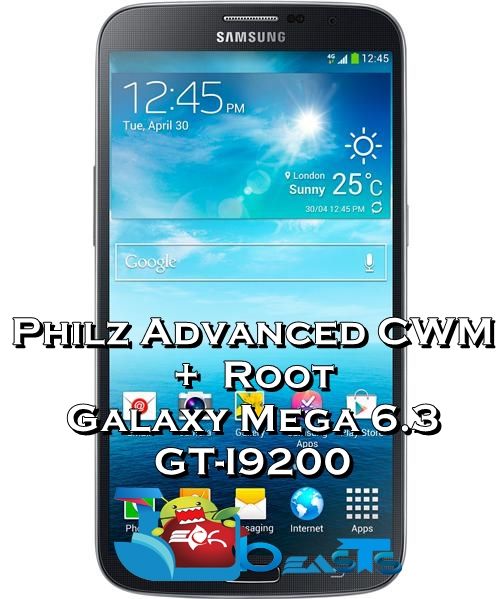
Install Philz Advanced CWM Touch Recovery And Root Samsung Galaxy Mega I9200

Install Philz Advanced CWM Touch Recovery And Root Samsung Galaxy Mega I9200

The reason behind my liking specifically for Philz Advanced Touch CWM over ordinary CWM recovery is its cool interface. XDA Recognized Developer Phil3579 has greatly modified the existing CWM recovery and added a lot of cool features that make this recovery a first choice. Besides that, as the title mentions, this recovery has a touch interface, that means you don’t need to get bothered pressing volume up and down buttons on your compatible device.

Phil’s recovery has already made its way to a number of devices and luckily, Galaxy Mega 6.3 I9200 has joined that family as well now. In the succeeding post, we are going to install Philz Advanced Touch CWM Recovery on our beloved Samsung Galaxy Mega 6.3 GT-I9200 and then we will root it by flashing Chainfire’s SuperSu. If you’ve been looking for this method, you only need to follow this guide to the letter now.

In case you’re a newbie, here’s a brief introduction to the custom recovery and root access.

A custom recovery allows you to install custom roms, mods etc. Along with these, you can make a Nandroid backup, this helps you a lot as you can move back to the previous working state of your phone at any time you want if you have backed up your current system. In some cases, to root the phone you need to flash SuperSu.zip file in the custom recovery, having installed the recovery may help you while in some cases to install the recovery easily, you need to have the phone rooted. You can also wipe cache and dalvik cache of your phone using a custom recovery.

Rooting your phone gives you complete access over all the data which is apparently locked by the manufacturers. This includes removal of the factory restrictions and making changes to the internal system and the operating system. Gaining the root access gives you the privileges to install various applications to enhance the performance of your device, allows you to remove the built-in applications/programs, helps you to upgrade the battery life of your device & install the apps which require the root access for the proper functionality and modify your device in so many other ways e.g using mods and flashing custom recoveries and custom ROMs. Here’s our collection of 10 Best Root Apps.

Early Preps:

1. This guide is only for Samsung Galaxy Mega I9200!

Make sure that your device is exactly as mentioned above. To check out what device you have, go to Settings > More/General > About Device or Settings > About Device and match the model number. Be careful about the device model number, flashing a file on a device not listed here might result in bricking it up. This guide will work for a Galaxy Mega running Android 4.4.2 KitKat or earlier.

2. Battery should be charged at least 60%!

Your device’s battery shouldn’t be weak. In case your device goes dead during the flashing process, your device may get soft bricked and you might be in need of flashing stock firmware and that will ultimately result in wiping up your data as well. So, make sure that you charge your device before you start the flashing process.

3. Use the OEM datacable to establish connection!

Always use the original data cable to establish connection between your Android device and your computer / laptop. Using ordinary data cables might interrupt the flashing process, so to avoid any mishap, you need to meet this requirement as well.

4. Backup everything!

Just to be on the safe side, you may consider backing up each and everything from your Android device. This is highly recommended so that in case anything goes wrong, you still have the access to all of your data and you can restore it immediately. You may backup everything as listed below.

5. Turn off Samsung Kies and other softwares while using Odin3!

Make sure that you turn off Samsung Kies while using Odin3 flashtool. Samsung Kies will interrupt Odin3 and will result in causing errors and may not let you flash your desired recovery or root file. Also, make sure that you turn off any antivirus software you’ve installed and also disable firewall to avoid any connection and flashing issues.

6. Disclaimer

The methods involved in flashing custom recoveries, roms and rooting your phone are highly custom and may result in bricking your device, and has nothing to do with Google or the device manufacturer that is SAMSUNG in our case. Also rooting your device will void its warranty and you will be no longer eligible for any kind of free device services by the manufacturers/warranty providers. In case of any mishap we may not be held responsible. Follow these instructions to the letter to avoid any mishap or bricking. Make sure that whatever you do, you are doing it at your own responsibility.

galaxy-mega-6.3-i9200

Downloads Required:

How to Install CWM Recovery And Root Galaxy Mega 6.3 I9200:

  1. Download recovery.tar.md5 file for your device.
  2. Open Odin3.exe.
  3. Put your Galaxy Mega  in download mode. To do so, turn it off and wait for 10 seconds. Turn it on by pressing and holding Volume Down + Home Button + Power Key simultaneously, You should see a warning, press Volume Up to continue. In case this method doesn’t work for you, try one from this guide.
  4. Connect your device to your PC.
  5. As soon as Odin detects your phone, the ID:COM box should turn blue.  Make sure that you’ve installed Samsung USB drivers before connecting.
  6. For Odin 3.09 hit the AP tab. Select the recovery.tar.md5 or recovery.tar, that you downloaded above.
  7. If you’re using Odin 3.07, you will select “PDA” tab instead of the AP tab, rest of the options remain untouched.
  8. Make sure that the options selected in your Odin are exactly as shown in the pic.
  9. Odin 3.09 explained. (2)
  10. Hit start and wait till the recovery flashing is complete, as soon as your device restarts, remove it from PC.
  11. You can now boot into recovery mode by turning off your device, and then turning it on by pressing and holding Volume Up + Home + Power Key.
  12. That’s all!

How to Root Galaxy Mega I9200:

  1. Download the Root Package.zip file [ UPDATE-SuperSU-v2.02.zip ]
  2. Copy the downloaded Root Package.zip file to your Galaxy Mega’s SD card.
  3. Boot into recovery mode on your Galaxy Mega 6.3, use step 11 in the recovery installation guide.
  4. Now Select “Install > Choose Zip from SD card > Root Package.zip > Yes / Confirm”.
  5. This will flash the Root Package and quickly gain the root access on your Galaxy Mega.
  6. Reboot your device now.
  7. Find SuperSu in the App Drawer.
  8. That’s All!

How to check if the device is properly rooted or not?

  1. To do so, go to Google Play Store on your Galaxy Mega.
  2. Find “Root Checker” and install it.
  3. Open Root Checker.
  4. Tap “Verify Root”.
  5. It will ask you for SuperSu rights, tap “Grant”.
  6. It should show you Root Access Verified Now!
  7. That’s All!

1560688_10202529514651766_2061540064_n

If you’re facing any difficulties regarding this post, feel free to stop by the comment box and drop us your words. We will get back to you ASAP!