Home Blog Page 449

Some Of The iOS 8 Hidden Features

0
Some Of The iOS 8 Hidden Features

Apple surely has released iOS 8 in front of the whole world, and even again this time, they forgotten to mention all the features of iOS 8 and most importantly they are quite useful for our daily routine. After the release of iOS 8 beta, despite that it was removed because of bug issues. Still, those who have got their hands on this upgrade and are exploring the OS, have shared some of the amazing features of iOS 8 that Apple didn’t even mentioned at all. Here is a little list of those features, that might save your time and also makes your iOS 8, a powerhouse.

ios-8-logo

1. Improved Battery Usage View:

Battery life has always been an issue in modern smartphones including Apple iPhone, until there is a way to solve it,and now iOS 8 is there to give us a brief glimpse of all the apps ‘killing’, so you’ll realize which app you are using the most or what is running in background, eating up the battery.

ihsioiqztzxptmtbz4kf

2. Upgraded App Store:

I have never used Wishlist in any App store at all and now I don’t know about others, but in iOS 8 this thing has gotten much importance. Not only will it remember all the apps we want to download later but it also remembers the songs which we tell Siri to find and Radio station in iTunes. Even it gives us a preview in case if we forget something.

tb92bgsd7hszsqjeu0zc

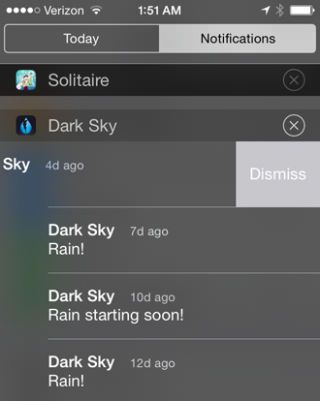
3. Dismiss Notifications By Swiping:

Something we have seen in almost all the Android devices  that iOS 8 Apple has ported a feature by removing the Notification and Swiping instead of waiting for the X to appear, thus saving a lot of time.
fclcinunpp9fdapve2ob

4. More Customization in Mail App:

As Always, Apple tries to beef up its Mail app and in iOS 8 Apple has responded in some serious way. They have given the feature of deleting the message by Long swiping, Mark a Read/Unread/Flag button by Swiping left and also it is smart enough to combine all the related message in a conversation no matter where they are.

zf17dyosz6fumdogve7f

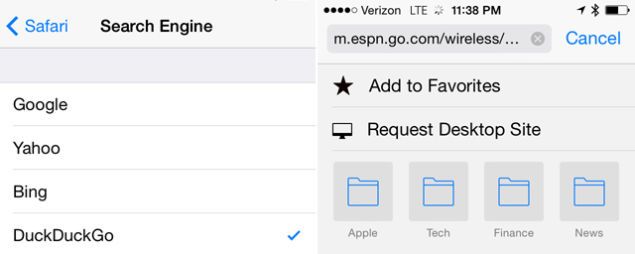
5. Safer and Smarter Safari:

Since, there aren’t much apps to change Apple default apps, so we are stuck with them until there is a way to change them for real. This time there was another upgrade of Safari, but Apple has made this less of an issue in iOS 8. You can say goodbye to the Mobile versions of site, just a single swipe and you can request the Desktop version of that site.
efjcgkm8bcbqa9tk0tpu

6. Better Camera Controls:

Apple does have explained about the Shutterbugs and also the features to remove it in iOS 8, but one thing they forgot to mention was  the easy controls of the Exposure value before taking a picture. Just as you tap the Focus, you will see a Slider to adjust the exposure value.

7. Lock Screen Notification Based on Location:

Well, everyone must have heard about it on Macrumors and the iOS 8 beta has confirmed it, Apple have placed the elegant notifications in Lock Screen area, if you happen to walk by or suppose into a Starbucks, you’ll see a tiny icon appeared opposite to Camera icon, taping on it will direct you to the app and will be ready to make the purchase.

onc0ycbqmvfsydgqvn4f

Xperia T3 Hands on and Details

0
Xperia T3 Hands on and Details

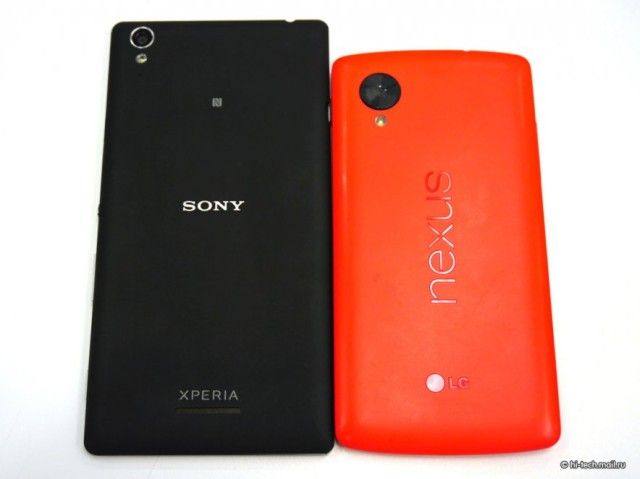
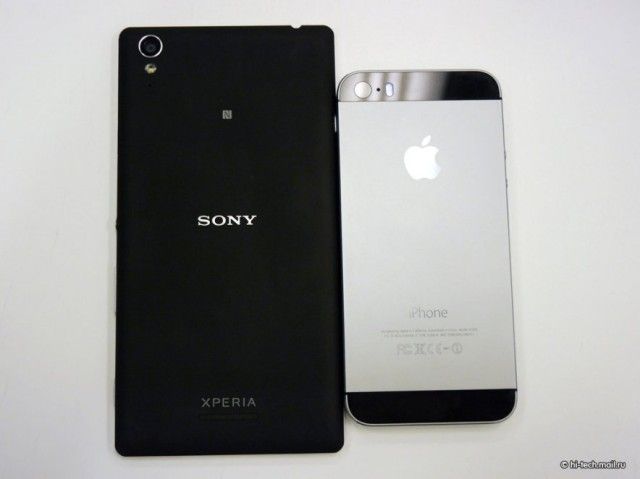
Sony is giving a very handy smartphones like Xperia Z, Z1, Z2 and Z Ultra, I’ve tried Xperia Z and Z1 both are very good smartphones according to specs and performance. Sony Mobile is working very hard to get a strong position against giants like Samsung and HTC, this might be the reason why Sony is experimenting on new devices. Few days back, out of the blue Sony announced their new Smartphone Xperia T3. There was no official word about Xperia T3 nor press conference, you can say that it was a surprise by Sony Mobiles.

Xperia-T3_Hands-on_1-640x479

Following are the main specs of the Xperia T3:

  • 5-inch Display.
  • 1.4GHz quad-core processor.
  • 1GB RAM.
  • 8GB storage.
  • 2500mAh Battery.
  • 8MP Exmor RS camera.

According to specs its a mid range device and yet there is no news about the price. Thanks to Russian site we have got Photos and Video of Xperia T3.

Xperia-T3_Hands-on_2-640x479

Xperia-T3_Hands-on_3-640x479

Xperia-T3_Hands-on_4-640x479

Xperia-T3_Hands-on_5-640x479

Xperia-T3_Hands-on_6-640x479

Xperia-T3_Hands-on_7-640x479

Xperia-T3_Hands-on_9-640x479

Xperia-T3_Hands-on_11-640x479

Xperia-T3_Hands-on_12-640x479

Xperia-T3_Hands-on_15-640x479

Xperia-T3_Hands-on_17

Xperia-T3_Hands-on_19

Xperia-T3_Hands-on_23

Xperia-T3_Hands-on_28

Source: Hi-Tech.mail.ru and Mobile-Review.

Download Nubia UI 2 HD Wallpapers

1
Download Nubia UI 2 HD Wallpapers

There are many smartphones of ZTE running and Nubia UI 2 is in the market. Nubia UI 2 has the same interface like HTC Sense but it’s not used by many smartphone companies. As you all know, I love to collect Wallpapers for Smartphones like Samsung Galaxy S5, Samsung Galaxy Note 3, iPhone, iPad, Windows, Mac, LG and Nexus 7. Today, I have got Nubia UI 2 Stock Wallpapers and good thing is that all of them are HD. Enjoy!

Nubia UI 2.0_wallpaper_ (3)

Nubia UI 2.0_wallpaper_ (6)

Nubia UI 2.0_wallpaper


I’ve a huge collection of Stock and HD Wallpapers for Smartphones and Tablets. You can bookmark our Wallpapers category in order to see the updated and latest Wallpapers easily.

Techbeasts Wallpapers Collection *** Here ***.


Download Nubia UI 2 Stock Wallpapers

Nubia UI 2.0_Wallpapers.zip

Credit: DroidViews

No to iOS 8 Beta, What About iOS 8 Jailbreak

0
No to iOS 8 Beta, What About iOS 8 Jailbreak

iOS 8 beta was a huge bug despite it was downloaded, it was removed from the Official Site because of too many bugs in it and also those who have downloaded it can’t go back to iOS 7.1 or below, because the device and iTunes are not allowing them. However, since Apple released the iOS 8 and the update is in progress, it is obvious like rooting in Android, Jailbreak for iOS 8 will be there before we know it.

Stefen Essar, Hacker and Security Researcher, who successfully Jailbroke the iOS 7.1.1, brought some good news for all of us. He Tweeted about iOS 7.1.1 Jailbreak that Apple hasn’t patched any of the exploits used to Jailbreak iOS 7.1.1. Furthermore, he also tweeted that he plans to fix the code making it compatible for iOS 8 Beta.

Screenshot_37 Screenshot_38

A few days ago we saw the i0n1c published the untethered jailbreak for iOS 7.1.1 called Cyberelevat0r in action, it seems like they will be able to make a Jailbreak for iOS 8 beta after making relevant changes in the Code. iOS 8 will be available for Public this fall and there is one thing to note that Hackers don’t just post Jailbreak for the beat versions, as it makes their work and hacking vulnerable, giving Apple a chance to Patch them.

How To Update Your Nexus Device To Android 4.4.3 Kit-Kat

0
How To Update Your Nexus Device To Android 4.4.3 Kit-Kat

Android 4.4.3 is getting all over the world with the OTA update and most of the Nexus devices along with Google Play Edition flagship devices are receiving it. So far it has been rolling out for Nexus 7 2013(Wi-Fi), Nexus 5 and Google Play Editions of Galaxy S4, HTC One M7 and HTC One M8. Eventually, other Nexus devices along with all the Google Play Edition devices will receive the Update of Android 4.4.3, in the meantime, all those who wants to get their hands on Android 4.4.3 can download and install the update Manually.

nexus7-443

But here are the things you need to consider before proceeding further:

  • Your Device must be completely Stock.
  • Bootloader Must be Unlocked.
  • Double Check the Android Build your are running.
  • Android SDK must be installed.
  • Enable USB Debugging Mode

Disclaimer:

The method involved in flashing ROMs, rooting your phone is highly custom and may result in bricking your device, and has nothing to do with Google or the device manufacturers which is Nexus in our case. In any case of any mishap we may not be held responsible. Follow these instructions to the letter to avoid any mishap or bricking. Make sure that whatever you do, you are doing it at your own responsibility.

Downloads:

Installation Process:

  • Download and Copy the update.zip file to Android SDK/Platform Tools and rename it to update.zip, if the file name is different.
  • Switch Off your device.
  • Now go to Bootloader/Fastboot mode, Press and hold Power + Volume Down Buttons till you see some text on-screen –
  • Once the Menu is loaded, connect your device with PC.
  • From Bootloader, choose Recovery.
  • When you see the Red Exclamation mark, Quickly Hold the Power button then Volume Up button, once you are in recovery mode, proceed below.
  • Navigate to Apple Update from ADB and select it.
  • Open Command Prompt in Android SDK/Platform Tools folder and Type the Following:

Windows: adb.exe sideload update.zip

Mac: adb-mac sideload update.zip

Linux: adb sideload update.zip

  • Once the process is done and update is installed. Highlight Reboot System now and Enjoy the Android 4.4.3

Tweet Bot Lets You Tweet Relatively In a much Efficient Manner

0
Tweet Bot Lets You Tweet Relatively In a much Efficient Manner

Tweetbot is a third party client associated with Twitter, the famous social networking site. This app allows you to use Twitter features relatively in a much efficient manner that saves both time and energy, also it is instantly available on your iPhone, iPod or iPad. The app basically has three versions, one is for use on your iPhone and iPod Touch, other is for Mac and last one is designed especially to be used for iPad. Although the app doesn’t support signing in through multiple accounts yet but  it is still very useful.

Tweet bot 1

Through the app you have shortcuts to update your tweets, check and direct messages, use Twitter chat, respond to other tweets etc.
For example; when you tap a tweet, it would turn grey and a menu will appear from behind the tweet with available options like Retweet, favorite or reply.

tweet bot 2

Other features include:

  • Saving drafts, adding locations, pictures and videos.
  • Multiple timelines to quickly switch between the lists.
  • Push Notifications and Mute Filters.
  • Pull to refresh and see sub menus.
  • It supports 5 Languages; English, French, Arabic, Japanese & German.

tweet bot 5 tweet bot 4 tweet bot 3

The manufacturers have worked hard to make this app look more interesting and fun to use, giving it a creative outlook, sounds and animations along with the robot-themed design. The app is flawless with no complaints, registered for crashes or bugs.

The app is available in App Store and it requires iOS 5.0 or Later for Tweetbot 2. The Latest version of Tweetbot (Tweetbot 3) is also available that includes structural changes of the app and is recommended, if you are using iOS 7. Download Tweet Bot .

How To Install iOS 8 beta On Your Device

1
How To Install iOS 8 beta On Your Device

Apple unveiled iOS 8 yesterday at their Keynote conference, and already developers have released a way to install it on the compatible devices and almost all those who are compatible with iOS 7 can be upgraded to iOS 8 too. iOS 8 included many new features, including support of 3rd Party Keyboards, interactive Notifications, widgets in Notifications center and much much more and as always those who are a member at iOS Dev Center, wants to upgrade their device to iOS 8, so let’s begin.

ios-8-logo

Before Beginning, keep in mind that:

  1. You are the member at Apple’s iOS developer Program, if not you can become one with $99 per year. Follow the link
  2. Make sure that you have made a Back-up of all your data to iCloud or iTunes.
  3. Beta Versions are usually buggy, follow at your own risk.
  4. iOS 8 beta version is compatible with the following:
  • iPhone 5s, iPhone 5c, iPhone 5, iPhone 4S
  • iPad Air, Retina iPad mini, iPad with Retina Display (iPad 4, iPad 3), iPad 2, iPad mini
  • iPod touch (5th generation)

1. Register Your iOS Device:

  • Open iOS Dev Center and Log-in there.
  • Click on the Certificates, Identifiers & Profiles at the Side bar (top right).
  • Now on the Navigation panel, Click on Devices.
  • Click On + button to Add your device.
  • Here you need to Enter the name and UDID of your device and here is how you can find your Device’s UDID:
  1. Connect your device with Mac and launch iTunes.
  2. Select your iOS device from Devices section of iTunes and Open the Summary Tab.
  3. Click Serial number Label and you’ll see the identifier field and 40 hex UDID number, copy it to clipboard.
  • Now paste that UDID number and enter the name of your device and click the Continue button.
  • Review the Details and Click the Register button.

2. Download iOS 8 Beta:

  1. Visit iOS Dev Center again.
  2. Under the iOS 8 beta tab, download iOS 8 beta for your device.
  3. After the Download, Extract the zip file to access the .ipsw file.
  4. Make sure that your iTunes are the latest ones.

3. Install iOS 8 Beta (iTunes Method):

  1. Open iTunes, and connect your device to Mac or Windows PC.
  2. In iTunes, Select your iOS device from Devices section and Open the Summary Tab
  3. Hold Down Option/Shift Key and Click Update iPhone.
  4. Select the .ipsw file and click OK/Open button.
  5. Click OK to continue, if iTunes gives you any message.
  6. Once the device reboots and open on your lock Screen, Swipe the Slider to continue.
  7. The device will reboot again and this time you’ll be greeted with a “Hello” screen, Swipe on the “Slide to setup” and continue, follow on screen instructions to set-up your device.

Framaroot 1.9.2 Released

Framaroot 1.9.2 Released

Have you just got your hands on a new Android device and looking for ways to enhance your experience. The first thing that you must come across is rooting. This term may seem foolish at first but this is the most basic and essential tool for any Android device. If you are planning to install lot of custom applications and mos on your phone, then your Android device must be completely unlocked. Stock devices have lot of restrictions, restriciting users from many system files. There are many Android applications that require root access as well. Such applications provide unique functionalitiies like using two Whatsapp accounts on the same device and increasing the clock speed of CPU.

There are number of ways to root an Android device. Because of large diversity in Android ecosystem and lot of manufacturers releasing their own themed versions of Android, it is virtually impossible to find one general rooting method. While there are few but they are quite difficult and long methods. Many Android developers have tried developing tools, that can root many Android devices at once, with same exploit. Such examples include vroot, kingo root app and tools like doomlord rooting toolkit. However, all of these tools and applications require PC for functioning and their working is limited to very few specific Android devices. Recently, a senior member at XDA alephzain released framaroot applications. Framaroot is a universal one click root application. The number of devices that can be rooted using it is increasing every day. Framaroot has gained popularity quickly because of easy-to-use method. Framaroot can root without PC. It’s developer has recently released Framaroot 1.9.2 app. It includes compatibility for new devices and also installs SuperSU 1.94. The other update in framaroot 1.9.2 is error #15 fix.
Android-Droid-left

If you want to root your device using Framaroot app, then you must see the compatibility list below. It is also possible that your device might not be listed below and it is successfully rooted. This list os not complete yet and you should report if you are successful with it. It is also reported that it may not work with Android 4.3 and above.

This surely is developer’s hardwork and if you’re really happy with such easy rooting method, please consider donating by purchasing his app here.

Framaroot 1.9.2 Compatible devices
Compatibility for Qualcomm devices (Gandalf exploit only) :

  • ASUS Memopad FHD 10 LTE
  • Asus Padfone 1/2
  • Asus Padfone A66
  • Asus Padfone Infinity
  • Asus Transformer Pad Infinity TF700KL
  • Archos 50 Platinum
  • BLU Studio 5.3 S
  • BW T18+ (Fortis Evo)
  • Cloudfone Thrill 430x
  • Disgo 8400g
  • DNS S4504/S4503/S4502
  • FAEA F1
  • Gigabyte GSmart G1315 Skate
  • Gigabyte GSmart Rio R1
  • Google Nexus 4
  • Highscreen Spark/OMEGA Q/Blast/Strike/Boost
  • Hisense AD683G
  • HTC One S
  • Huawei Ascend G330D U8825D
  • Huawei Ascend G526
  • Huawei Honor Pro (U8950-1)
  • Huawei Premia 4g
  • Huawei U8815/U8816 Ascend G300/G301
  • Huawei U8825D Ascend G330D
  • Huawei Vitria Y301-A2
  • Huawei Y215
  • K-TOUCH TITAN S100
  • Karbonn Titanium S5
  • kyocera Hydro Edge
  • Kyocera Torque
  • Lenovo A600e
  • Lenovo A706
  • Lenovo S870E
  • LF-LTE3 (F260S)
  • LG Nitro HD
  • LG L1 II
  • LG L7 II P700/P710/P714/P715/P870
  • LG Lucid 2 (VS870)
  • LG Optimus F5 (P875)
  • LG Optimus F7
  • LG Optimus G E970/E975
  • LG Optimus L3 II E425
  • LG Optimus L5 E610/612/615
  • LG Optimus L7 II P710/P713/ P714/P715
  • LG Optimus L7 P700/Р705
  • LG Optimus LTE 2
  • MEDION LIFE P4013
  • Micromax A111 Canvas Doodle
  • Motorola Defy Mini XT321
  • Oppo Find 5
  • Orange Nivo
  • Orange Yumo
  • Orange Zali
  • Pantech Discover
  • Pantech Flex
  • Pantech IM-A840S Vega S5
  • Pantech Sky S5 A840S
  • Pentagram Combo
  • Phicomm i370w / i600 / i800
  • Samsung Galaxy Core i8260
  • Samsung Galaxy Express GT-I8730
  • Samsung Galaxy Win I8552
  • Sharp Aquos Phone SH930W
  • Smartfren Andromax U
  • Smartfren Andromax i2
  • Sony Xperia E C1505/Dual C1605
  • Sony Xperia L C210X
  • teXet TM-3204R
  • teXet TM-4677
  • Xiaomi Mi-2S
  • Yarvik Ingenia Compact SMP35-200
  • ZTE T83 (Telstra Dave)
  • ZTE V880G/ZTE V955
  • ZTE V9815 Grand Memo N5
  • ZTE Warp Sequent
  • Waiting feedbacks …


Compatibility for MTK devices (Boromir, Faramir and Barahir exploits only) :

  • A8 Alps
  • Acer A1-810
  • Acer A1-811
  • Acer Iconia A3-A10
  • Acer Liquid E2
  • Acer Liquid Z3
  • Alcatel OT 4030D S’POP
  • Alcatel OT 8008D Scribe HD
  • Alcatel OT 997D
  • Alcatel OT Fierce
  • Alcatel OT Idol 6012X / Le Mobile Sosh / Orange Hiro
  • Alcatel OT Idol 6030X/6030D/6030H
  • Alcatel OT Scribe Easy 8000a
  • Alcatel OT Star 6010X
  • Alcatel OT Pop C5
  • Alcatel OT Ultra 6033x
  • Alcatel OT X’Pop 5035D
  • Amoi N828
  • Archos 40 Titanium
  • Arc Mobile 350D
  • ASUS Memo Pad HD 7
  • atab4w
  • AVUS A24
  • Blu Dash 5.0
  • Blu Life Play
  • BLU ONE X
  • BLU Studio 5.0 / 5.5 / 5.5S
  • BQ Aquaris 5 / 5.7
  • BQ Elcano
  • Brondi Glory 2
  • Cat B15
  • Changhong z9
  • Charmpin (UTime) G7
  • Cherry Mobile Amber
  • Cherry Mobile Burst 2
  • Cherry Mobile Cosmos S
  • Cherry Mobile Cosmos X
  • Cherry Mobile Omega XL
  • Cherry Mobile Thunder 2.0
  • Chinese Star S7589
  • Chuwi VX1
  • Coolbox Quore v57
  • Coolpad F1 (8297)
  • Cube U39GT 3G (CubeTalk 9)
  • Cube U51GT C4
  • Cube U55GT (CubeTalk 79)
  • Cubot A890
  • CUBOT GT90 / GT99
  • CUBOT ONE
  • CUBOT X6
  • DAXIAN XY100S
  • Doogee DG200 Hotwind
  • Doogee DG350
  • Evercoss A7S
  • Excelvan ET704
  • Explay HD Quad
  • Explay infinity II
  • Explay Polo
  • Explay Surfer 7.32 3G
  • Explay Surfer 8.31 3G
  • Explay X-Tremer
  • Fly IQ440 Energie
  • Fly IQ441 Radiance
  • Fly IQ442 Miracle
  • Fly IQ443 Trend
  • Fly IQ446 Magic
  • Fly IQ450 Quattro Horizon 2
  • Fly IQ451
  • Gionee 868H
  • Gionee E7 mini
  • Gionee Elife E3
  • Gionee GN 708
  • Gionee Pioneer P2
  • GoClever Fone 570Q
  • GoClever Quantum 4
  • GoClever Tab M713G
  • Goophone N3
  • GSmart Aku A1
  • GSmart Sierra S1
  • Haier W718
  • Haipai I9389
  • HDC I9500/N9006
  • Highscreen Alpha GTX
  • Hisense U970
  • HKC Q79 3G
  • Hosin v70
  • Huawei U8836D G500 Pro
  • Huawei G610-U00 / G610-U20
  • Huawei G700-U10 / G700-U20
  • Huawei Ascend G730
  • Huawei Y320
  • Huawei Y511
  • HTM A6
  • HTM M1/M3
  • HUMMER H1+
  • iBall Slide 3G Q1035
  • IconBIT NetTAB Space 3G Duo
  • IconBIT NetTAB Mercury Q7
  • I-mobile series I-style 7.2
  • INEW I6000+
  • iNEW V3
  • Intex Aqua HD
  • iOcean X7
  • Jiayu F1
  • Jiayu G2
  • Jiayu G3S
  • Jiayu G4
  • Just5 Spacer
  • Karbonn A1 / A30
  • Karbonn Titanium S2
  • Kata i3
  • Kata Venus 3
  • KENEKSI Beta
  • KingTopKt07
  • Kvd N3+
  • LANIX ILIUM S600
  • Lava iris 405 / 503
  • Lenovo A3300
  • Lenovo B8000-H
  • Lenovo 10.1″ Tablet S6000
  • Lenovo IdeaPhone P700i
  • Lenovo IdeaPhone S720
  • Lenovo IdeaTab A3000-H
  • Lenovo IdeaTab S6000-H
  • Lenovo P770/P780
  • Lenovo S720, S820, S920, A390, A850, A516, A656, A369i, A859
  • Lenovo S5000-H
  • Lenovo S6000-F
  • Lenovo Yoga 8 / 10
  • Le Pan TC802a
  • M-Pai 809T
  • M4tel SS1060
  • Mi354 “Spice Smart Flo Space”
  • Micromax A58
  • Micromax A89 Ninja
  • Micromax A90
  • Micromax A114 / A117
  • Micromax A115 Canvas 3D
  • Micromax Canvas 2 Plus
  • Micromax Canvas 4 A210
  • Micromax Canvas EGO A113
  • Micromax Canvas HD
  • Mlais MX70
  • MoreFine S6 Pro
  • Motorola RAZR D1
  • Motorola RAZR D3
  • MSI primo 76
  • MyPhone Agua Iceberg
  • Mysaga C2
  • N800 Mini Note
  • Neken N6
  • NEO N003 Advance
  • Newman N1 / K18
  • Nexa Vega N4
  • NGM Forward Prime
  • NGM Forward Young
  • NGM Dynamic Racing GP
  • Omate TrueSmart
  • Onda v819 3G tablet
  • OPPO Find Clover
  • Oppo find 5 mini
  • Oppo findway U7015
  • OUMEI X5
  • Overmax Vertis-01/01+
  • Overmax Vertis-02/02+
  • Pantech Vega LTE Ex (IM-820L)
  • Pearl Smartwatch AW-414
  • Philips W536
  • Philips W736
  • Phoenix Rockx1
  • PocketBook SURFpad 3
  • Prestigio Multipad 4 Quantum
  • Prestigio MultiPhone 4055
  • Prestigio MultiPhone PAP 3350/3400/4505/5044 DUO
  • Runbo x5 / x6
  • S09 W63 IP68
  • Sesonn N9200+
  • Sharp AQUOS SH837W
  • Shengda S4
  • Sky Vega A800S
  • Smartfren Andromax V
  • Star HD9000+
  • Star N8000
  • Star N9800
  • Star S5 Butterfly
  • Star S6
  • Star S9500
  • Starmobile Diamond V3
  • Starmobile Knight
  • Symphony Xplorer ZII
  • Tecno R7
  • TeXet NaviPad TM-7055HD
  • Texet TM-5277
  • THL T100S / T200
  • THL V12
  • THL W8 Beyond
  • THL W8S
  • THL W11
  • THL W100(S) (130711)
  • THL W200(S)
  • Tronsmart TS7
  • Ulefone u7
  • Utime U100S
  • Vonino Ego QS
  • Vonino Sirius QS
  • Xiaocai X9
  • Xiaomi Hongmi / Redmi
  • Xolo A600/Q700/Q800/Q3000
  • Zen Ultrafone 701HD
  • ZOPO 980/990
  • ZOPO C2 Platinum
  • ZOPO C3
  • ZOPO ZP910
  • ZOPO ZP300+ / ZP500+
  • ZOPO ZP900 Leader
  • ZOPO ZP950H
  • ZOPO ZP990+
  • ZOPO ZP998
  • ZTE BLADE Q
  • ZTE BLADE Q MAXI / MINI
  • ZTE Kis
  • ZTE Leo S1
  • ZTE N986
  • ZTE Open
  • ZTE Roamer 2
  • ZTE V795
  • ZTE V880G/H
  • ZTE V967S
  • ZTE V987 Grand X Quad
  • Walpad
  • Walton Primo F3i
  • Walton Primo G1
  • Walton Primo H2
  • Wiko Cink Peax 2
  • Wiko Darkfull
  • Wiko Darknight
  • Wiko Darkmoon
  • Wiko Iggy
  • Wiko Ozzy
  • Wiko Rainbow
  • Wiko Stairway
  • Waiting feedbacks …


Compatibility for Huawei K3V2 devices (Pippin exploit only) :

  • Huawei Ascend D1 Quad XL U9510E
  • Huawei Ascend G615
  • Huawei Ascend Mate
  • Huawei Honor 2
  • Huawei MediaPad 10 Link
  • Waiting feedbacks …


Compatibility for AMLogic devices (Gollum exploit only) :

  • Waiting feedbacks …


Compatibility for Samsung devices (Legolas and Aragorn exploits only) :

  • Samsung Galaxy Core GT-I8262
  • Samsung Galaxy S Aviator
  • Samsung Galaxy S M110S
  • Samsung Galaxy Proclaim S720C
  • Samsung Galaxy Young GT-S6312/GT-S6310
  • Samsung Illusion SCH-I110
  • Samsung Lightray SCH-R940
  • Waiting feedbacks …


Compatibility for Exynos devices (Sam, Frodo, Legolas and Aragorn exploits only) :

  • AT&T Galaxy Note 2 SGH-I317
  • Highscreen Explosion
  • Hyundai T10
  • Hyundai T7s
  • Impression 9702 (Exynos 4412)
  • Lenovo K860/К860i
  • Newman N2
  • Meizu MX2
  • Samsung Galaxy Camera EK-GC100
  • Samsung Galaxy Note 10.1 GT-N8000, GT-N8010, GT-N8013, GT-N8020
  • Samsung Galaxy Note 2 GT-N7100
  • Samsung Galaxy Note 2 LTE GT-N7105
  • Samsung Galaxy Note 8.0
  • Samsung Galaxy Note GT-N7000
  • Samsung Galaxy S GT-i9000
  • Samsung Galaxy S2 AT&T SGH-I777
  • Samsung Galaxy S2 Epic 4G Touch – SPH-D710
  • Samsung Galaxy S2 GT-I9100
  • Samsung Galaxy S3 GT-I9300
  • Samsung Galaxy S3 LTE GT-I9305
  • Samsung Galaxy Tab Plus GT-P6200/GT-P6210
  • Samsung Galaxy Tab 7.7 GT-P6800/GT-P6810
  • Samsung SGH-i997 Infuse 4G
  • T-Mobile Galaxy Note 2 T-889
  • Verizon Galaxy Note 2 SCH-I605
  • iBerry Auxus CoreX2 3G and CoreX4 3G


Compatibility for Omap36XX devices (Gimli exploit only) :

  • Archos Gen8
  • Cliq 2 MB611
  • Coolpad Quattro 4G
  • Droid 2 (a955)
  • Droid 2 Global (a956)
  • Droid X (MB810)
  • LG Marquee LS855
  • LG P970 Optimus Black
  • Motorola DEFY+ (MB525 / MB526)
  • Motorola Droid PRO
  • Motorola Droid X
  • Motorola Milestone 2
  • Motorola XPRT
  • Parrot ASTEROID Smart
  • R2D2 (a957)

Download: Framaroot APK v1.9.2

How to Install and Use Framaroot:

    1. Download the APK file and place it on your phone.
    2. Run the APK file, allow unknown sources if asked.
    3. Open Framaroot from App Drawer.
    4. Follow the onscreen instructions!

That’s All! In case you got any queries or face any difficulties regarding this post, feel free to stop by the comment box below. We will try our best to help you out. Thanks All! You can also visit developer’s thread to make requests or ask for advanced fixes.

iOS 8 Is released With Dev Mode and Quick Reply

0
iOS 8 Is released With Dev Mode and Quick Reply

Finally! Apple announced iOS 8 with a lot of new exciting features like Dev Mode, Quick Reply and much more under this new update. This can be easily done by just double tapping the home button and you will get the list of people whom you’ve contacted recently as well as recent apps.  Mail application has been improved, now you can edit and minimize the mail at any run time. You can even edit notifications with swipe down and access keyboard, for third party. Spotlight search has been improved and now you can search for movies, inside safari, mails, apps and pictures. Keyboard is in its updated version with words suggestion.Well, I have been expecting a big change in interface but there is nothing new in that . They have added few new features but nothing much,

Screen Shot 2014-06-02 at 23.04.31

You can create group on messaging, add and remove, share location, ‘Do not Disturb’ option in group messages, leave group and you can also send voice messages just like the Viber Tap Speak and Send. You can also send Video messages through messaging app very  easily send pictures in messages as well.

Take And Save Photo On the Fly With AlbumSnapper

0
Take And Save Photo On the Fly With AlbumSnapper

Comparing iOS camera app with Android one’s and without a doubt, Android has far more better camera apps than iOS. Instead of just taking and editing photos; they also offer to make Album, direct sharing, even photo-sphere and much more. However, Jailbreak Community is doing everything they can, to give iOS users a lot of new things that they desire, even within the camera app. This new tweak adds the functionality of taking and adding the photos directly to the Album. AlbumSnapper is the name of the tweak and as mentioned in its description:

Once you have installed this tweak, open the default camera app and check out the top bar, right next to the Camera reversing option, you’ll see a whole new option called “Album”. Once you tap this Album button, you’ll be presented with the Albums names you have created, just by tapping once on the album name will make it the default album to save photos, till you change it. In the settings, the first thing you’ll see is the ‘Kill switch’ and second thing is the ‘Persist Album’, it remembers your Album even after you have closed the camera app. Whereas, “Add Album” allows you to create a new album and the last one allows you to select the newest album that you have just created. This tweak is Available on Cydia for only $0.99.

Screenshot_5

Jailbreak your iOS Device.

Since the following tutorial needs an iOS device which is Jailbroken, you need to Jailbreak your device. If your device is still in its normal condition. Follow our Jailbreak Section to find out how to Jailbreak your device.

Download AlbumSnapper:

albumsnapper1

  1. Open Cydia.
  2. Search for AlbumSnapper.
  3. Tap AlbumSnapper once the search is over.
  4. Purchase the app and wait for the Install button to appear
  5. Tap Install on the top right corner.
  6. Tap Confirm.
  7. Restart your Device.

How To Transfer Files Between Cloud Services In Android

0
How To Transfer Files Between Cloud Services In Android

Time and again, everyone wants to know, how to transfer files between their cloud back-up services without having to download them and upload again manually, instead they just have to tap one and then the second to just transfer all the stuff. If you’re on a Computer, doing such thing is a very easy job and much of the times you have to do it from PC, but under some circumstances you may have to transfer data from Cloud services using your Android device and the task isn’t that easy as it seems, however, not difficult either.

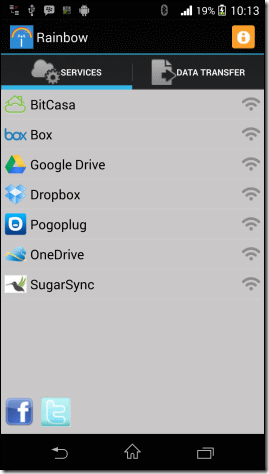
Rainbow is an app that allows users of Android to directly transfer files between Cloud Storage services. However, this app is still in its developmental process, so there are chances of bugs which isn’t a big issue and if you don’t find your Cloud Service on it, go to XDA Forums and vote your Cloud Service in the poll. Now, let’s see how we can install and use this app.

Rainbow-Home

How to Install and Use Rainbow:

  • Download and Install Rainbow from Google Play Store.
  • Once you have installed it, open it.
  • Make sure that you have a working Wi-fi connection.
  • You will see a list of Cloud Services that are available, tap on the one you want.
  • You’ll be promoted to the Log-in screen, Log-in using your account.
  • Accept the administrative permissions to successfully connect to the service.
  • After you have configured all the accounts you wish to manage using this app, tap the Data Transfer tab
  • You’ll see the list of accounts that you have configured, including the Android device.
  • Tap on the one from where you want to transfer the data, you won’t be able to see any thumbnails.
  • Once you tap a file, a pop-up containing two options, Delete and Copy, will emerge.
  • Tap copy to copy the item to clipboard or delete it if you want.
  • Now all that is left is to open the other Service and paste the copied data there.
  • It will take a little time, so please be patient.

Data-Transfer

Download From Google Play: Link

Leaked Photos Of Samsung Galaxy S5 Mini Emerged On the Web

0
Leaked Photos Of Samsung Galaxy S5 Mini Emerged On the Web

Following the previous traditions, from Samsung Galaxy S3 Mini to Galaxy S4 Mini, Samsung  has been releasing a mini version of its Flagship device since then. Now, it is time for us to see Samsung Galaxy S5 Mini and as we have also seen in the past that whenever after the release of leaked photos of any flagship device, it is not long enough for it to be available in the market. And it looks like the same case has happened with Samsung Galaxy S5 Mini, because SamMobile has gotten the leaked images of Galaxy S5 Mini, obviously the source is not official, so you only have to believe that it is true.

We have already seen two other variants of Samsung Galaxy S5, namely Galaxy S5 Active and Galaxy K Zoom and they did the same thing with Galaxy S4 as mentioned above, so it is quite obvious that they will do the same thing with Galaxy S5. The leaked pictures suggest that the Galaxy S5 Mini looks same like its senior device, rounded corners are with perforated back and both the Heart Beat Sensors and Finger Print sensors are present.

samsung-galaxy-s5-mini-leaked-picture

As far as the Specs are concern, 1.4GHz Quad Core Exynos 3 Processor with Mali 400 GPU and 1.5GB of RAM, 720p 4.5-inch display, 16GB built-in storage with 8MP rear and 2.1MP front camera, running Android 4.4.2 Kit-Kat out of the box, with most of the features from Galaxy S5 including Private Mode, Ultra Power Saving mode and Kids Mode.

samsung-galaxy-s5-mini-leaked-pictures


Source: SamMobile