Home Blog Page 469

2048 for PC – Windows 7/8/XP/Mac

0
2048 for PC – Windows 7/8/XP/Mac

If you love to solve the puzzles then you’ll love 2048 puzzle game, a unique and mind blowing puzzle game. You have to join the tiles and get to 2048 tile exciting isn’t it. ( Swipe (Up, Down, Left, Right) to move the tiles. When you touch tiles with the same number, they merge into one and when 2048 tile is created, the player wins ). 2048 is on both Android and Apple play store, worth time passing game. Today we’ll tell you how you can download and install 2048 on PC.

2048 for PC

2048 for PC – Windows 7/8/XP/Mac Features:

– Added animation, default on
– Added swipe feedback sound, default off
– Game is automatically saved
– High score
– Leaderboard
– Achievements
– Undo support
– Share with friends
– Setting for : when the game ends, toggle animation, toggle sound
– Completely native
– Clear and simple UI
– Game works for android 2.3.* and above devices
– Supports all devices including tablets

How to Download and Install 2048 – Windows 7/8/XP/Mac:

  1. Running Android apps on PC is possible through an App Player / Android Emulator only. To do this, we recommend BlueStacks. Follow the full guide here and install it on your PC.
  2. Download 2048 apk file to your PC.
  3. Once downloaded, go to the downloaded file location.
  4. Double click the downloaded APK file now.
  5. Wait for the installation to get complete with BlueStacks.
  6. Once it complete, open BlueStacks now.
  7. Click on “All Apps” in the BlueStacks now and click on the app that you just installed.
  8. Use the app by following the on-screen instructions.
  9. That’s All! Enjoy!

Android Kit-Kat Battery, Signals in iOS 7 – How To

0
Android Kit-Kat Battery, Signals in iOS 7 – How To

Getting iOS looks and apps on Android is an easy thing to do but hearing to get an Android thing on iOS is something that is rare to see. Android Kit-Kat brought nothing new when it is compared in, looks with previous versions, but it is a little smoother than any previous version of Android. Despite that user can enjoy the best things from their own side of OS, yet they want to try things from other Platforms on their device, even if it is not much to change the style or the UI.

Photo-Apr-02-5-12-41-PM

Grpahics are such things that can be transfer from one platform to another without effort but on deviantArt a user named theBassment has start from the scratch to reproduce Kit-Kat graphics for iOS, in a whole new way to make it suitable for iOS. Apple made some of the tweaks for iOS 7 to make it look more charming, smooth and especially the Cleaner design of iOS 7 makes it unique.

Still it is not perfect and as mentioned above that users want to use apps and tweaks of other platforms on their device, but you cannot use all of their features, only some of them and maybe not even the important ones. Now if you want to try Android Kit-Kat Batery Icon and Signals Style on iOS 7, not much of a difference it will make, still it is something that is not usually seen on an iOS device.

Android-Kitkat-battery-indicatior

Of course, you will need a Jailbroken device, if you want to toy around with the elements of Status bar as you might have guessed WinterBoard is necessary to install it, but it will look better with a Dark theme, so better grab yourself a dark theme and then try this tweak on your iOS 7 device and also you will need a Free theming app installed on your device. You can download Android Kit-Kat Battrey and Signals bar as a .zip file from theBassment’s deviantART page.

Once Downlaoded you need to extract it and place the files into your /private/var/stash/Themes directory using any app, as iFiles and then go to WinterBoard and select it.


Auxo 2 For iOS Released, Here Is How You Can Install It

0
Auxo 2 For iOS Released, Here Is How You Can Install It

About Auxo 2, back in late February the A3Tweaks officially released the confirmation about the release of Auxo 2 and it would be getting a specific design for iOS 7 according to the theme and use of iOS 7. They confirmed that, on April 2, they will release the upgraded version of Auxo Tweak, Auxo 2 and true to their words the Tweak is now live on Cydia Store. Incase if you haven’t used it on iOS 6, which was quite a big task back then, taking the multi-tasking to its peek then. After iOS 7 Apple Significantly changed the Multi-Tasking but still this Tweak, as made according to iOS 7, can take Multi-Tasking to a whole new level even in iOS 7 and when it comes to tweaks like Auxo 2 there is always an interesting thing, whether this app will be relevant or not and in case of Auxo 2, there is no disappointment.

auxo-2

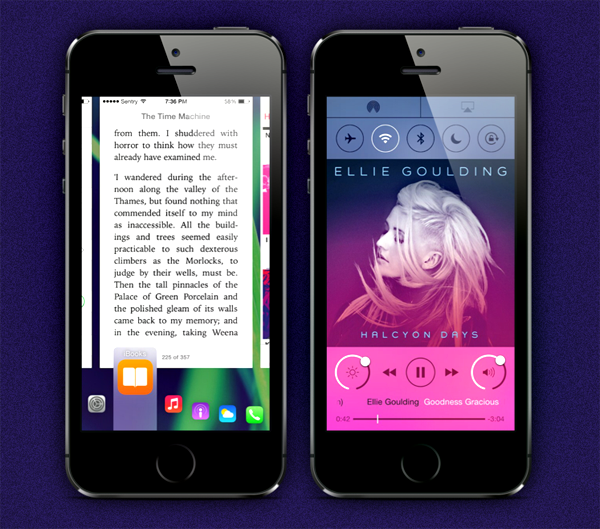
Once you installed this Tweak, you can glide through different apps with aplomb, with just simple swipe gestures you can switch from one app to another and just like its predecessor the app perfectly blends in with the interface of iOS 7 and looks even more stunning than what it was in iOS 6. Auxo 2 can be categorized in Three parts as mentioned in the description of tweak itself: Multi-Center, Quick-Switcher and Hot Corners

Multi-Center is just like Control Center in iOS 7, just from a single swipe up from the bottom of the display brings up the Multi-Center View, which features App Switcher, Brightness Control,Playback control and much more. Form this view, you can pull down the app preview to make an even bigger view of them which can be very handy.

Photo-Apr-02-9-07-25-PM

Quick-Switcher is one of the best part in this app, it lets you switch between apps with just a single Swipe up gesture. While Hot-Corners, as same as iOS 6, lets you swipe up from the bottom to left or right corner of display to bring up multi-tasking or straight jump to home-screen. You have to option to invert Hot-Corner,if you like.

Photo-Apr-02-9-07-14-PM

About the price of Auxo 2, if you are the owner of the previous version of Auxo, then you can get a new one for only $1.99 and if you are a new user only $3.99. The discount for old users is because they helped the developer in releasing the new version of Auxo, although over-all saving is negligible 1cent.

The worst part is that this app is not compatible with iPad but the A3Tweaks have promised to release an iPad compatible version specifically designed for iPad. This is a great opportunity for all the iOS 7 users with iPhones only, to grab their hands on Auxo 2. If you want the true multi-tasking experience on your iPhone then you better, no, get it now, while its fresh. =D

How To Download And Install Auxo 2

Download Auxo 2:

  1. Open Cydia.
  2. Search for Auxo 2.
  3. Tap Auxo 2 once the search is over.
  4. Tap Purchase in the top right corner.
  5. Pay and Close it and then Tap install.
  6. Tap Confirm.
  7. Restart your device

How To Use Auxo 2:

  1. After the Installation, Auxo 2 will automatically start.
  2. You can Swipe Up to bring the Multi-Taksing.
  3. You can Swipe up from bottom to Left or Right Corner of Display to bring up multi-tasking or straight jump to home-screen.
  4. You can close all the apps at once with Big X button after Swiping up to bring multi-tasking
  5. Open Auxo Settings to learn more about it.
  6. Enjoy!

Fantastical 2 for iPad, Best Calender App For iPad

0
Fantastical 2 for iPad, Best Calender App For iPad

Calender apps are not of much importance for many users, but there are some who use this app in everyday life. They mark the dates according to the events and meetings, whether it is a Birthday, Office Meeting, an upcoming event whatever the case may be, they use it a lot more than any average user. Fantastical was an app for iOS device, released way back in 2012 and rated as the best camera app for iPhone/iPad. The first released took much positive responses from the users but they delay in its second release made everyone think that there will be no upgraded version of Fantastical.

Photo-Apr-02-7-32-48-PM

Fantastical 2 has made its way to iPad, filled with a lot of new features. This version is specifically designed for iPad, can you imagine that an app which was once released for all iOS devices made its way to the top within less time now that it is released for only a specific device it can top everything without much more ,effort. The first release of Fantastical showed the world how a Calender app must be and now with a whole new version it is far better than before, opening new gates for all the Calender apps for everyone.

With an updated User Interface for iOS 7, Fantastical brought a lot of new features while some older  features are also remained in it to let users think that they are not using a whole new app. The seamless integration with iOS reminder facility gave it a boost, location based events can ease the problem of finding the place, Week view is there allowing users to monitor the immediate future schedule.

Photo-Apr-02-7-32-58-PM

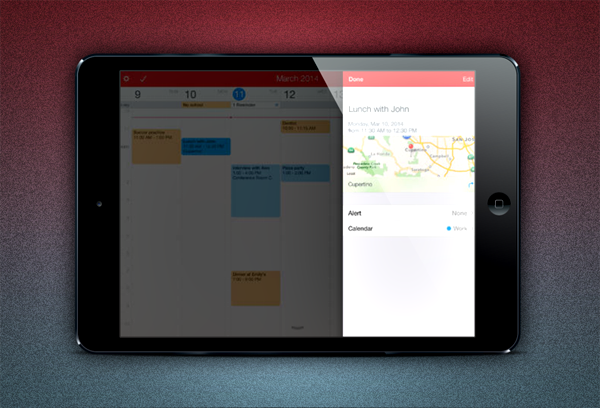
The iPad version of this app has been built on the same image as its cousin, but it looks more stunning on the Bigger screen, like watching a movie on a small screen then suddenly switch to a bigger screen make it more entertaining.When it comes to keeping daily notifications, iPad version makes it easier to view, Change and Edit tasks as you go along.

By the means of Money, Fantastical 2 is not a cheap app but an Apple user should’t worry about money as Fantastical 2 only costs $9.99. Flexibits has proved to be a very loyal to all its users over the past 18-months and has remarkably build the app to its new position, iPad users will not be disappointed. We suggest you to purchase this app as fast as you can, because $9.99 is the discounted price and you save over 5 Bucks.

If you are on the hunt for a Calender app then Fantastical 2 is the best one and if you happen to download it, Make sure to leave your thoughts below in the comment section.


Download Fantastical 2 For iPad On App Store

Download WhatsApp APK v2.11.186

0
Download WhatsApp APK v2.11.186

WhatsApp Messenger for Android has recently received a new update that packs up a lot of bug fixes and some new options are also available. The new options in WhatsApp include Privacy Settings for last seen, profile picture and WhatsApp status. Other changes include core enhancements making WhatsApp even more reliable and convenient. The only change that has added charm to the use of WhatsApp is its long awaited “Last Seen” block option on the privacy settings that allows the users to stay silent while using WhatsApp and get rid of the annoying people around.WhatsApp

We’ve pulled out WhatsApp’s latest APK and embed the download link right here. Just in case you’re looking for the APK to install or keep in your phone, you may go ahead through the installation instructions. Before we do so, let’s first have a precise look on the changes as per WhatsApp’s official changelog.

What’s New
2.11.186
new privacy settings for last seen, profile photo and status
add Camera shortcut for quicker picture sending
add ability to pay for a friend’s WhatsApp service
add large video thumbnails in chat
add option to show unread messages on home screen widget (Android 3.0+)
add option to share/save profile photo/group icon
increase message history user can send
fix sending flag emoji on Sony phones
fix voice note recording volume on Samsung Note 3 and Sony phones
enabled Hindi (Android 4.1+)
How to download & install WhatsApp Messenger v2.11.186 APK:
  1. Download WhatsApp APK v2.11.186
  2. Download it to your PC and transfer it to your phone or else download it to your Phone directly.
  3. Uninstall any previous versions of Snapseed from your phone.
  4. Now locate the WhatsApp  APK on your phone and tap it.
  5. Begin the installation, allow “Unknown Sources” if required.
  6. Select “Package Installer” if asked.
  7. Complete the installation.
  8. Access the installed app from the app drawer.
  9. Enjoy Socializing!

How to Hide WhatsApp Last Seen on Android or iPhone

0
How to Hide WhatsApp Last Seen on Android or iPhone

WhatsApp is the fastest growing social chat messenger in the world, the application that actually killed SMS messaging. The very feature everyone wanted on WhatsApp was to have a choice for it’s “Last Seen” status that always informed other contacts when did the person checked his WhatsApp last time or when did he come online last time. Now this is embarrassing and annoying when you don’t want to talk to someone, you don’t want to reply and the other person comes to know about it despite knowing that you’ve seen his / her message and you didn’t reply.

Earlier in 2014, WhatsApp was acquired by Facebook for 19 Billion Dollars and changes were definitely expected in WhatsApp. The greatest feature that hit WhatsApp after it was sold, are it’s privacy settings that allow a user to have full control over his WhatsApp profile. These privacy settings allow the users to hide their WhatsApp status, restrict their WhatsApp profile Picture and the most desired feature everyone wanted, the privacy settings allow a user to hide his “Last Seen” feature.

Just in case you were looking for a way o hide your WhatsApp Last Seen status and after trying a number of third party applications you’re tired enough, you may stop worrying as you will find the this feature embedded in WhatsApp’s latest version. In the following post I’ve also written a small how-to that explains how you can setup your last seen privacy on your WhatsApp account on your Android smartphone or iPhone. Let’s go through it now.

How to Hide WhatsApp “Last Seen”:

  1. Open WhatsApp lastest version installed on your phone.
  2. Press the options key.
  3. Go to Settings > Account > Privacy.
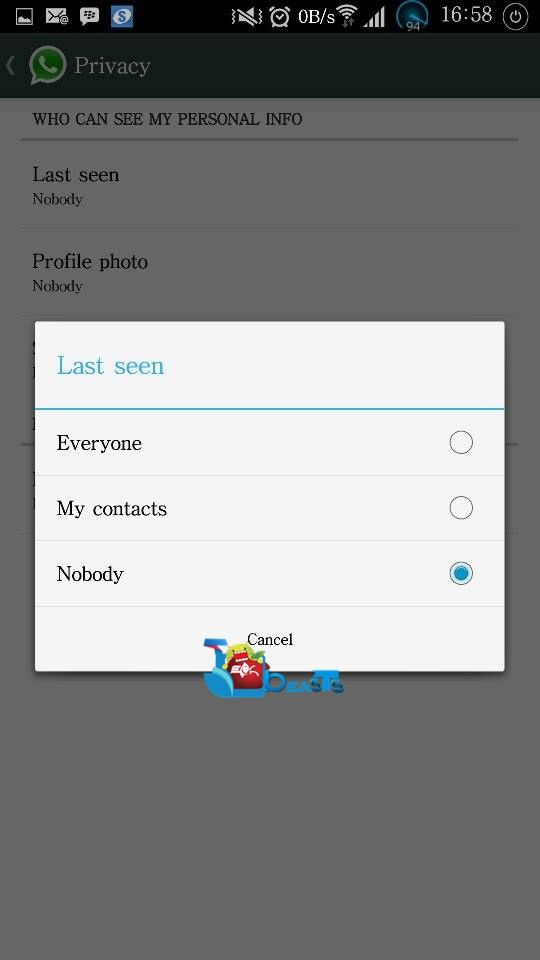
  4. Tap “Last Seen” in privacy.
  5. Now select from whom you want to hide it, you will see 3 different options as follows.
      1. Everyone – Tap to allow everyone to see your “Last Seen”.
      2. My Contacts – Tap to allow only your contacts to see your “Last Seen”.
      3. No Body – Tap to allow no one to see your “Last Seen”.
  6. Once you select one of these three options, your privacy settings will be applied.
  7. You’ve successfully hidden your “Last Seen” status from the people you wanted.
  8. That’s All!

10155521_10202983805688758_230068270_n983639_10202983805328749_1204662931_n1908276_10202983805208746_1715066662_n

There is one thing to be kept in mind while you apply these privacy settings. If you restrict everyone to see your “Last Online” status on WhatsApp, means if you select the “No Body” option, you won’t either be able to see anyone’s last online option. In short, you’re disabling the “Last Online” status.

Cymera v 1.4.8 APK

0
Cymera v 1.4.8 APK

Editing photos on Android is really good if you’re a photography Enthusiast. Smartphone cameras are getting better every day but the built in features and effects aren’t just enough sometimes to give your photos a whole new eye-catching dimension. There was a time when people had to use different photo editing apps on the computers to enhance their photographs, but now each and everything can be done straight from your Android smartphone. To do this very job here, you may use Cymera – Selfie & Photo Editor app.  Cymera is capable of capturing your photos in so many different environments, not only that, the app gives you lots of options to enhance your photographs and make them look beautiful. Different effects Storytelling Collage, Beautifying Effects, Fun Decorations, Oldies but Goodies etc.

Cymera

Cymera is available for free in the Google Play Store but just in case you’re unable to find this app or you want to keep it’s setup in your Android phone, we’ve pulled out it’s apk and embed the download link right here for you guys. Let’s go through the official features of Cymera – Selfie & Photo Editor and then head towards the APK and installation instructions.

Cymera – Selfie & Photo Editor Features:

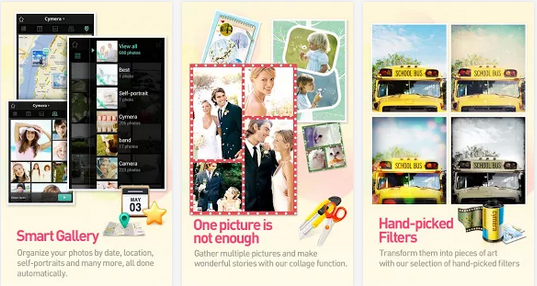
■ Powerful Camera

– 7 camera lenses inspired on the famous DSLR cameras
– Out of Focus, Anti-Shake, Timer, Self-Portrait, Touch Shots and other shooting modes to help you get the best out of your capturing experience.

■ Hand-picked Filters and Borders

– More than 20 carefully selected filters to bring different emotions to your photos. Adjust the light and intensity of the filters individually. Add one of our 20+ borders and light filters to give your photos a completely different feel.

■ Amazing Beautifying Effects

– Big Eyes, Smile, Slim Face, Clear Spots, Liquify, Brighten and more options to help you make the most beautiful portraits.
– No more zooming in and out and doing things manually! Our face detection technology allows Cymera to locate every trait of your face and know exactly where to add the effect.
– We have compiled over 70 different realistic hair and makeup items to help you complement your looks. Truly the best beautifying effects in the market!

■ Storytelling Collage

– One picture is not enough. Make photo stories with our multiple collage options.
– Cymera offers diverse fixed and freestyle collage layouts plus really beautiful backgrounds and editing functions that will help you have the best collage experience.

■ Fun Decorations

– Over 800 decoration options that include: stickers, comic masks, frames and more. All free.
– A beautiful variety or brushes with different colors, lines, patterns and shapes to help you express yourself and make unique photo decorations.

■ “Oldies but Goodies” Editing Functions

– Cymera offers all the other complementary editing functions such as rotation, cropping, auto level, brightness, contrast, saturation, sharpening and more to enhance the quality and versatility or your photos. All in a simple and easy to use interface.

■ Sharing

– Share with your friends on Facebook, Twitter, Mixi and Weibo

■ Language Support

Cymera offers language support for: English, Spanish, German, Japanese, Korean and Chinese (Traditional and simplified)

How to Download & Install Cymera  v1.4.8:

  1. Download Cymera  v1.4.8 APK.
  2. Download it to your PC and transfer it to your phone or else download it to your Phone directly.
  3. Uninstall any previous versions of Snapseed from your phone.
  4. Now locate the Cymera APK on your phone and tap it.
  5. Begin the installation, allow “Unknown Sources” if required.
  6. Select “Package Installer” if asked.
  7. Complete the installation.
  8. Access the installed app from the app drawer.
  9. Enjoy Photo Editing!

Snapseed APK v1.6.0

0
Snapseed APK v1.6.0

Passion of photography is something growing too fast these days and when it comes to Android phones, the manufacturers aren’t taking a break from pulling off the curtains from something new everyday. Camera is one of the main focuses of any Android smartphone manufacturer and we’ve been seeing lots of new Camera features getting introduced with the flagships of Sony, Samsung, HTC and others. The in-built features of  a smartphone camera’s aren’t always enough to add the special charm to the photographs taken so something more good is needed here. This is what Snapseed will do for you, one of the best and my favorite Android Photo-Editors available around. Snapseed is a free app that enhances the photography experience on your Android device, the users can add funny, beautiful and magnificent effects to their photographs to make them eye-catching.Snapseed

Snapseed is currently having it’s version v1.6.0. In case you’re looking for this app, we’ve pulled out it’s apk and embed the download link right here. Just go ahead and grab the download link and install using the installation instructions. Before we move further, we’ll first have a look on it’s features.

Snapseed Features:

 Easily adjust your photos with a single tap using Auto Correct
• Tweak your photo to perfection with Tune Image
• Use Selective Adjust to enhance specific objects or areas in your photos
• Experiment with fun & innovative filters like Drama, Vintage, Grunge, and Tilt-Shift
• Add Image Borders for a finishing touch
• Share your creations via Google+, email, and any other service you have installed.

How to Install Snapseed APK:

  1. Download Snapseed v1.6.0 APK.
  2. Download it to your PC and transfer it to your phone or else download it to your Phone directly.
  3. Uninstall any previous versions of Snapseed from your phone.
  4. Now locate the Snapseed APK on your phone and tap it.
  5. Begin the installation, allow “Unknown Sources” if required.
  6. Select “Package Installer” if asked.
  7. Complete the installation.
  8. Access the installed app from the app drawer.
  9. Enjoy Photo Editing!

Top 10 Free Android Action Games [ 2014 ]

0
Top 10 Free Android Action Games [ 2014 ]

It’s smartphone era and games are the best part of it. There are Paid and Free Android  games. Yesterday we posted about Top 10 Paid Android Action Games. Today we are providing  you with about Top 10 Free Android Action Games. It’s a combo collection of all the action games. Following is the list of free Android action games. Enjoy the top 10 action games for Android.

1. Temple Run 2:

Temple Run 2

With over 170 million downloads, Temple Run redefined mobile gaming. Now get more of the exhilarating running, jumping, turning and sliding you love in Temple Run 2.Navigate perilous cliffs, zip lines, mines and forests as you try to escape with the cursed idol. How far can you run?. It’s the best endless running game you have to stole the idol then run for your life, facing hurdles of fire, waterfalls, broken bridges etc.

2. Sniper Hero – Shooting Game:

Sniper Hero - Shooting Game

Are you going to be able to survive Sniper Hero shooting game? Only if you are good with your sniper rifle. The monster invasion has started but as a mercenary you have grabbed your rifle and are ready to shoot some monsters. Defend yourself and shoot to kill and try to stop the monsters from destroying everything and killing you first. See how long you can last in Sniper Hero FPS game.

3. Snooker 147 free game:

snooker 147 free gameThis is a free tile game about snooker, specifically designed for snooker fans. If you love the billiards, you’ll love this!The game is optimized for ease of playing with a pleasant, aesthetic appearance. It is also an educational game for all people, because it has been demonstrated that resolving puzzles helps in the development of skills and abilities of everyone,special kids, such as motricity, creativity, spatial skills, language and self- esteem. Besides, kids will train the resolution of problems, and they will get a funny picture as a reward, stimulating their imagination and self-confidence.how to play, it is a free game, consisting in moving the pieces to the correct square in order to assemble the picture.Please, let us know your opinion and suggestions about the game in order to improve it.

4. Bubble Archery:

Bubble ArcheryThe game is to shoot Bubbles with Bow and Arrow. This is a level game. It has many unique and interesting levels where you have to shoot all the bubbles using your aiming and logical skills to complete a level. The physics used in this game is very accurate and interesting. So get it and enjoy this interesting world.

5. Death Shooter 2:Zombie killer:

Death Shooter 2:Zombie killerDeath Shooter 2 Coming. when Death Shooter 3D Download will Break 500W. More Weapon, New Mode, and more Maps. More Zombie. It’s require less Memory. support more mobile device. Counter Strike and Zombie War. Different feeling , different modes. equipment silencer will not be found in few times to killer Enemy. Upgrade your weapon’s magazine to increase capacity and reduce reloads. Upgrade your weapon’s scopes to increase damage and zoom. Upgrade your weapon’s silencer to increase critical. Upgrade levels increase hp max value. kill npc before he alert will not spotted. Bomb coming get behind cover will safe. kill star Enemy will get surprise. Zombie War Mode Can Get Money Faster than Counter Strike .You can get protect time when squat behind cover.

6. Clumsy Bird:

Clumsy Bird

THE CHASE IS ON! Flap the little wings of the Clumsy Birds in this #1 thrilling and action packed flying adventure. Meet the hapless ever Clumsy Birds and they need your help! The survival of the Clumsy Birds is at risk because the bad dragons have stolen their precious eggs. With their little wings, the Clumsy Birds are not afraid of any danger. It’s your job to guide these cute birds fly through all kinds of obstacles to get back their eggs. Simple one touch controls: touch to flap the wings. Easy and fun to play, but a challenge to fully master .Stunning graphics: beautifully detailed world comes to life on Android Tap anywhere on the screen to fly higher. Online Play: Fly as far as possible to beat other players within 60 seconds. This game is same as the famous Flappy Bird.

7. Guns:

Screen Shot 2014-04-02 at 13.02.34Guns is a realistic simulator with shooting range experience, which has most popular guns/weapons and their information, including Handguns, Shotguns, Sub-Machine Guns, Assault Rifles, Sniper Rifles, Machine Guns, Grenades, Knives.Tap the screen or shake to fire, tap menu for settings.

8. FRONTLINE COMMANDO 2:

Screen Shot 2014-04-02 at 13.08.41

Betrayed and left for dead on the battlefield, you must build your team of mercenaries and exact a war of revenge against your enemies. ASSEMBLE YOUR ELITE SQUADR ecruit and train soldiers and lead the ultimate war team to the battlefield! Choose from 65 possible unique squad members, from sharpshooters to medics. DOMINATE ACTION-PACKED CAMPAIGNS Lead your squad to victory through 40 unique missions and 13 elite challenges, including online PVP. BATTLE FOR ONLINE PVP SUPREMACY Think you have an unstoppable squad? Challenge other shooters online for the ultimate bragging rights in PVP. FACE PERILOUS URBAN WARFARE Shoot your way through 7 destructible battlefields! Take on snipers, heavy weapon specialists, tanks, helicopters, flying drones and more. COMMAND ADVANCED WEAPONRY Maximize your firepower with multiple, upgradable weapon classes including sniper rifles, assault rifles, shotguns and machine guns. Utilize special war gear on the battlefield such as drones, grenades and RPGs.

9. Sniper Killer:

Screen Shot 2014-04-02 at 13.17.41

Sniper Killer is dedicated to the awesome game Call of Duty (COD) shooting game. It consists of 3×60 second rounds where your objective is to shoot the bad guys as accurately as possible. You can aim for the head or the body area. The closer you are to the center of each of these areas the more points you gain. The trick is to make every single shot count. If you waste a bullet on thin air your points will suffer!

 10. Bike Race Free – Top Free Game:

Screen Shot 2014-04-02 at 13.21.48

In this simple and fast-paced physics-based free game, tilt your device to lean your bike and touch the screen to accelerate/brake.

Features:

– Multiplayer
– Simple controls
– Earn stars to unlock new levels
– 18 addictive worlds
– 144 challenging tracks
– 16 amazing bikes
– Touch to accelerate, tilt to lean the bike
– Cool stunts

Top 10 Best Paid Android Action Games [ 2014 ]

0
Top 10 Best Paid Android Action Games [ 2014 ]

Yesterday we have posted about top collage apps for Android and top photo editors for Android. Today we came up with the Top 10 best paid Android action games of 2014. I have collected the best and top Action games going on to so far. These games are full of adventure and action also paid. Check out the following list of top 10 paid Android action games. We will update the post as the trends changes.
Modern Combat 4: Zero Hour:

Modern Combat 4 Zero Hour

The #1 Action FPS game is back on smartphone with a new chapter to push the boundaries of mobile gaming even further. In the wake of nuclear warfare, the only chance to avoid global devastation is in the hands of the few elite soldiers who must track down and rescue the world’s leaders from a frighteningly familiar terrorist group.Feel the story’s dramatic intensity and see both sides of the story by also playing the villain, Edward Page.Dominate the battlefield with a new tactical movement system.Wage war and take action all over the world, from Antarctica to Barcelona.Feel the chaos of war on the battlefield with console-like graphics, lifelike animations and dynamic objects.The first Gameloft title powered by the Havok Engine for amazing ragdoll effects. Warfare never felt so realistic.

Dokuro:

Dokuro

You are a nameless skeleton in the Dark Lord’s army. After a chance encounter with the Princess, who was abducted to become the dreaded Dark Lord’s wife, you found yourself setting her free. Guide the Princess from the shadows in Skeleton Form, switching to Hero Form when it’s time to mount a gallant offense! Can you spring the Princess from the castle? Aid the Princess in her flight from the Dark Lord’s castle, guarding her from traps and enemies as you strike an artful balance between both Skeleton and Hero Forms–each boasting a palette of unique abilities and traits. Can you safely guide your royal counterpart to the flower at the end of each area? Succeed, and the fairytale will further unfold!

Deep gameplay and whimsical storytelling come together in a resplendent production you can pick up and play–as well as save and stop–anytime you please! Equal parts action and puzzle, a new kind of fairytale awaits you!
Survivalcraft:

SurvivalcraftYou are marooned on the shores of an infinite blocky world. Explore, mine resources, craft tools and weapons, hunt, make traps and grow plants. Build a shelter to survive nights and share your worlds online. Ride horses or camels and herd cattle. Blast your way through the rock with explosives. Build complex electric devices. Possibilities are infinite in this sandbox survival and construction game.This is the twenty fifth release of Survivalcraft, and it is Christmas-themed. Check out the new, prettier Christmas Tree and find reindeer roaming the land. More importantly, this update finally adds long awaited bow and arrows, and an electric shooting target. There are iron fences to better match your building style and ivy that grows from overhangs in hot and humid areas. Beware the fearsome tigers, which can easily jump over large obstacles to get to you.

The Amazing Spider-Man:

The Amazing Spider-ManGet ready for intense web-slinging action with The Amazing Spider-Man! Join Spidey in the official game app of this highly anticipated 2012 blockbuster! Play through the movie storyline as Spider-Man faces off against the Lizard and rampaging gangs. Web-sling and crawl your way through an open, fully 3D New York while using your amazing skills to save the city.Fight the Lizard and his minions to put a stop to his dark schemes.Play The Amazing Spider-Man through more than 25 immersive missions inspired by the upcoming movie’s storyline. Climb, jump and web-sling from building to building for an aerial thrill like never before. Explore the city through its five distinctive districts (Central Park, Business, Downtown, Pier and Residential) An exciting and enjoyable fighting system with melee, ranged, combo attacks and much more. A wide selection of upgrades to customize your style, attacks and skills.

Grand Theft Auto: San Andreas:

Grand Theft Auto San AndreasFive years ago, Carl Johnson escaped from the pressures of life in Los Santos, San Andreas, a city tearing itself apart with gang trouble, drugs and corruption. Where filmstars and millionaires do their best to avoid the dealers and gangbangers. Now, it’s the early 90’s. Carl’s got to go home. His mother has been murdered, his family has fallen apart and his childhood friends are all heading towards disaster.On his return to the neighborhood, a couple of corrupt cops frame him for homicide. CJ is forced on a journey that takes him across the entire state of San Andreas, to save his family and to take control of the streets.Rockstar Games brings its biggest release to mobile yet with a vast open-world covering the state of San Andreas and its three major cities – Los Santos, San Fierro and Las Venturas – with enhanced visual fidelity and over 70 hours of gameplay.

Grand Theft Auto III:

Grand Theft Auto III

Rockstar Games celebrates the 10th anniversary of one of the most influential games of all time. The critically acclaimed blockbuster Grand Theft Auto III comes to mobile devices, bringing to life the dark and seedy underworld of Liberty City. With a massive and diverse open world, a wild cast of characters from every walk of life and the freedom to explore at will, Grand Theft Auto III puts the dark, intriguing and ruthless world of crime at your fingertips.

With stellar voice acting, a darkly comic storyline, a stunning soundtrack and revolutionary open-world gameplay, Grand Theft Auto III is the game that defined the open world genre for a generation.

Rayman Jungle Run:

Rayman Jungle RunRayman Jungle Run is powered by the same UbiArt Framework engine that brought you Rayman Origins – Winner of numerous Game of the Year and Platformer of the Year awards. Rayman Jungle Run is easy for all ages to pick up and play, but challenging for the longtime Rayman fans to master.  Unlock the Land of the Livid Dead levels if you have the skills.Dodge cannon balls and jump your way through falling rocks in the new Pirate Ship section for more exhilarating action. Rush faster than ever in the Boss Plant chapter to escape a giant “flower” that doesn’t smell too good. After so much running, will you dare enter the two new Land of the Livid Dead levels. Rayman Jungle Run is easy for all ages to pick up and play, but challenging for the longtime Rayman fans to master.  Unlock the Land of the Livid Dead levels if you have the skills.
Gangstar Vegas:

Gangstar VegasRoll up on a dangerous new trip through the City of Sin in the latest episode of the acclaimed open-world action game. Get ready for fun, immersive, and wild gun wars. Play as a mixed martial arts (MMA) fighter in a BLOCKBUSTER STORY MODE. Perform amazing stunts with ragdoll effects making use of HAVOK PHYSICS. Climb the leaderboards in tough CHALLENGES including air, water and street racing, MMA fighting & more. Become Vegas’s finest shooter in Carnage & Heist modes. In this third-person shooter action game, you will play as a rising MMA champion. Framed by the mafia, you are supposed to throw your bout at the fighting event of the year. But when your opponent beats you to the punch and goes down first, famous crime lord Frank Veliano’s perfect plan goes down too. You have just become the most wanted man in the city. In a place where crime is everywhere, you will have to hold your gun tightly and take part in the wildest mafia wars ever.

N.O.V.A. 3 – Near Orbit:

N.O.V.A. 3Four months have passed since Kal ruined the Volterites’ plans by sabotaging their war factories, and stopping the extraction of the Judger Artifacts. However, following the assassination of President Folsom, the government surrendered the colonies to the Volterite Protectorate in order to prevent civil war.Kal Wardin has been laying low since Folsom’s death, but now he has received a desperate plea from Yelena to come to Earth. Once again, the hero must rise to save mankind. An epic storyline: Humanity finally returns to Earth after years of exile! Fight in 10 immersive levels across the galaxy, from a war-torn Earth to a frozen Volterite city. Multiple weapons and powers: Run, shoot, drive vehicles, and pilot a mech to defeat hordes of enemies. For the first time, multiple allies can jump inside the same vehicle and spread destruction on the battlefield.

TMNT: ROOFTOP RUN:

TMNT ROOFTOP RUNNow, you can play as Leo, Donnie, Raph, or Mikey in this action packed combat runner with an all new vehicle mode! Run, jump, fight and now drive through New York’s endless cityscape as you rid it from the Foot Clan, Kraang, Dimension X and now Baxter Stockman.

Collect energy orbs to unlock exclusive weapons, gear, and boosts that will keep you one step ahead of the Kraang ship. One-touch controls combine with ninja moves and shell shocking battles for an epic gaming experience. Rooftop Run collects personal user data as well as non-personal user data (including aggregated data), and offers in-app purchases. User data collection is in accordance with applicable law, such as COPPA. User data may be used, for example, to respond to user requests; enable users to take advantage of certain features and services; personalize content and advertising; and manage and improve Nickelodeon’s services.

How To Easily Change Languages In iOS 7

0
How To Easily Change Languages In iOS 7

There are number of people who speaks different languages and if you are one of them then you must write messages in multiple languages, which you can change in Keyboard Settings. However, it is a little bit of process to add or remove languages in settings and also cycle through the languages to select one for you is also time taking. AnyBoard is a great Jailbreak tweak that adds a Globe Button in your Keyboard, upon pressing which brings a list of languages instead of blindingly cycling through them.

1

It is free easy to use and even if you don’t speak or write different languages it can be add a good Globe button in your keyboard or you can send your friends texts in different languages. Without further ado, lets find out how we can install it on an iOS device.

Jailbreak your iOS Device.

Since the following tutorial needs an iOS device which is Jailbroken, you need to Jailbreak your device. If your device is still in its normal condition. Follow our Jailbreak Section to find out how to Jailbreak your device

Download AnyBoard:

  1. Open Cydia.
  2. Search for AnyBoard  .
  3. Tap AnyBoard  once the search is over.
  4. Tap Install in the top right corner.
  5. Tap Confirm.
  6. Restart your device

How To Use AnyBoard

  • For the Globe button to appear on your Keyboard, you need to enable at-least Two languages.
  • Go to settings and enable another Language the follow the rest.
  • Long Press the Globe button to bring up the list of Enabled Languages.
  • If you don’t see the Globe button, then follow the steps below
  1. Go To Settings.
  2. Tap General.
  3. Tap Keyboard.
  4. Tap the Option that says keyboard.
  5. Tap Add new Keyboard.
  6. Select A Language.
  7. Open any app that requires keyboard, such as Notes.
  8. Locate the Globe button just left to Space key.
  9. Long press the Globe button to bring up the list.
  10. Tap any language you want.
  11. Enjoy!

Update Sony Xperia M Dual C2004/C2005 to Official Android 4.3 Jelly Bean 15.5.A.0.18 Firmware

10
Update Sony Xperia M Dual C2004/C2005 to Official Android 4.3 Jelly Bean 15.5.A.0.18 Firmware

Recently Sony started updating it’s mid-range device Xperia M to Android 4.3 Jelly Bean. Xperia M came in different variants, one with dual SIM slot and the other with single SIM slot, at first they updates were available for the C1904/C1905 [Single SIM] smartphones but Sony didn’t want to keep the Dual SIM Xperia M owners waiting for a long time and started seeding out the Android 4.3 Jelly Bean updates to Xperia M Dual C2004 and C2005 owners through OTA updates and through Sony PC Companion. All of you might be well aware of the update roll outs, that these updates take quite a long time to hit different regions as these are region-specific usually, so just in case you’re Sony Xperia M Dual owner and you haven’t detected the latest update at your end, chances are you may get a little disappointed but you may not worry at all and that’s only what we are here for.

Let’s have a look on Android 4.3 Update changes first:

      • New Camera UI with Sony Smart Social Camera.
      • New Camera Effects i.e AR Effects, Timeshift etc.
      • New Themes and Wallpapers.
      • Messaging and other Native apps are improved.
      • Latest Security Enhancements for Android 4.3
      • Stamina Mode for Battery.
      • Media Apps Walkman, Album Movies.
      • New Burst Mode in Camera App.

In the following post we are going to install latest firmware official / stock Android 4.3 Jelly Bean based on the build number 15.5.A.0.18 on Sony Xperia M Dual C2004 and C2005 through Sony Flashtool. The method is much easy and doesn’t require any hard and fast rules, all you need to do is to read the instructions carefully and get it done successfully by following our step by step guide.  Let’s start it now by first having a look on important installation notes.

Pre Requisites:

      1. As mentioned, this firmware is only for Xperia M Dual C2004 and C2005. Do not try this on any other phone, that may result in bricking your device. Check your device’s model number in Settings > About device.
      2. You must have installed Sony Flashtool. Find the full guide here.
      3. After installing Sony Flashtool, open the Flashtool folder from the drive where you installed it.
      4. Now open Flashtool>Drivers>Flashtool-drivers.exe and install the Flashtool, Fastboot & Xperia M  drivers from the list. [Important]
      5. Your phone must be charged at least over 60%. This is highly recommended in order to prevent any power issues during the flashing process.
      6. Enable USB debugging mode on your device. To do so, tap settings>developer options>USB debugging. If you can’t find developer options in settings, then tap settings > about device and tap “Build Number” for 7 times and you’ll get em’ activated under settings.
      7. Make sure that you back up all your important media content,  contactscall logs and text messages. This is highly recommended and important in case something goes wrong during the flashing process or in case you select the data wipe option before flashing. You can easily restore whenever you need.
      8. To flash this firmware, you do not need to root your device, you do not need to unlock the bootloader.
      9. Download the firmware file properly.
      10. Use the OEM data cable to connect your phone to your PC. Using any other data cable might cause connection problems.
      11. This firmware can be flashed on Xperia M Dual in any region/any country.
      12. Alright! Follow this guide to the letter in order to prevent any mishap.

How to Install Android 4.3 Jelly Bean 15.5.A.0.18 firmware on Xperia M Dual C2004/C2005:

      1. Before moving forward, please make sure that you’ve read the pre requisites and ensure that you are set to go ahead.
      2. Download the latest firmware Android 4.3 Jelly Bean 15.5.A.0.18 FTF file for C2004 [Generic]
      3. Download the latest firmware Android 4.3 Jelly Bean 15.5.A.0.18 FTF file for C2005 [Generic]
      4. Extract the downloaded rar file and you will get the ftf.
      5. Copy the file and paste in Flashtool>Firmwares folder.
      6. Open Flashtool.exe now.
      7. Hit the small lightening button on the top left corner and select Flashmode.
      8. Select the FTF firmware file that you placed in the Firmware folder. 
      9. From the right side, select what do you want to wipe. Data, cache and apps log, all wipes are recommended, however you may select if you don’t want.
      10. Click on OK, and it will start preparing the firmware for flashing. This may take a little while to load.
      11. As soon as the firmware is loaded, it will prompt you to attach the phone by turning it off and keeping the back key press.
      12. For Xperia M DualVolume Down key will do the job of back key, just turn off your phone, keep the Volume Down key pressed and plug in the data cable.
      13. As soon as the phone is detected in Flashmode, the firmware will start flashing, Do not leave the Volume Down key until the process is complete.
      14. As soon as you see “Flashing ended or Finished Flashing” leave the Volume Down key, plug the cable out and reboot.
      15. That’s All! Congrats! You’ve installed latest Android 4.3 Jelly Bean on your Xperia M Dual C2004 or C2005. Enjoy!

That’s All. In case you got any queries or you’re facing any difficulties regarding this post, please feel free to stop by the comment box below and drop us your words. We will get back to you as soon as possible. Thanks All.