Are you an Android power user, or an Android enthusiast who keeps coming across flashing new ROMs / MODs / Recoveries or tweaking the system in any other way? If say then you must have heard of the term “Nandroid Backup”. A very important thing to keep in mind before you do anything with your device regarding flashing, you have to make sure that you have backed up Nandroid and you’re safe to go with it. Well, in case you’re not familiar with Nandroid Backup, you may not need to worry about anymore as we will thoroughly go through Nandroid Backup’s introduction and then have a look on how to create and restore it on an Android device in a few minutes.
So, what is Nandroid Backup?
Android’s open nature has allowed the developers to do the impossible things on a very small sized device. It takes a few minutes to change the whole system of the device, there is a plenty of tweaks that can be made to the device, a number of custom ROMs comes out every second and a number of MODs is there that adds charm to the functionality of a device running Android OS. One can backup all the apps, apps with data, media content, contacts, call logs, sms messages and anything else on an Android device easily. There are third party apps to perform these tasks, like Titanium Backup, Contacts, SMS backup and restore, Call logs backup and restore, Helium and others that have made the lives of Android users easier more than a lot. Users do not need to worry about any data loss and they can tweak their device the way the want because it’s easy to get their data back within no time.
Well, that was one part of backing up some data from an Android device, but how about backing up the whole system? Whole system means, the operating system of an Android device, including all the system data, system apps, system settings, each and everything and that’s called Nandroid Backup. In short, the backup of the Android operating system in a device is called Nandroid Backup. The very advantage of this Backup is, once you’ve made it and you tweaked / flashed your device and something goes wrong during this process and ends up soft bricking your device, you’re safe even now because you’ve created a Nandroid Backup and flashing Nandroid Backup will take you to the last working state of your Android device within a few seconds. Nandroid Backup is also useful if you’re phone has got some radio issues after flashing something weird, the old system will definitely bring back the working Radio that was present in the device at that time and give your device it’s life back. Now the point comes how you can create this Backup and how you can restore it and where is it store on your device, well let’s discuss it now. One of the greatest discoveries to come out in the world of Android were the custom Recoveries, and these recoveries actually boosted up the Android development. Custom Recoveries (TWRP / CWM) actually allow creating the Nandroid Backup. It is created in the form of a zip file or an image file that can be flashed using the same custom recovery. Nandroid Backup doesn’t backup data stored on the internal sd card of your device because it, itself is stored on the sd card however as explained it backs up the whole system. In the following post we’ll be having a look on the steps that will help you even more to create and restore Nandroid Backup easily. Let’s go through these methods.
Using TWRP Recovery:
Team Win Recovery Project is by far the most easy to use, and simple recovery available for Android devices. Might not be the best choice for many, but it really impressed me with it’s UI. TWRP Recovery allows you to backup Nandroid easily, you simply need to follow these steps.
- Install TWRP Recovery on your Android device.
- Once installed, open TWRP Recovery on your Android device using the method for your device specifically.
- Once in TWRP Recovery, tap “Backup”.
- You will find the following options in the Recovery now:
- Boot
- Recovery
- System
- Data
- Cache
- EFS
- all these will be followed by their size, select the options you want to backup.
- You will also find compression options, enable if you want.
- Below these options, there will be the storage location shown as well, tapping the location will allow you to pick up your desired storage location (Internal or External SD if your device supports).
- Wipe to Back Up.
- As soon as you swipe, the Backup process will start and complete in a few minutes.
- Once complete, you may copy the Nandroid Backup to your PC for safety measures.
- You can flash the same Nandroid Backup using the Install option in the recovery.
- That’s All!

Using ClockworkMod [CWM] Recovery:
- Install CWM Recovery on your device, you may use ROM Manager to install it or install manually. Find here for your device.
- Once installed, boot into CWM Recovery on your device using the method specifically for the device you own.
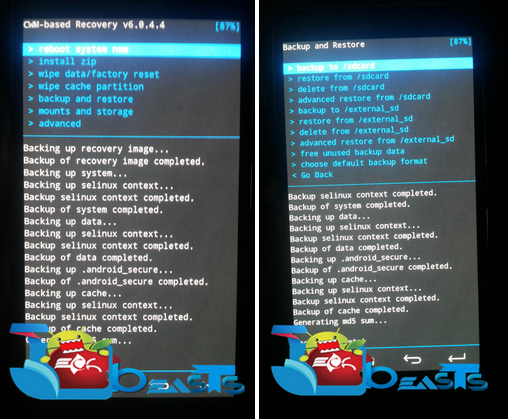
- Once in CWM, you will find a number of options, select “Backup and Restore” from the list and get in it.
- Once in the Backup and Restore option, you will find the following sub-options.
- Backup to /sdcard: Creates Nandroid Backup on internal sd card of your device.
- restore from /sdcard: Restores Nandroid Backup from internal sd card if you’ve created one on this location.
- delete from /sdcard: Deletes Nandroid Backup from this location if you’ve created one.
- advanced restore from /sdcard: Advanced restore option restores the files quickly, has some enhanced functionalities.
- backup to /storage/extSdcard: Creates Nandroid Backup on external sd card of your device.
- restore from /storage/extSdcard: Restores Nandroid Backup from external sd card if you’ve created one on this location.
- delete from /storage/extSdcard: Deletes Nandroid Backup from this location if you’ve created one.
- advanced restore from /storage/extSdcard: Advanced restore option restores the files quickly, has some enhanced functionalities.
- free unused backup data: frees up unsued backup data, saves enough space on your phone’s Sdcard.
- choose default backup format: You can choose the format for the backup, for example, you may choose .tar or tar + gzip or dup format for the backup. Go Back.
- Select your desired option, whether you want to backup or restore and proceed.
- That’s all with CWM recovery.
In case using a recovery is a bit hard for you, you may try using Online Nandroid Backup application that requires only root access on your Android device.
To install custom recovery on your phone, check out our custom recovery section. In case you’re unable to find one for your phone, request us in the comment box below and we will find it and make a guide.
Note: The options appearing in the recovery may differ from the ones mentioned above, however the functionality will be the same. In case of any discrepancies, feel free to let us know and we’ll surely have a look on the suggestions and answer the queries. Thanks all.




![Root Galaxy Note 3 LTE N9005 On Android 4.4.2 XXUENB7 Kit-Kat Official Firmware[Guide]](https://techbeasts.com/wp-content/uploads/2014/03/note-3-lte-i9005.jpg "Root Galaxy Note 3 LTE N9005 On Android 4.4.2 XXUENB7 Kit-Kat Official Firmware[Guide]")