![How to get rid of Windows 10 Home folder [ Guide ]](https://techbeasts.com/wp-content/uploads/2014/10/DeleteHomeFolder1.png "How to get rid of Windows 10 Home folder [ Guide ]")
Windows 10 preview edition is out most of us have installed it to see what new features are coming. We all know its a beta version so we will face alot of bugs, but there is a new feature in Windows 10 ( home folder ). Home folder shows a list of File Explorer Favorites, folders that you frequent, and your recently-accessed files. I don’t think this a good thing so I though to get rid of Windows 10 Home folder. In the following guide i’ll explain you how to remove Windows 10 Home folder.

How to get rid of Windows 10 Home folder:
- First of all open Windows registry by going to search bar and write “regedit”.
- Now click on regedit.exe.
- Now Nevigate to HKEY_LOCAL_MACHINE\SOFTWARE\Microsoft\Windows\CurrentVersion\Explorer\HomeFolder\NameSpace\DelegateFolder.
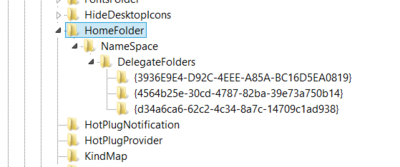
- Click on Home Folder.
- You’ll see each subkey in the DelegateFolders, represents one of the sections in the Home Folder view.

- Now right click on the folder whom you want to delete.
- Confirm your selection and after that you won’t see that content in the home folder.
Image Credit: Wpcentral Source: Neowin (forums);