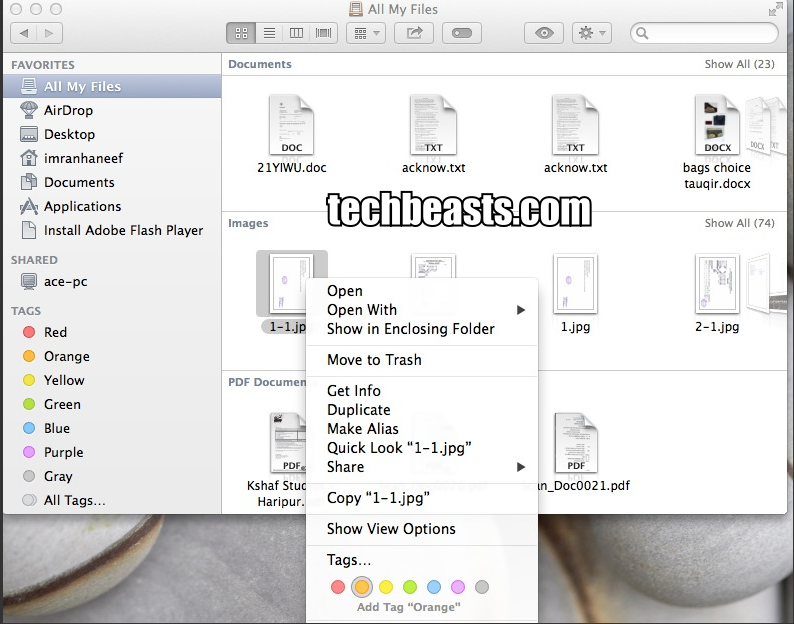
People who upgraded their Macbook to Maverick they must be confused of the new option ” Tagging “. How to use Finder tags in OS Mavericks a new cool and different feature, today i will tell you how to make most of Mavericks Finder tags. This new tag feature help to assign labels and keywords to your files and folders. Basiclay this new feature is to organize your files and folder so that you can easily find your files and also after assiging tags your files and folders will be categories. Mavericks’s Finder Tags feature is not so easy to configure you have to use few tools. So lets begin :).
Following are the simple steps through you can easily Use Mavericks’s many built-in tagging options:
1.Tag when you save:

2. Drag to tag:
If you forget to tag anything find the file and then drag and drop it the desired tag you want to add it adopt the tag.
3. Use an iCloud shortcut:
You can easily add Tag with the help of iCloud options. click the small triangle > next to the document’s name > window that appears, add the tag in the Tags field.
4.Control-click (or right-click) to tag:

Well for that was not so difficult please do tell me in comments that its helpfull or not stay tuned to Techbeasts.com for more Mac Tutorials.